
A local homepage layout is the structured arrangement of webpage elements designed so local visitors immediately understand what a business does, where it operates, and what to do next. This is not just a design preference. It is a conversion and visibility system that combines visual hierarchy, local SEO signals, and strategic calls to action into a single page that works for both humans and search engines. For local business owners and marketers, getting this layout right determines whether a visitor books a call or bounces to a competitor. The core components include a header, hero section, services overview, trust signals, contact information, and CTAs. Tools like Google Business Profile, LocalBusiness schema, and embedded Google Maps all feed directly into how well this layout performs.
What is a local homepage layout and why does it matter?
A local homepage layout is defined by its ability to answer three questions within seconds of a visitor landing on the page: What do you do? Where do you do it? What should I do next? According to homepage layout guidance, effective layouts use consistent visual hierarchy and dedicated sections, with a hero above the fold and supporting sections for credibility, navigation, and CTAs. That structure is not arbitrary. It mirrors how local visitors scan a page, especially on mobile.
The importance of local homepage design goes beyond aesthetics. A well-structured local business webpage layout directly influences local search rankings, time on site, and lead conversion rates. Local SEO guidance confirms that simply adding a city name in the footer does not improve local visibility. The page must be structured around what local customers actually search for, with service and location context made immediately obvious.

Think of a plumbing company in Austin, Texas. If their homepage hero reads “Professional Plumbing Services in Austin” with a phone number visible above the fold, a map embed, and five Google reviews displayed below, that page is doing its job. If the homepage says “Welcome to Our Company” with no location, no phone number, and a generic stock photo, it is losing leads every single day.
What key elements should a local homepage layout include?
Every effective local website homepage design contains the same core building blocks, even if the visual style varies by industry or brand.
- Header with logo and navigation. Your logo, primary navigation links, and a click-to-call phone number should be visible on every scroll position. Reliable navigation and clear structure are especially critical for mobile users arriving with high intent.
- Hero section. This is the first thing visitors see. It must state your service and location clearly. “Trusted HVAC Repair in Denver, CO” beats “We’re Here to Help” every time. Pair it with a strong image or short video and a single CTA button.
- NAP and map. NAP stands for Name, Address, Phone Number. Display all three prominently and embed a Google Map. Matching NAP on your website and Google Business Profile is a direct Google Maps ranking factor.
- Services overview. Give visitors a scannable summary of what you offer. Use short descriptions with links to dedicated service pages. Do not bury your services three scrolls down.
- Trust signals. Local reviews, star ratings, certifications, and years in business all reduce hesitation. Testimonials from recognizable neighborhood names or local landmarks carry extra weight.
- Multiple CTAs. Place calls to action in the hero, mid-page, and near the footer. Options like “Call Now,” “Get a Free Quote,” and “Book Online” cover different visitor preferences. Strong CTAs are the difference between a visitor and a lead.
- Local FAQ section. Address questions specific to your service area. “Do you serve the Northside neighborhood?” or “What are your hours during winter?” These answers reinforce local relevance and support featured snippet opportunities.
Pro Tip: Place your phone number in the top-right corner of your header as a tappable link. Mobile visitors arriving from Google search expect to call immediately, and removing that friction can increase call volume significantly.
How does a local homepage layout differ for single vs. multi-location businesses?
The answer depends on how many locations you serve and how Google needs to interpret your site structure.
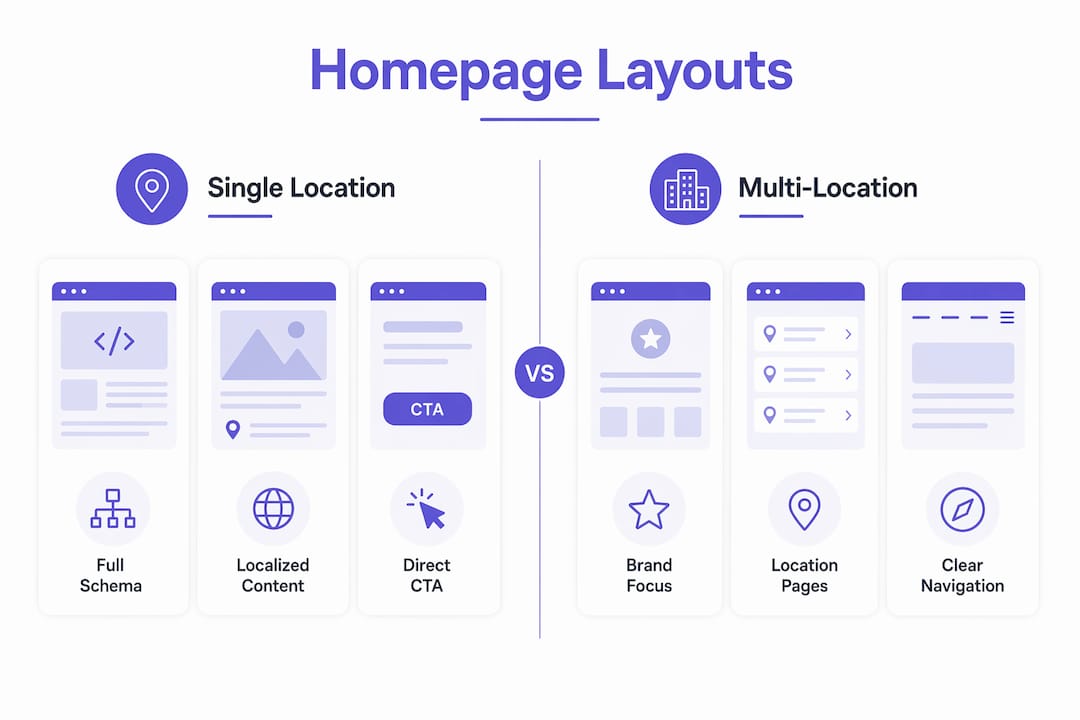
| Business type | Homepage strategy | Local SEO approach |
|---|---|---|
| Single location | Full LocalBusiness schema on homepage, detailed local signals throughout | Homepage IS the local landing page |
| Multi-location | Brand-level homepage with Organization schema, funnels to local pages | Dedicated local landing pages carry LocalBusiness schema |
For a single-location business, the homepage carries all the local weight. It includes LocalBusiness schema with your address, phone, hours, and service area. Every section reinforces one location. The hero, the map, the reviews, and the NAP all point to the same city and address.
For multi-location businesses, the homepage strategy shifts. The homepage establishes brand identity and funnels visitors to dedicated local landing pages. Multi-location SEO performs better with separate pages per location, each containing unique content, local testimonials, an embedded map, and LocalBusiness schema specific to that branch. A national pest control franchise, for example, should have a homepage that says “Serving communities across the U.S.” with a location finder, not a page that tries to rank for “pest control in Phoenix” and “pest control in Nashville” simultaneously.
Overloading your homepage with multiple location names, addresses, and maps confuses both visitors and search engines. It dilutes your SEO signals and creates a poor user experience. The homepage schema should reflect site structure, with Organization schema at the brand level and LocalBusiness schema reserved for individual location pages.
Pro Tip: If you serve two or three nearby cities from one location, you do not need separate location pages. Instead, mention those cities naturally in your homepage hero and services section, and create individual service-area pages to capture those searches.
For a deeper look at structuring a site across multiple service areas, the guide on building a multi-location service website covers the full architecture.
What homepage layout best practices improve UX and local search visibility?
Designing effective local homepages requires more than placing the right sections on the page. The execution of each element determines whether visitors stay, scroll, and convert.
-
Establish visual hierarchy. Use size, color, and whitespace to direct attention. Your headline should be the largest text on the page. Your CTA button should contrast sharply with the background. Whitespace around key elements prevents visual clutter and keeps focus where you need it.
-
Design mobile-first. Local visitors typically arrive on mobile with high intent, which means your layout must perform on a 375-pixel screen before you worry about desktop. Test tap targets, font sizes, and button placement on actual devices, not just browser simulations.
-
Optimize page speed. A slow homepage loses visitors before they see your offer. Compress images, minimize JavaScript, and use a fast hosting provider. Google PageSpeed Insights and GTmetrix both give you specific fixes, not just scores.
-
Write headlines with local keywords. Your hero headline is prime real estate for local search terms. “Roof Replacement in Columbus, OH” tells both visitors and Google exactly what you do and where. This is how local SEO requires structuring content around real customer search behavior.
-
Add LocalBusiness structured data. Schema markup helps Google understand your business details without guessing. Include your business name, address, phone, hours, and service area in JSON-LD format. This supports rich results and local pack visibility.
-
Embed Google Maps and align your NAP. Your website address must match your Google Business Profile exactly. Even small discrepancies, like “St.” versus “Street,” can weaken your local rankings.
-
Use sectional breaks to encourage scrolling. Alternate between full-width image sections, text blocks, and review carousels. This visual rhythm signals to visitors that more value is below the fold and keeps them engaged past the hero.
“The best local homepage layouts are not the most beautiful ones. They are the ones where a visitor can answer three questions in under five seconds: What do you do, where do you do it, and how do I reach you.”
For a full checklist of what your local site needs before launch, the website launch checklist from Cosmicdigitalstudios covers every element in sequence.
Examples of effective layouts and common pitfalls to avoid
The strongest local homepage layouts share a predictable pattern. A roofing company in Charlotte that leads with “Charlotte’s Most Trusted Roofers Since 2004,” displays a phone number in the header, shows a before-and-after photo gallery, and places a “Get a Free Estimate” button in the hero will outperform a competitor whose homepage opens with a generic tagline and buries the contact form at the bottom.
Common mistakes that undermine local homepage performance include:
- Hiding location information. If your city or service area only appears in the footer or on a contact page, Google and visitors both miss the signal. Location context belongs in the hero, the services section, and the page title.
- Missing trust elements. A homepage without reviews, credentials, or social proof asks visitors to take a leap of faith. Local customers specifically look for neighborhood familiarity, recognizable review platforms like Google Reviews or Yelp, and visible certifications.
- Poor mobile usability. Buttons too small to tap, text that requires zooming, and forms that break on mobile are conversion killers. Google also uses mobile usability as a ranking factor.
- Misaligned content and search intent. If your homepage headline talks about your company history but local searchers want “emergency electrician near me,” you are answering the wrong question.
- No clear next step. A homepage with beautiful design but no CTA leaves visitors with nowhere to go. Every section should point toward one action: call, book, or request a quote.
Pro Tip: Run your homepage URL through Google’s Rich Results Test to confirm your LocalBusiness schema is valid. Invalid or missing schema is one of the most common and most fixable local SEO gaps on small business websites.
Reviewing the essential pages every local service business needs helps you see how the homepage fits into the broader site structure and where supporting pages carry the load.
Key takeaways
A local homepage layout works when it answers what, where, and what next within the first five seconds of a visit, using structured sections, local signals, and clear CTAs.
| Point | Details |
|---|---|
| Define your layout purpose | Every section must answer what you do, where you serve, and what visitors should do next. |
| Include all local signals | NAP, embedded map, LocalBusiness schema, and Google Business Profile alignment are non-negotiable. |
| Match schema to business type | Single-location sites use LocalBusiness schema on the homepage; multi-location sites use Organization schema and push LocalBusiness to individual location pages. |
| Design for mobile first | Most local visitors arrive on mobile with high intent, so layout and tap targets must work on small screens before desktop. |
| Avoid common pitfalls | Hidden location info, missing trust signals, and no clear CTA are the three fastest ways to lose a local lead. |
What most local businesses get wrong about their homepage
After working with local service businesses across dozens of industries, the pattern is consistent. Most owners invest in a good-looking website and then wonder why it does not generate calls. The answer is almost always the same: the homepage looks professional but does not communicate locally.
The biggest missed opportunity I see is the hero section. Business owners write headlines about their values or their team instead of their service and city. A visitor from Google search already knows they need a plumber. They do not need to be told you are “passionate about pipes.” They need to know you serve their zip code and can come today.
The second issue is treating the homepage as a brochure rather than a conversion page. Every section should have a job. The hero captures attention and states the offer. The services section builds relevance. The reviews section removes doubt. The CTA section captures the lead. When sections exist just to fill space or look complete, they dilute the page’s focus.
I also see businesses ignore their Google Business Profile connection entirely. Your homepage NAP must match your GBP listing exactly. When they align, Google’s confidence in your local relevance increases. When they conflict, your rankings suffer quietly and you never know why.
The fix is not a full redesign every time. Often, rewriting the hero headline, adding a visible phone number, and placing one strong CTA above the fold produces measurable results within weeks. Start there, then test and build from that foundation.
— Max
Build a homepage that actually converts local visitors
If your homepage is not generating calls, quote requests, or bookings from local visitors, the layout is likely working against you.

Cosmicdigitalstudios builds custom-designed local business websites that are fast, mobile-ready, and structured to convert. Every homepage is built with clear local signals, conversion-focused CTAs, and proper schema markup from day one. Whether you need a new site or a focused redesign, the work is tailored to your market and your goals. Visit Cosmicdigitalstudios to see what a conversion-focused local homepage looks like in practice, or explore the website redesign guide to understand what a rebuild actually involves.
FAQ
What is a local homepage layout?
A local homepage layout is the structured arrangement of elements on a business’s homepage designed to communicate the service, location, and next steps to local visitors. It includes a hero section, NAP information, service overview, trust signals, and CTAs optimized for local search intent.
What makes a good local homepage?
A good local homepage states the service and city in the hero, displays a phone number and address prominently, includes local reviews, and provides at least one clear CTA above the fold. Local SEO guidance confirms that structure around local search behavior drives both rankings and conversions.
How does schema markup affect a local homepage layout?
LocalBusiness schema on a single-location homepage tells search engines your exact business name, address, phone, and hours. Multi-location businesses should use Organization schema on the homepage and reserve LocalBusiness schema for individual location pages to avoid SEO confusion.
Should a multi-location business use one homepage for all locations?
No. Dedicated local landing pages with unique content, local testimonials, maps, and LocalBusiness schema perform significantly better than a single homepage trying to rank for multiple cities. The homepage should establish brand identity and funnel visitors to the right location page.
How do I know if my local homepage layout is working?
Track phone calls, form submissions, and Google Business Profile clicks from your homepage. If visitors land and leave without taking action, check whether your hero states your service and city clearly, whether your CTA is visible above the fold, and whether your page loads in under three seconds on mobile.