
Internal linking is the practice of connecting one page on your website to another page on the same domain using a clickable hyperlink. It does two things at once: it helps visitors find related content, and it helps search engines discover, crawl, and prioritize your pages. Get it right and you build a site that ranks better and converts more.
Here are three quick tasks you can do today:
- Add one contextual link from a high-traffic page to a related page that needs more visibility.
- Check for orphan pages (pages with zero internal links pointing to them) using Google Search Console or Screaming Frog.
- Use descriptive anchor text that tells both the reader and the crawler exactly what the linked page is about.
Pro Tip: Start with your single highest-traffic page. Find one relevant, under-linked page on your site and add a contextual link from it today. That one action often produces faster indexing than any other quick fix.
Key Takeaways
Internal linking is one of the highest-ROI on-page SEO tactics available because it improves crawlability, distributes authority, and guides visitors toward conversion without requiring new content or external links.
| Point | Details |
|---|---|
| Core definition | An internal link connects one page on your domain to another page on the same domain. |
| Highest-impact link type | Contextual in-body links carry the most SEO value; prioritize them over footer or sidebar links. |
| Fix orphan pages first | Pages with zero internal links are invisible to crawlers; find and fix them with Screaming Frog or Google Search Console. |
| Anchor text quality | Use descriptive, relevant anchor text on every internal link; replace “click here” and “read more” immediately. |
| Cosmicdigitalstudios | Builds conversion-focused websites with full internal-link audits and pillar-cluster architecture built in from the start. |
Table of Contents
- What are internal links, exactly?
- What types of internal links should you know about?
- Why does internal linking matter for SEO and users?
- Actionable internal linking best practices you can apply today
- How internal linking supports site architecture and topic clusters
- How many internal links should a page have?
- Which tools help you audit your internal links?
- Common internal-linking mistakes and how to fix them
- A practical checklist and HTML examples you can use now
- What does Google Search Central say about internal links?
- The part most site owners get wrong about internal linking
- Cosmicdigitalstudios builds sites where every link works for you
- Sources
What are internal links, exactly?
An internal link is a hyperlink that connects one URL on your domain to another URL on the same domain. That is the complete definition. A link from yoursite.com/blog/post-a pointing to yoursite.com/services is an internal link. A link from that same post pointing to google.com is an external link.
Yoast puts it plainly: internal links help both users and search engines navigate your site, and they signal which pages are related and which are most important.
Here is what a basic internal link looks like in HTML:
<a href="/services/web-design">custom website design</a>
That single tag tells the browser where to go, tells the crawler what the destination page is about, and tells the reader what to expect when they click. Simple, but the impact compounds across hundreds of pages.
You will find internal links in several places on a typical site: the top navigation menu, in-body paragraphs (contextual links), the footer, sidebars, breadcrumb trails, and related-post modules at the bottom of blog articles. Each placement serves a slightly different purpose, which the next section covers.
What types of internal links should you know about?
Not all internal links carry the same weight or serve the same purpose. Here are the main types and when each one matters:
- Navigation/menu links. These sit in your header and connect your most important pages (Home, Services, About, Contact). Every visitor sees them on every page, so they carry structural authority but limited topical context.
- Contextual (in-body) links. Placed inside the body copy of a page, these are the highest-value internal links for SEO. They appear in a relevant sentence, carry descriptive anchor text, and pass the most topical context to the destination page.
- Breadcrumb links. A trail like
Home > Blog > SEO > Internal Linkingthat shows hierarchy. Breadcrumbs help crawlers understand your site structure and give users a fast path back up the tree. - Footer links. Useful for sitewide links to legal pages, contact, and key service pages. They carry less SEO weight than contextual links because they appear on every page regardless of relevance.
- Sidebar/related-content links. Common on blogs and news sites. They surface related articles and keep visitors reading longer, which supports engagement metrics.
- CTA/transactional links. Buttons or text links that push visitors toward a conversion action (“Book a free call,” “See pricing”). These are internal links with a direct revenue purpose.
- Related-post modules. Automated or manually curated blocks at the bottom of articles. They reduce bounce rate and help crawlers find content that might not be well-linked elsewhere.
For SEO impact, prioritize contextual links first. For site structure, prioritize navigation and breadcrumbs. For conversions, prioritize CTA links from your highest-traffic pages.
Why does internal linking matter for SEO and users?
Internal linking is one of the few on-page tactics that affects crawlability, authority distribution, topical relevance, and user experience at the same time.
Crawlability and indexing
Search engine crawlers discover pages by following links. If a page has no internal links pointing to it, crawlers may never find it. That page becomes an orphan, invisible to Google regardless of how good its content is. Google Search Central states directly that every page you care about should be reachable from at least one other page on your site.
Link equity distribution
When an external site links to your homepage or a popular blog post, that page earns authority. Internal links let you pass a portion of that authority to other pages on your site. Semrush explains this as distributing PageRank-like equity: a well-linked internal page can rank better than an equally strong page that receives no internal links at all.
Topical authority and site hierarchy
Search engines and AI-powered search tools use link patterns to interpret what your site is about. When your pillar page on “web design” links to cluster pages on “landing page design,” “site speed,” and “conversion optimization,” you signal that your site covers this topic in depth. That topical coherence helps you rank for a broader set of related queries. Understanding website content hierarchy is the foundation of building those signals deliberately.
User experience and engagement
A visitor who lands on a blog post and finds relevant links to your service pages or related articles stays longer and clicks deeper. Those engagement signals (time on site, pages per session, low bounce rate) correlate with stronger rankings over time. Shopify’s analysis found that pages with a higher number of thoughtful internal links can show materially greater traffic compared with pages that receive few internal links.
Actionable internal linking best practices you can apply today
Good internal linking follows a short set of rules. Break them and you either waste the opportunity or actively hurt your rankings.
| Practice | Do This | Avoid This |
|---|---|---|
| Anchor text | Use descriptive keywords: “conversion-focused landing page” | Vague text: “click here,” “read more,” “this page” |
| Link placement | Add contextual links in body paragraphs near relevant content | Dumping all links in the footer or sidebar only |
| Source pages | Link from your highest-authority, highest-traffic pages | Only linking from new or low-traffic pages |
| Link volume | Add links that genuinely help the reader | Stuffing many links onto one page to pass equity |
| Anchor variety | Vary anchor text naturally across multiple links to the same page | Using the exact same anchor phrase every time |
| Link targets | Point to pages that need visibility and are topically relevant | Linking to your homepage from every single paragraph |
Moz is direct on anchor text: vague or repetitive anchors like “click here” give search engines no useful context about the destination page. Descriptive anchors do. That single change, applied consistently, improves how crawlers interpret your entire site.
Contextual links in body copy carry the most weight because they appear in a relevant sentence, surrounded by topically related content. A link to your services page placed inside a paragraph about web design carries more signal than the same link sitting in your footer.
Pro Tip: When you publish a new page, immediately find two or three existing pages on your site that are topically related and add a contextual link from each one to the new page. This gets the new page indexed faster and starts building its authority from day one.
How internal linking supports site architecture and topic clusters
The pillar-and-cluster model is the clearest framework for building internal links with purpose. One pillar page covers a broad topic at a high level. Multiple cluster pages cover specific subtopics in depth. Internal links connect them in both directions.
Here is how the hierarchy flows:
- Home page links to main category/pillar pages (e.g., “Web Design,” “SEO,” “Funnels”).
- Pillar pages link down to cluster/subtopic pages (e.g., the “Web Design” pillar links to “Landing Page Design,” “Site Speed,” “Conversion Optimization”).
- Cluster pages link back up to the pillar page and across to related cluster pages.
- Blog posts link to the most relevant pillar or cluster page and to related posts.
This structure does three things simultaneously. It tells crawlers which pages are most important (the ones with the most internal links pointing to them). It tells search engines which pages are topically related. And it gives users a logical path through your content. For coaches and consultants, linking from a high-traffic blog post to a coaching website that converts is a direct application of this model.
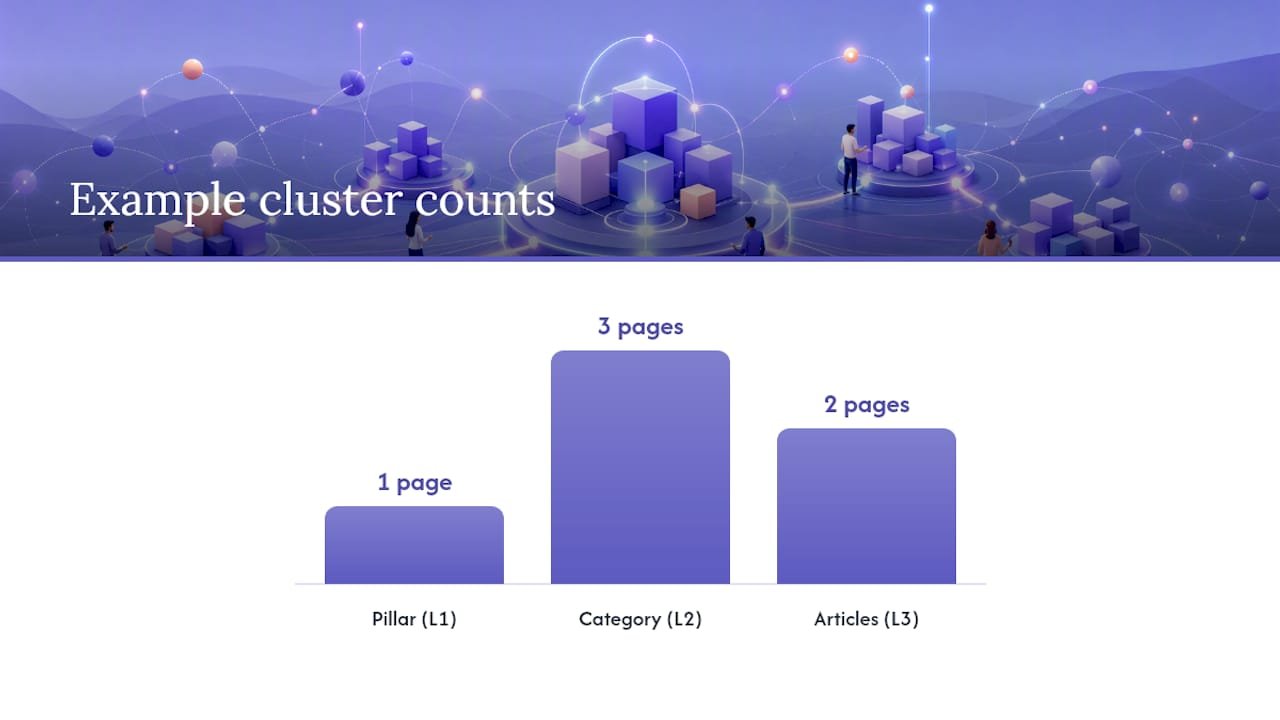
A simple three-level cluster for a web design agency might look like this:
- Level 1 (Pillar): “Web Design Services” page
- Level 2 (Category): “Landing Page Design,” “E-commerce Design,” “Local Business Websites”
- Level 3 (Article): “How to design a high-converting landing page,” “Best practices for local service websites”
Every Level 3 article links back to its Level 2 category page. Every Level 2 page links back to the Level 1 pillar. The pillar links down to all Level 2 pages. That is a complete cluster.
How many internal links should a page have?
There is no single correct number. Google has not published a hard limit, and chasing a specific count misses the point entirely.
The practical guidance is usefulness-first:
- Add a link when it genuinely helps the reader find related content or take a logical next step.
- Remove a link when it is redundant (the same destination already linked twice in the same section) or irrelevant (a forced connection that does not serve the reader).
- Avoid pages with hundreds of links. When a page links to too many destinations, each individual link carries less weight. A page with 200 links distributes far less equity per link than a page with 15 focused links.
- Add more links when launching new content. A new page with no internal links pointing to it will be slow to index. Prioritize linking to it from two or three existing pages immediately.
- Common practical ranges cited by practitioners tend to fall between 3 and 20 contextual links per page for most content pages, but this varies by page length and topic complexity. A 3,000-word pillar page can support more links than a 500-word blog post.
The Shopify analysis supports a usefulness-first approach: pages with thoughtfully placed internal links outperform pages with few links, but the quality and relevance of those links matters more than raw volume.
Which tools help you audit your internal links?
Running an internal-link audit takes less than an hour with the right tools. Here is what each tool shows and how to use it:
| Tool | What It Shows | Best For |
|---|---|---|
| Google Search Console | Pages with few or no internal links; crawl errors; index coverage | Free first audit; identifying orphan pages |
| Screaming Frog | Full crawl of all internal links; anchor text; redirect chains; broken links | Deep technical audits; exporting link counts |
| Ahrefs | Internal link counts per page; top linked pages; link equity flow | Authority distribution analysis |
| Semrush | Site audit with internal linking report; orphan pages; link depth | Ongoing monitoring; combined SEO audit |
A practical audit workflow, drawn from Search Engine Land’s guide and Backlinko’s checklist, runs like this:
- Crawl your site with Screaming Frog or Semrush. Export the full internal-link report.
- Identify orphan pages (pages with zero internal links pointing to them). These are your highest-priority fix.
- Check internal link counts per page. Pages with one or two links need attention.
- Review anchor-text distribution. Flag pages where all links use the same generic anchor or where anchor text does not match the destination page’s topic.
- Find redirect chains and broken links. A link pointing to a 301 redirect wastes equity. A broken link (404) wastes it entirely.
- Prioritize fixes by traffic or conversion value. Fix orphan pages that have high organic potential first.
From a typical audit, you should be able to extract: a list of orphan pages, a list of your top-linked pages (which tells you where your equity is concentrated), and a list of pages with no internal links pointing to them.
Common internal-linking mistakes and how to fix them
Most internal-linking problems fall into four categories. Each one has a direct fix.
- Orphan pages. A page with no internal links pointing to it is invisible to crawlers and users alike. Fix: run a crawl, find every orphan, and add at least two contextual links from topically related pages.
- Broken links and redirect chains. A link pointing to a deleted page (404) or a chain of redirects (A → B → C) wastes crawl budget and dilutes equity. Fix: use Screaming Frog or Ahrefs to find them, then update the link to point directly to the live destination URL.
- Excessive or irrelevant linking. Linking to every page from every page does not help anyone. Crawlers treat it as noise; readers ignore it. Fix: audit pages with unusually high outbound internal-link counts and remove links that do not serve the reader.
- Over-optimized anchor text. Using the exact same keyword-rich anchor phrase every time you link to a page looks unnatural and can trigger a manual review. Fix: vary your anchor text naturally. “web design services,” “our design team,” and “custom website builds” can all point to the same page without triggering a flag.
- JavaScript-heavy navigation. If your site renders navigation links in JavaScript that crawlers cannot execute, those links may be invisible to Google. Fix: use standard HTML anchor tags for all links you want crawlers to follow. Test with Google Search Console’s URL Inspection tool to confirm your links are being discovered.
A practical checklist and HTML examples you can use now
Work through this list in order. High-impact items come first.
- Step 1. Run a crawl (Screaming Frog free version handles up to 500 URLs). Export your orphan pages list.
- Step 2. For each orphan page, find two topically related pages on your site and add a contextual link with descriptive anchor text.
- Step 3. Identify your five highest-traffic pages in Google Search Console. Check whether each one links to your most important conversion pages. Add links where they are missing.
- Step 4. Review anchor text across your site. Replace every instance of “click here,” “read more,” or “this article” with a descriptive phrase.
- Step 5. Fix all broken internal links and redirect chains. Update them to point directly to the live URL.
- Step 6. Confirm your pillar pages link down to all relevant cluster pages, and that cluster pages link back up to the pillar.
Anchor text: good vs. bad
| Bad Anchor | Good Anchor |
|---|---|
| “Click here” | “conversion-focused landing page design” |
| “Read more” | “how to structure consulting website navigation” |
| “This page” | “local service website redesign checklist” |
| “Learn more” | “why service pages matter for rankings” |
HTML anchor examples
A basic contextual link:
<a href="/services/landing-page-design">conversion-focused landing page design</a>
A breadcrumb link:
<a href="/blog/seo">SEO</a> > <a href="/blog/seo/internal-linking">Internal Linking</a>
A CTA link:
<a href="/contact">Book a free website audit</a>
What does Google Search Central say about internal links?
Google’s official documentation on internal linking is specific and worth reading directly. The core recommendations are:
Google also recommends using crawlable link formats, meaning standard HTML anchor tags with an href attribute. Links hidden inside JavaScript events, form submissions, or Flash elements may not be followed by Googlebot. The guidance is clear: if you want a page indexed and ranked, link to it from another page using a standard anchor tag with descriptive text.
This aligns with what Moz recommends on anchor text quality: natural, relevant anchors that describe the destination page’s content are better for both users and search engines than generic or keyword-stuffed alternatives.
The part most site owners get wrong about internal linking
Most guides treat internal linking as a technical checklist. Crawl the site, fix the orphans, update the anchors. Done. That framing misses the bigger opportunity.
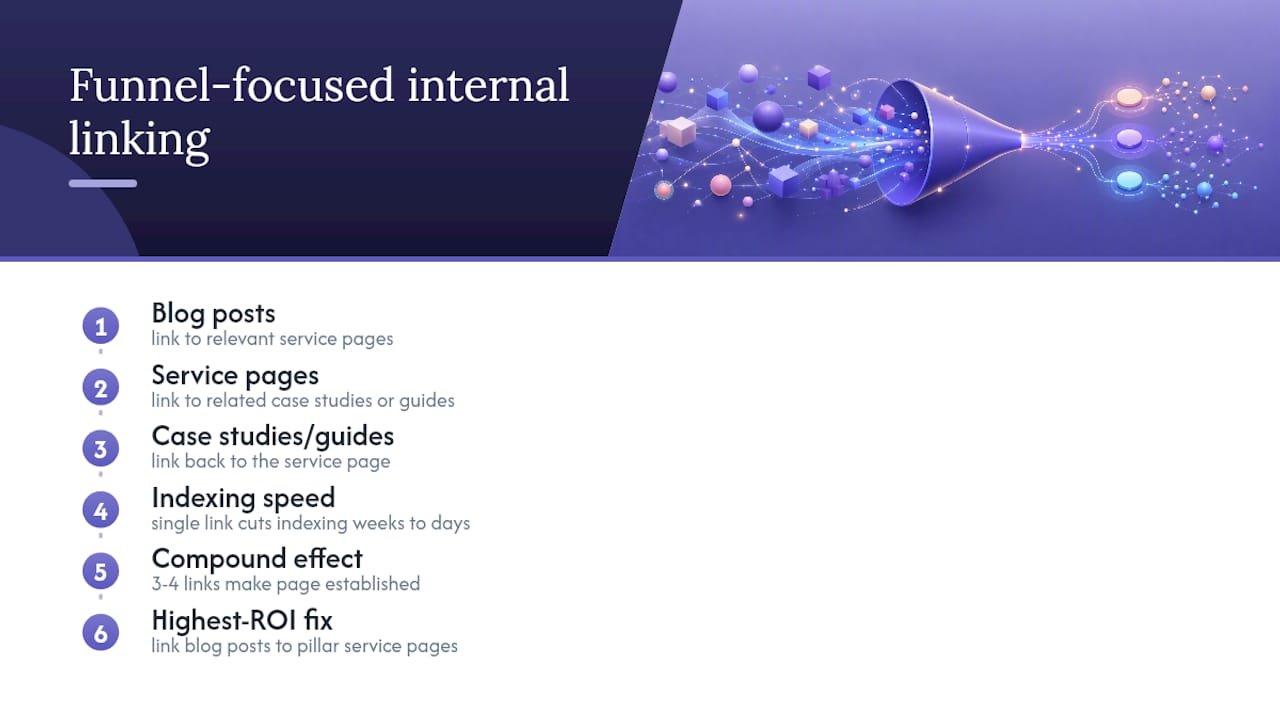
The sites that see the largest gains from internal linking are not the ones that fixed their orphan pages. They are the ones that built a deliberate linking strategy around their conversion funnel. Every high-traffic blog post links to a relevant service page. Every service page links to a related case study or guide. Every guide links back to the service. The result is not just better crawlability. It is a site that actively moves visitors toward a decision.
The other thing practitioners underestimate is how quickly internal linking compounds. A single link from a high-authority page to a new piece of content can cut indexing time from weeks to days. Add three or four such links and you have a page that Google treats as established content almost immediately. That speed advantage is real for any business publishing content regularly.
One pattern worth noting: local service businesses and coaches often have strong pillar pages (their main service pages) that receive almost no internal links from their blog content. The blog and the service pages exist in parallel, never reinforcing each other. Fixing that disconnect, by linking from relevant blog posts to the service pages that matter for rankings, is usually the single highest-ROI internal-linking fix available. No new content required. No technical changes. Just deliberate links placed where they already make sense.
Cosmicdigitalstudios builds sites where every link works for you
Internal-link audits and site architecture are built into every project at Cosmicdigitalstudios. When you work with the team, your site gets a full crawl-based audit, a pillar-and-cluster linking plan, and contextual links placed deliberately to move visitors from content to conversion. Every page earns its place in the structure.
If you are a coach, consultant, or local service business owner who wants a site that ranks and converts, the team at Cosmicdigitalstudios builds exactly that. See how we build websites that convert or get your high-converting landing page built by a team that treats internal linking as a revenue lever, not an afterthought. Book a free discovery call to get started.
Sources
- Internal links: cross-reference your own content — Google Search Central
- Internal Linking for SEO: Types, Strategies & Tools — Search Engine Land
- Internal links SEO best practices — Moz
- Internal Links: Ultimate Guide + Strategies — Semrush
- Internal Linking for SEO: The Complete Guide — Backlinko
- Internal Linking Benefits: How Internal Links Help UX and SEO (2026) — Shopify