
A 24-hour service page is a dedicated web-based hub that lets your business handle customer questions, capture leads, and resolve issues at any hour, without requiring a full in-house team on the clock. Think of it less as a staffing solution and more as a resolution system built to solve routine problems outright or capture enough context so your team can follow up efficiently. The industry standard term for this concept is “24/7 customer support infrastructure,” and understanding that framing changes how you build it. 74% of consumers expect 24/7 service availability in 2026, and nearly half consider it a baseline requirement for good service. For small business owners, that number is not a luxury benchmark. It is a revenue signal.
What is a 24 hour service page and how does it work?
A 24-hour service page functions through layered routing and escalation protocols, not a single contact form. Effective 24/7 support separates routine interactions from complex ones and handles each differently. Routine tasks get automated or triaged immediately. Complex issues get escalated to a human with full context already attached.
Here is how the layers typically work together:
- Automation layer: An AI chatbot or FAQ system handles common questions like pricing, hours, order status, and password resets. This layer resolves the majority of after-hours contacts without human involvement.
- Form capture layer: When automation cannot resolve an issue, a structured intake form collects the customer’s name, issue type, and urgency level. This gives your team a head start when they follow up.
- Live agent layer: For businesses with higher contact volume, a live answering service or hybrid agent model handles calls that need a real voice. This layer activates based on urgency flags set in the routing logic.
- Escalation layer: Complex issues that need a specialist get flagged with full conversation history attached. The customer never has to repeat themselves.
The key to making this work is consistent scripting and knowledge access across every layer. Customers should never feel they reached an “off-hours” version of your business. The tone, information, and resolution quality must match what they would get at 10:00 AM on a Tuesday.
Pro Tip: Add a website chat widget to your service page as the first automation layer. It handles the highest volume of routine questions and costs a fraction of live agent coverage.
Multi-channel integration matters here. Your 24-hour service page should connect chat, phone, email forms, and social messaging into one unified workflow. When a customer starts a chat and then calls, your system should recognize the context. That continuity is what separates a functional support page from a frustrating one.

What are the main benefits of a 24-hour service page?
The business case for 24/7 support goes well beyond customer convenience. Nearly half of consumers consider round-the-clock availability crucial, not just nice to have. That expectation directly affects whether a prospect converts or walks to a competitor.
The core benefits for small businesses include:
- Revenue protection: Missed after-hours inquiries are missed sales. A service page captures those contacts before they bounce.
- Customer retention: Customers who get fast answers, even automated ones, report higher satisfaction and return more often.
- Brand credibility: A business that responds at 11:00 PM signals reliability. That perception builds trust before a human ever gets involved.
- Reduced pressure on your team: When automation handles routine questions, your staff spends their hours on higher-value work.
The turn from visitor to client often happens outside business hours. A prospect researching your services at midnight will not wait until morning to get basic answers. If your page gives them what they need, they move forward. If it does not, they find someone who does.
One underrated benefit is competitive positioning. Most small businesses still rely on a phone number and a contact form. A well-built 24-hour support page with chat, structured intake, and clear escalation paths puts you ahead of that baseline without requiring enterprise-level resources.
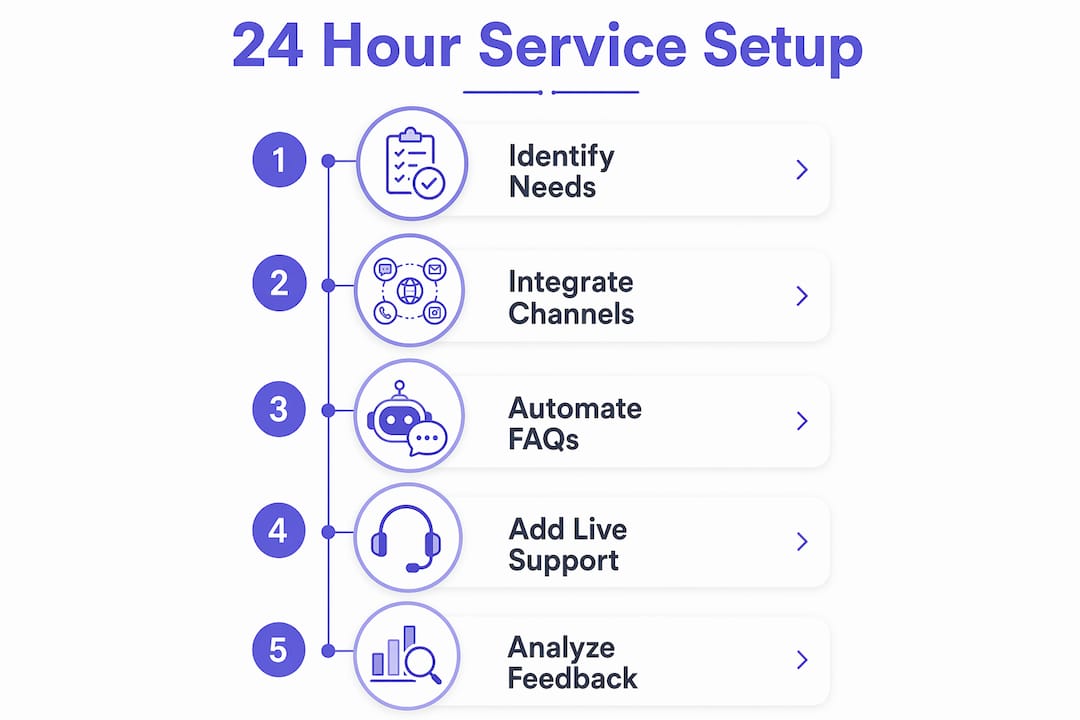
How to set up an effective 24-hour service page
Setup works best when you treat it as a phased build, not a single launch. Experts recommend starting with overflow or weekend coverage before attempting full 24/7 operations. That approach lets you tune your workflows and measure impact before committing to full-scale costs.
Follow these steps to build your page correctly:
- Audit your current contact points. Identify which interactions generate the most after-hours volume. Focus your first phase on those.
- Choose your coverage model. Three models exist: live agents, AI automation, or a hybrid of both. Not every business needs full 24/7 coverage. Identify which interactions risk revenue loss and start there.
- Set your budget using the right pricing model. Live per-minute rates run $0.75–$1.75 per minute, per-call rates run $3–$10, and AI flat-rate plans run $25–$50 per month. Each model has trade-offs.
- Design your escalation workflow. Map which questions get automated, which get captured for follow-up, and which need immediate human response.
- Build your knowledge base. Write clear answers to your 20 most common questions. This feeds your chatbot and keeps scripting consistent across all hours.
- Integrate your channels. Connect chat, phone, and form submissions into one inbox or CRM so context travels with the customer.
- Monitor and adjust. Review resolution rates, escalation frequency, and customer satisfaction scores monthly.
Pro Tip: Per-minute live billing often rounds up. A two-minute call bills as three, which adds up fast. Per-call or AI flat-rate pricing removes that risk for predictable monthly costs.
The table below summarizes the three main coverage models and their best-fit scenarios:
| Model | Best for | Cost range |
|---|---|---|
| AI flat-rate automation | High FAQ volume, low complexity | $25–$50/month |
| Per-call live answering | Moderate volume, relationship-focused | $3–$10 per call |
| Hybrid AI + live agent | Mixed volume, varied complexity | Varies by provider |
Workflow design is the part most small businesses skip. They install a chatbot and call it done. Real resolution depth means your automation actually solves problems, not just collects emails. Build your knowledge base first, then layer your tools on top of it.
Common challenges when maintaining a 24-hour service page
The most common failure point is context loss during transfers. A customer explains their issue to a chatbot, gets escalated to a live agent, and has to start over. That experience creates more frustration than no support at all.
Here is how to address the most frequent challenges:
- Context loss: Build your escalation workflow so conversation history and intake data transfer automatically to the next agent or form.
- Cost overruns: Per-minute billing is the most common budget surprise. Switch to per-call or flat-rate AI pricing once you know your average contact volume.
- Agent burnout: Hybrid AI-human models reduce burnout by keeping human agents focused on complex, high-value interactions rather than repetitive questions.
- Inconsistent quality: Use a shared knowledge base and standardized scripts so every channel delivers the same answers.
- Over-automation: Customers escalate when they feel stuck in a loop. Set clear triggers that move contacts to a human after two failed resolution attempts.
“24/7 support is more an operational design challenge than a staffing one. Businesses that focus on resolution depth, not just coverage hours, consistently outperform those that simply add more agents.” — 24/7 support implementation insight
The businesses that struggle most with 24-hour service pages treat them as a set-and-forget tool. The ones that succeed review their escalation data weekly and update their knowledge base as new questions emerge. The page is a living system, not a static feature.
Key Takeaways
A 24-hour service page succeeds when it is built as a resolution system with layered routing, consistent scripting, and a phased rollout tied to your highest-value customer interactions.
| Point | Details |
|---|---|
| Resolution over coverage | Build to solve problems outright, not just to appear available around the clock. |
| Start phased | Begin with overflow or weekend coverage before committing to full 24/7 operations. |
| Match pricing to volume | Use AI flat-rate for high FAQ volume; per-call pricing for moderate, relationship-focused contacts. |
| Context must travel | Escalation workflows must pass conversation history so customers never repeat themselves. |
| Monitor monthly | Track resolution rates and escalation frequency to improve service quality over time. |
Why most small businesses get 24/7 service wrong
I have seen this pattern repeat across dozens of small business websites. The owner installs a chatbot, adds a contact form, and assumes they now have 24/7 support. What they actually have is a digital dead end that collects emails and delivers nothing until Monday morning.
The real mistake is treating 24-hour service as a staffing problem. It is not. It is an operational design problem. The businesses I have watched succeed at this built their knowledge base before they touched any tool. They mapped their top 20 customer questions, wrote clear answers, and then chose the technology to deliver those answers. The chatbot came last, not first.
The other misconception I see constantly is that small businesses cannot afford real 24/7 support. That was true in 2018. In 2026, AI flat-rate plans start at $25 per month. A well-configured automation layer handles the bulk of after-hours contacts for less than a single hour of live agent time. The cost barrier is gone. The execution barrier is what remains.
My honest advice: start with your highest-risk interaction. What is the one question, if unanswered at 9:00 PM, costs you a sale? Build your page to answer that question perfectly. Then expand. That approach beats a full overnight launch every time, and it gives you real data to justify the next phase of investment.
— Max
How Cosmicdigitalstudios builds service pages that work around the clock

If you are ready to build a 24-hour service page that actually converts after-hours visitors into leads and booked calls, Cosmicdigitalstudios builds exactly that. Every website we create is designed around clear messaging, structured contact flows, and conversion-focused layouts that guide visitors toward taking action, whether it is 2:00 PM or 2:00 AM.
We handle the design, the messaging, and the technical setup so your page works as a real lead generation system, not just a placeholder. If your current site is losing after-hours leads, visit Cosmicdigitalstudios to see how we build fast, modern websites that keep working when you are not.
FAQ
What is a 24-hour service page?
A 24-hour service page is a dedicated section of your website that handles customer questions, captures leads, and routes issues at any hour using automation, live agents, or a hybrid of both.
Do small businesses really need 24/7 support?
74% of consumers expect 24/7 availability, but not every business needs full overnight staffing. Start by identifying which after-hours interactions risk revenue loss and cover those first.
How much does a 24-hour answering service cost?
Costs vary by model: AI flat-rate plans run $25–$50 per month, per-call live answering runs $3–$10 per call, and per-minute live rates run $0.75–$1.75 per minute.
What is the difference between a chatbot and a 24-hour service page?
A chatbot is one tool within a 24-hour service page. The full page includes escalation workflows, intake forms, knowledge base content, and multi-channel contact options working together as a system.
How do I prevent customers from feeling frustrated by automated support?
Set clear escalation triggers that move contacts to a human after two failed resolution attempts, and ensure conversation history transfers automatically so customers never have to repeat their issue.