
City-specific landing pages are dedicated web pages built to attract and convert local customers in a defined geographic area by delivering unique, location-focused content and clear proof of service availability. These pages are the industry’s standard answer to geographic search intent, a concept local SEO professionals call “location landing pages” or “service area pages.” Digital marketers and small business owners who build them correctly capture high-intent local searches that generic service pages simply cannot reach. This guide covers city specific landing pages explained from structure to schema, so you can build pages that rank and convert.
What are the key components of an effective city-specific landing page?
A high-performing city landing page does one job: prove to a local visitor that you serve their area, you are qualified, and you are worth contacting right now. Every element on the page must support that proof.
The content foundation comes first. Experts recommend at least 400–600 words of unique, locally focused content per page. That word count is not arbitrary. It gives Google enough substance to evaluate topical relevance without triggering duplicate content filters.

The opening paragraph carries extra weight. The first 100–150 words should address the local reader’s specific situation, referencing local factors like regulations, weather, or neighborhoods. A roofing company targeting Austin, Texas should mention the city’s hail season and local permit requirements, not just swap the city name into a generic template.
Beyond content, every effective city page needs these components:
- Unique, locally written content of 400–600+ words that addresses local conditions, not just a city name inserted into a template.
- A clear, above-the-fold CTA such as a phone call button or booking form. Strong CTA placement directly improves conversion rates on city pages.
- Local social proof including customer reviews from that city, photos of completed projects in the area, and named neighborhood references.
- Proper URL structure and metadata aligned with SEO best practices, including a city-specific title tag and meta description.
- Schema markup using the most specific schema.org subtype available, such as Plumber or HVAC Business, rather than the generic LocalBusiness type.
- Internal links connecting the city page to your main service pages and related location pages to distribute link equity.
Pro Tip: Add a “neighborhoods we serve” section to each city page. Naming specific districts, zip codes, or suburbs signals geographic depth to both visitors and search engines, and it separates your page from thin templates instantly.
How to structure city-specific landing pages for SEO and user experience
Page structure determines whether Google can find, crawl, and rank your city pages. Getting the architecture right from the start saves you from costly fixes later.
Follow these steps to build a technically sound structure:
- Use a clean URL pattern. Standard practice calls for predictable formats like
/services/[location]/or/[location]/[service]/with lowercase letters and hyphens separating words. Avoid parameters, session IDs, or uppercase characters in URLs. - Write genuinely unique content for each city. Never use a template that only swaps the city name. Generic city-name swap pages without unique local proof can trigger Google to classify them as doorway pages and penalize rankings.
- Build for mobile first. City pages receive heavy mobile traffic because local searches happen on phones. Include click-to-call buttons, fast load times, and a layout that works on a 375px screen.
- Link from parent and related pages. Orphaned location pages with no internal links or sitemap inclusion suffer poor crawlability and ranking issues. Every city page needs at least one inbound internal link from a parent service page or location hub.
- Include pages in your XML sitemap. Sitemap inclusion signals to Google that these pages are intentional, indexable content, not accidental duplicates.
- Add precise schema markup. Using the most specific schema.org subtype and including precise geo coordinates improves local relevance signals. For service-area businesses without a physical storefront, use
areaServedschema instead of a fabricated address.
| Structural element | Best practice |
|---|---|
| URL format | /services/[city]/ or /[city]/[service]/, lowercase, hyphens |
| Content length | 400–600+ words of unique, locally written copy |
| Schema type | Most specific subtype (e.g., Plumber), with geo coordinates |
| Internal links | At least one inbound link from a parent or hub page |
| Sitemap inclusion | Required for every city page |
Pro Tip: Geo coordinates matter more than most marketers realize. Precise coordinates to at least five decimal places help search engines associate your page with an exact service area, not just a city name.
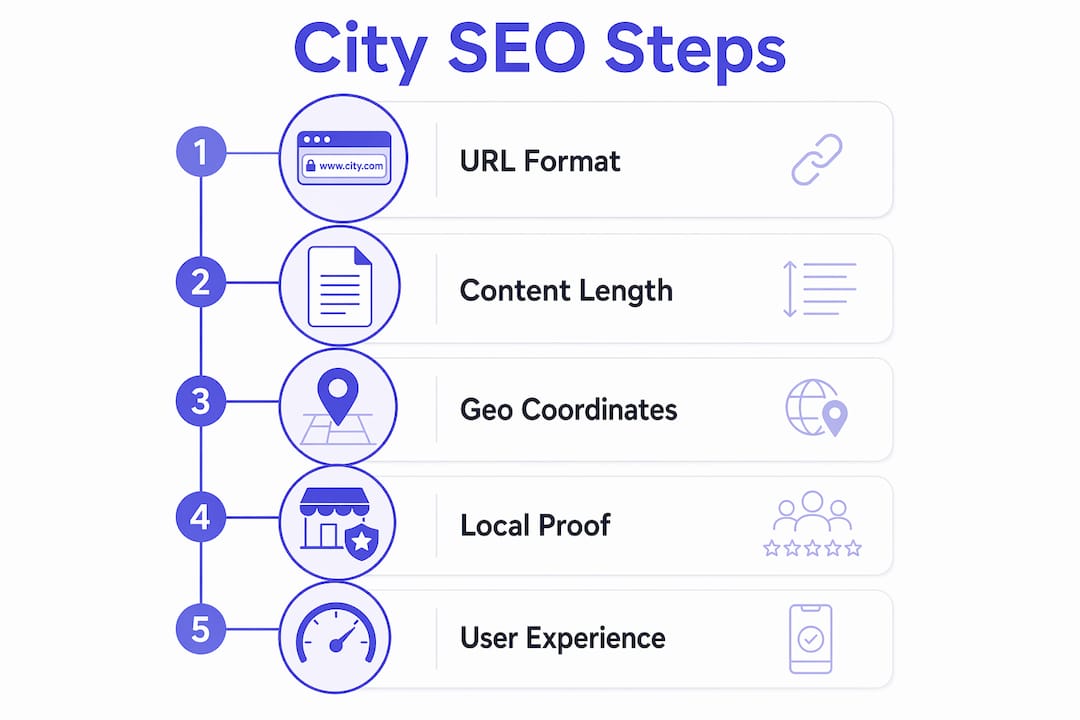
For a broader view of how these pages fit into your full site, the local service website checklist from Cosmicdigitalstudios covers every technical element worth auditing before launch.
What common mistakes should you avoid with city-specific landing pages?
Most city pages fail not because of bad design but because of bad decisions made before a word is written. These are the mistakes that cost rankings and conversions.
- City name swaps with no real content. Copying one page and replacing the city name is the fastest way to earn a doorway page penalty. Google’s guidelines are explicit: pages created primarily to rank for location-based queries without serving users get demoted or removed from the index.
- Fabricated addresses in schema. Service-area businesses should use
areaServedschema and avoid misleading LocalBusiness schema with fake addresses. A false address destroys NAP consistency and violates Google’s guidelines. - No local proof. Reviews, photos, and project examples from the target city are what separate high-performing city pages from doorway pages. A page without proof is just a claim.
- Keyword cannibalization. Creating multiple city pages targeting the same service with overlapping keywords causes your own pages to compete against each other. Map one primary keyword intent to one page.
- Orphaned pages. A city page with no internal links and no sitemap entry may never get crawled. Google cannot rank what it cannot find.
- Missing conversion tracking. A city page without a tracked CTA tells you nothing about what is working. Set up goal tracking in Google Analytics or your preferred platform before the page goes live.
City-specific landing pages function as decision pages. They must prove service relevance, trustworthiness, and location availability upfront. A visitor who lands on your Austin page and sees no Austin reviews, no Austin projects, and no Austin-specific details will leave. Proof is not optional. It is the page’s entire job.
Understanding the difference between a landing page and a full website also matters here. The landing page vs. website distinction affects how you set goals, track conversions, and structure your local pages for maximum impact.
How can city-specific landing pages improve local customer engagement and conversions?
Well-built city pages do more than rank. They convert visitors into leads by giving local buyers exactly what they need to make a decision.
Local buyers arrive at your page with a specific question: “Does this business serve my area, and can I trust them?” A page that answers both questions immediately reduces bounce rates and increases the chance of a direct inquiry. Tailored content, local reviews, and neighborhood references all signal relevance within the first few seconds of a visit.
The conversion benefits are direct:
- Localized CTAs drive more calls. A button that reads “Call our Austin team today” outperforms a generic “Contact us” button because it confirms local availability at the moment of decision.
- Local reviews build trust faster than any copy. A five-star review from a named customer in the same city carries more weight than a paragraph of marketing claims.
- Neighborhood-specific content reduces friction. When a visitor from South Austin sees their neighborhood mentioned, they stop wondering whether you actually serve their area.
- City pages fuel AI-powered local results. High-quality city pages provide the clear, structured, location-specific content that AI-powered answer engines like Google AI Overviews and Perplexity cite most frequently.
- Team bios and local photos build credibility. A photo of your crew working on a job in the target city is worth more than stock imagery. It proves physical presence and real experience.
Pro Tip: Add a short FAQ section to each city page answering the top two or three questions local customers ask before hiring. This content often gets pulled directly into Google’s featured snippets and AI Overviews, giving you visibility beyond the standard organic listing.
For guidance on turning that traffic into booked calls, the Cosmicdigitalstudios resource on converting website visitors walks through the full conversion path from click to client.
Key Takeaways
City-specific landing pages succeed when they combine unique local content, strong proof, clean technical structure, and a clear conversion path on every page.
| Point | Details |
|---|---|
| Content depth is non-negotiable | Write 400–600+ words of unique, locally focused copy per page to avoid duplicate content penalties. |
| Proof separates pages from penalties | Include local reviews, project photos, and neighborhood references to avoid doorway page classification. |
| Technical structure drives discovery | Use clean URL patterns, XML sitemap inclusion, and at least one internal link per city page. |
| Schema specificity boosts relevance | Use the most specific schema.org subtype and precise geo coordinates for stronger local signals. |
| CTAs and tracking close the loop | Place a clear CTA above the fold and track every conversion before the page goes live. |
What I have learned after building city pages that actually rank
City pages get treated as an afterthought by most businesses. They spin up 30 pages by swapping city names into a template, call it a local SEO strategy, and wonder why nothing moves. That approach does not work, and it has not worked for years.
The pages that consistently rank and convert share one trait: they read like they were written by someone who has actually been to that city and done the work there. Local regulations, local weather patterns, local neighborhood names, real customer names in reviews. That specificity is not just good SEO. It is what convinces a local buyer to pick up the phone.
I have also watched AI-powered search change how these pages perform. Google AI Overviews and tools like Perplexity now pull directly from well-structured local pages. A city page with clear headings, specific schema, and genuine proof gets cited in AI answers. A thin template page gets ignored entirely. The gap between good and mediocre city pages is wider now than it was two years ago.
My honest advice: build fewer city pages and build them better. Ten pages with real content, real reviews, and real proof will outperform 100 thin templates every time. Quality over quantity is not a cliché here. It is the only strategy that holds up.
— Max
How Cosmicdigitalstudios builds city pages that convert
If you are ready to build city-specific landing pages that rank in local search and turn visitors into booked calls, Cosmicdigitalstudios builds exactly that.

Cosmicdigitalstudios designs custom, conversion-focused landing pages built around your service areas, your proof, and your business goals. Every page is written with unique local content, proper schema markup, and a clear CTA structure from the start. No templates. No city name swaps. Just pages built to perform. Visit Cosmicdigitalstudios to see how a custom local page build can put your business in front of the right customers in every city you serve.
FAQ
What are city-specific landing pages?
City-specific landing pages are dedicated web pages targeting a defined geographic area with unique, locally focused content and proof of service availability. They are designed to rank for location-based search queries and convert local visitors into leads.
How much content does a city landing page need?
Each city page needs at least 400–600 words of unique, locally written content. Pages with less content risk duplicate content penalties or doorway page classification by Google.
What is the correct URL structure for city landing pages?
Standard local SEO practice uses clean patterns like /services/[city]/ or /[city]/[service]/ with lowercase letters and hyphens. Avoid parameters, uppercase characters, or session IDs in city page URLs.
Can I use the same content on multiple city pages?
No. Generic city-name swap pages without unique local proof trigger Google’s doorway page filters and can result in ranking penalties. Each page must have genuinely distinct content.
What schema markup should city pages use?
Use the most specific schema.org subtype available for your business type, such as Plumber or Electrician, and include precise geo coordinates. Service-area businesses without a physical address should use areaServed schema rather than a LocalBusiness schema with a fabricated location.