
LocalBusiness schema is a JSON-LD structured-data block you add to your website that tells search engines exactly who you are: your name, address, phone number, hours, and location coordinates. The single action to take right now is to add or audit one JSON-LD block on your homepage or location page that matches your Google Business Profile (GBP) exactly, character for character.
Your immediate priorities:
- NAP parity: name, address, and phone must be identical across your schema, GBP, and every directory listing
- Correct subtype: use the most specific Schema available (Restaurant, ProfessionalService, Store) rather than the generic LocalBusiness
- Hours accuracy: add
openingHoursSpecificationso search engines and AI assistants read your schedule correctly - One block per location: never reuse a single JSON-LD block across multiple physical addresses
The fastest fix is a minimal JSON-LD block in your page <head>. Even a 10-field block covering name, address, telephone, and hours gives Google a machine-readable identity layer it can act on immediately.
Key Takeaways
LocalBusiness schema is a machine-readable identity layer that reinforces NAP consistency and supports rich results, but GBP, proximity, and reviews remain the primary drivers of Local Pack rankings.
| Point | Details |
|---|---|
| Match GBP exactly | Name, address, and phone in schema must be character-for-character identical to your Google Business Profile. |
| Use the most specific subtype | Choose Restaurant, ProfessionalService, or Store over generic LocalBusiness to unlock type-specific properties. |
| One block per location | Never reuse a single JSON-LD block across multiple physical addresses; each location needs its own page and block. |
| Validate before and after | Run both the Rich Results Test and Schema Markup Validator before deploying, then monitor Search Console for live errors. |
| Cosmicdigitalstudios includes schema | Every local site built by Cosmicdigitalstudios ships with valid JSON-LD, GBP-matched NAP, and a validation report. |
Table of Contents
- What LocalBusiness schema is and how it fits into local search
- Core properties Google expects in a valid LocalBusiness block
- How to pick the right subtype and which properties to add
- How to add LocalBusiness schema to your site step by step
- How to handle multi-location businesses and service-area models
- Copy-paste JSON-LD examples you can adapt right now
- Validation tools, common errors, and how to troubleshoot them
- Google and Schema.org guidelines, maintenance, and long-term reliability
- How Cosmicdigitalstudios implements LocalBusiness schema for clients
- Why most businesses get schema wrong, and what actually matters
- Cosmicdigitalstudios builds local sites with schema built in from day one
- Sources
What LocalBusiness schema is and how it fits into local search
LocalBusiness structured data is a vocabulary from Schema.org, implemented as JSON-LD, that explicitly declares your business identity to search engines. JSON-LD (JavaScript Object Notation for Linked Data) is Google’s preferred format because it sits in a <script> tag without touching your visible HTML, making it easy to add, update, and validate.
What schema actually does is reinforce entity understanding and NAP consistency. When Google sees the same name, address, and phone number in your schema, your GBP, and your Yelp profile, it gains confidence that all three refer to the same real-world business. That confidence feeds your knowledge panel, your AI-generated answers, and your eligibility for rich results.
What schema does not do is guarantee a Local Pack ranking. Industry guides consistently confirm that Local Pack placement is driven primarily by GBP completeness, proximity to the searcher, and review signals. Schema is the machine-readable identity layer that supports those signals. Think of it as the foundation, not the whole building.
GBP vs. LocalBusiness schema at a glance:
- Google Business Profile: the primary ranking signal for local search; controls your map pin, review aggregation, and Local Pack appearance
- LocalBusiness schema: the machine-readable confirmation on your website that reinforces what GBP says; feeds knowledge panels and AI assistants
- Where schema wins: structured data makes your pages eligible for rich results including hours, review stars, map links, and action buttons directly in search results
- Where schema cannot help: it cannot override proximity signals or compensate for a sparse or unverified GBP listing
Core properties Google expects in a valid LocalBusiness block
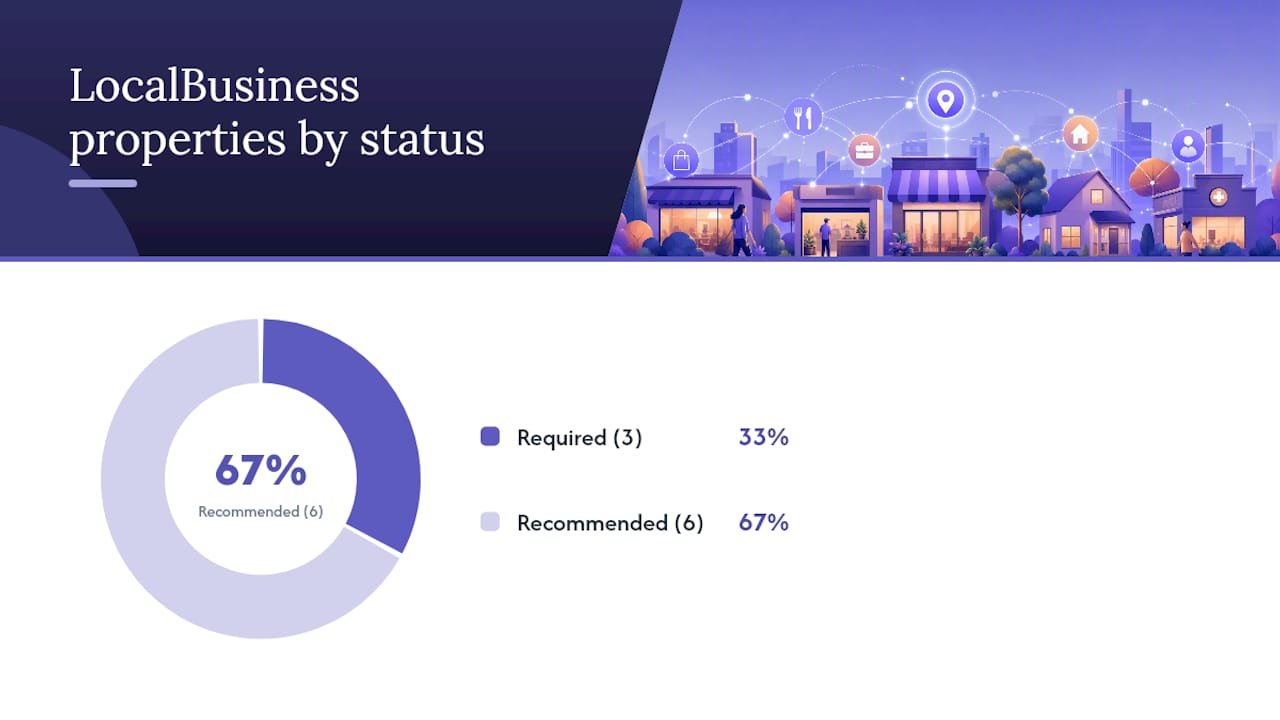
Google’s required and recommended properties fall into two tiers. Get the required ones right first, then layer in the recommended ones to improve clarity and rich-result eligibility.
| Property | Status | Rationale |
|---|---|---|
name |
Required | Must match GBP name exactly |
address (PostalAddress) |
Required | Street, city, state, ZIP, country |
telephone |
Required | Primary contact number |
openingHoursSpecification |
Recommended | Machine-readable hours for AI and rich results |
geo (latitude/longitude) |
Recommended | Precise map pin; reduces ambiguity for multi-location |
priceRange |
Recommended | Dollar signs ($, $$, $$$) for consumer-facing businesses |
image |
Recommended | Exterior or interior photo improves knowledge panel |
url |
Recommended | Canonical URL of the location page |
sameAs |
Recommended | Links to GBP, Yelp, Facebook, and other authoritative profiles |
A minimal valid block needs only name, address, and telephone. Here is what that looks like:
{
  "@context": "https://schema.org",
  "@type": "LocalBusiness",
  "@id": "https://example.com/#business",
  "name": "Acme Plumbing",
  "address": {
    "@type": "PostalAddress",
    "streetAddress": "123 Main St",
    "addressLocality": "Austin",
    "addressRegion": "TX",
    "postalCode": "78701",
    "addressCountry": "US"
  },
  "telephone": "+15125550100"
}
That block is valid and crawlable. It is not complete. Add openingHoursSpecification, geo, and sameAs as soon as you have the data ready.
How to pick the right subtype and which properties to add
Schema.org defines dozens of LocalBusiness subtypes, and choosing the most specific one unlocks type-specific properties that a generic LocalBusiness block cannot use. A Restaurant can declare servesCuisine and menu. A DaySpa can declare amenityFeature. A ProfessionalService can declare areaServed. None of those properties parse correctly under a plain LocalBusiness type.
Subtype inheritance works like this: every subtype carries all standard LocalBusiness properties plus its own. So a Restaurant block still needs name, address, and telephone, and it also gets to add cuisine type, menu URL, and reservation links.
High-value recommended properties by business category:
- All types:
aggregateRating(only when genuine reviews are visible on the same page),department,sameAs - Restaurants and food businesses:
servesCuisine,menu,hasMenu,acceptsReservations - Service businesses (ProfessionalService):
areaServed,serviceArea,hasOfferCatalog - Retail stores:
paymentAccepted,currenciesAccepted,openingHoursSpecification - Health and wellness:
medicalSpecialty,availableService
For B2B and service-area businesses that operate without a public storefront, use ProfessionalService and declare areaServed with the cities, states, or regions you cover. Do not list a home address or a P.O. box as a physical location. Schema.org’s guidance supports using areaServed precisely for this scenario.
Pro Tip: Never stack multiple vague types (e.g., ["LocalBusiness", "Organization", "Service"]) on a single block. Pick one accurate subtype. Stacking generic types dilutes the signal and can confuse parsers. If your business genuinely spans two distinct categories, use a department object for the secondary one.
How to add LocalBusiness schema to your site step by step
Adding JSON-LD to your site is a five-step process. Follow it in order and you will avoid the most common deployment mistakes.
-
Decide which URLs carry schema. Your homepage should always have a LocalBusiness block. If you have dedicated location pages, each one gets its own block. Inner pages (service pages, blog posts) do not need a full LocalBusiness block, though a minimal reference using
@idis acceptable. -
Build your JSON-LD. Use the minimal block from the core properties section as your starting point. Add recommended properties one at a time, validating after each addition. Set a stable
@idvalue (your canonical URL with a fragment, e.g.,https://example.com/#business) so other structured data on your site can reference the same entity. -
Test locally before deploying. Paste your JSON-LD into the Rich Results Test and the Schema Markup Validator before touching your live site. Fix every error and review every warning.
-
Deploy to your site. Place the
<script type="application/ld+json">block inside the<head>of the target page. Most CMS platforms support this natively or through a plugin. For WordPress, a schema plugin that outputs JSON-LD (not microdata) is the cleanest approach. You can also inject via Google Tag Manager, though server-side rendering is preferable because GTM-injected schema may not be crawled consistently. -
Monitor in Search Console. After Google recrawls the page, open Search Console and navigate to the Enhancements section. Structured data errors and warnings appear there within days of deployment.
Implementation notes:
- Keep your JSON-LD compact. A well-formed LocalBusiness block rarely exceeds 2–3 KB. Bloated scripts slow page rendering.
- Avoid inline JavaScript that executes before the schema tag renders. Place the
<script>block high in<head>so crawlers see it on first parse. - Schema must be crawlable and indexable. If your page is blocked by
robots.txtor anoindextag, the schema on it will not be processed. - Confirm your schema is not hidden behind a login wall or rendered only by client-side JavaScript that Googlebot cannot execute.
For a broader checklist on launching a local service site, the Local Service Website Redesign Checklist covers schema alongside technical SEO, page speed, and conversion elements.
How to handle multi-location businesses and service-area models
The rule is simple: one physical location, one JSON-LD block, one dedicated page. Reusing a single block across multiple locations is one of the most common mistakes practitioners see, and it actively undermines entity clarity.
When to create a separate page and schema block:
- You have a physical storefront or office at that address
- Customers visit that location in person
- You want that location to appear in local search for its city
When to use areaServed instead:
- You serve customers at their location (plumber, electrician, mobile dog groomer)
- You have no public-facing address
- You cover multiple cities or counties from a single base
For multi-location site architecture, each location page carries its own JSON-LD block with a unique @id, its own name (often “Business Name — City”), and its own address and telephone. Link locations to a parent organization using the parentOrganization property, and use branchCode to give each branch a stable internal identifier.
Nested department objects work well when a single location has distinct service divisions, each with its own phone number or hours. Place the department array inside the parent location’s block rather than creating separate top-level blocks for each department.
Common multi-location mistakes and fixes:
- Duplicated markup: copying one block to all location pages with only the city name changed. Fix: update every field (address, telephone, geo,
@id,url) for each location. - Single block for many locations: listing multiple addresses in one
addressarray. Fix: one block per location, full stop. - Fake addresses for service-area businesses: listing a home address or virtual office to appear local. Fix: use
areaServedwith city or state names and omit theaddressproperty entirely if you have no public location. - Inconsistent
@idvalues: using different@idstrings for the same location across pages. Fix: pick one canonical URL fragment and use it everywhere that location is referenced.
Copy-paste JSON-LD examples you can adapt right now
Each example below is annotated. Fields marked with // REQUIRED must be present. Fields marked with // MATCH GBP must be character-for-character identical to your Google Business Profile.
Minimal single-location block
{
  "@context": "https://schema.org",
  "@type": "LocalBusiness",
  "@id": "https://example.com/#business",     // stable entity ID
  "name": "Acme Plumbing",                    // REQUIRED, MATCH GBP
  "address": {
    "@type": "PostalAddress",
    "streetAddress": "123 Main St",           // REQUIRED, MATCH GBP
    "addressLocality": "Austin",
    "addressRegion": "TX",
    "postalCode": "78701",
    "addressCountry": "US"
  },
  "telephone": "+15125550100",                // REQUIRED, MATCH GBP
  "url": "https://example.com"
}
Business hours with openingHoursSpecification
{
  "@context": "https://schema.org",
  "@type": "LocalBusiness",
  "@id": "https://example.com/#business",
  "name": "Acme Plumbing",
  "openingHoursSpecification": [
    {
      "@type": "OpeningHoursSpecification",
      "dayOfWeek": ["Monday","Tuesday","Wednesday","Thursday","Friday"],
      "opens": "08:00",
      "closes": "18:00"
    },
    {
      "@type": "OpeningHoursSpecification",
      "dayOfWeek": "Saturday",
      "opens": "09:00",
      "closes": "14:00"
    }
  ]
}
Use validFrom and validThrough inside each OpeningHoursSpecification object for seasonal or holiday schedules. This prevents stale hours from appearing in AI-generated answers when your schedule changes.
Restaurant with cuisine and menu
{
  "@context": "https://schema.org",
  "@type": "Restaurant",
  "@id": "https://tacoplace.com/#restaurant",
  "name": "Taco Place",
  "servesCuisine": "Mexican",                 // type-specific property
  "menu": "https://tacoplace.com/menu",
  "acceptsReservations": "True",
  "address": {
    "@type": "PostalAddress",
    "streetAddress": "456 Oak Ave",
    "addressLocality": "Dallas",
    "addressRegion": "TX",
    "postalCode": "75201",
    "addressCountry": "US"
  },
  "telephone": "+12145550200",
  "priceRange": "$$"
}
ProfessionalService with areaServed
{
  "@context": "https://schema.org",
  "@type": "ProfessionalService",
  "@id": "https://smithlaw.com/#firm",
  "name": "Smith & Associates Law Firm",
  "areaServed": [
    {"@type": "City", "name": "Houston"},
    {"@type": "State", "name": "Texas"}
  ],
  "address": {
    "@type": "PostalAddress",
    "streetAddress": "789 Commerce Blvd",
    "addressLocality": "Houston",
    "addressRegion": "TX",
    "postalCode": "77002",
    "addressCountry": "US"
  },
  "telephone": "+17135550300",
  "url": "https://smithlaw.com"
}
Multi-location with nested department
{
  "@context": "https://schema.org",
  "@type": "LocalBusiness",
  "@id": "https://example.com/locations/austin/#business",
  "name": "Acme Services — Austin",
  "address": {
    "@type": "PostalAddress",
    "streetAddress": "100 Congress Ave",
    "addressLocality": "Austin",
    "addressRegion": "TX",
    "postalCode": "78701",
    "addressCountry": "US"
  },
  "telephone": "+15125550101",
  "department": [
    {
      "@type": "LocalBusiness",
      "name": "Acme Services — Austin HVAC Division",
      "telephone": "+15125550102",
      "openingHoursSpecification": {
        "@type": "OpeningHoursSpecification",
        "dayOfWeek": ["Monday","Tuesday","Wednesday","Thursday","Friday"],
        "opens": "07:00",
        "closes": "17:00"
      }
    }
  ]
}
Key reminders for all examples:
- Only add
aggregateRatingwhen real, genuine customer reviews are visible on the same page. Fabricated or imported ratings violate Google’s guidelines and can trigger a manual action. - Every field you mark up must reflect content that is actually visible on the page. Do not mark up data that only exists in the JSON-LD.
- Keep
@idvalues stable. Changing them breaks entity linking across your site.
Validation tools, common errors, and how to troubleshoot them
Two tools cover everything you need. The Schema Markup Validator checks vocabulary correctness against Schema.org’s specification. Google’s Rich Results Test checks whether your markup qualifies for Google’s rich result features. Run both, because passing one does not guarantee passing the other.
How to interpret results:
- Errors (red): your markup is invalid and will likely be ignored. Fix before deploying.
- Warnings (yellow): recommended properties are missing. Not blocking, but worth adding.
- No items detected: the tool cannot find your JSON-LD. Check that the script tag is in the rendered HTML, not injected after page load by JavaScript that the tool cannot execute.
Common errors and fixes:
- JSON syntax error: a missing comma, unclosed bracket, or stray character breaks the entire block. Use a JSON linter (JSONLint.com) to find the exact line before running the schema validator.
- NAP mismatch with GBP: “St” vs. “Street,” “Ave” vs. “Avenue,” or a different phone format. Fix: copy your GBP name and address character for character.
- Invalid subtype: using a type that does not exist in Schema.org (e.g.,
"@type": "LocalService"). Fix: check the Schema.org LocalBusiness type page for the exact type string. - Fabricated review markup: adding
aggregateRatingwhen no reviews are visible on the page. Fix: remove the property entirely or add a genuine review section to the page first. - Duplicate blocks: multiple JSON-LD blocks for the same location on the same page. Fix: merge into one block.
Pro Tip: After deploying, open Google Search Console and navigate to Enhancements > Structured Data. Errors that appear there reflect what Google actually parsed from your live page, which can differ from what the Rich Results Test shows on a cached version. Check Search Console within 7–10 days of any schema change.
Google and Schema.org guidelines, maintenance, and long-term reliability
Google’s core rule is straightforward: only mark up information that is visible on the page. If a user cannot see your address by reading the page, you cannot put it in the schema. This rule exists because schema is meant to be a machine-readable version of visible content, not a hidden data layer.
Must-follow rules:
- Never fabricate reviews, ratings, or aggregate scores
- Keep all required properties present at all times
- Do not use schema to misrepresent your business type or location
- Update schema immediately when hours, address, or phone number change
Maintenance checklist (run quarterly or after any business change):
- Compare GBP listing to on-site schema field by field
- Run the Rich Results Test and Schema Markup Validator on every location page
- Check Search Console Enhancements for new errors
- Update
openingHoursSpecificationfor seasonal schedule changes - Verify
sameAslinks still resolve to active profiles
Schema interacts with your broader entity footprint. Every sameAs link you add (to your GBP, Yelp, Facebook, LinkedIn, or industry directories) strengthens Google’s confidence that all those profiles refer to the same business. Consistency across all of them matters more than any single field in your JSON-LD.
Pro Tip: Canonicalize your location pages with a <link rel="canonical"> tag and use the same canonical URL as your @id value. This ties your entity signal directly to the page Google considers authoritative for that location, which reduces ambiguity when you have multiple URLs that could represent the same address.
How Cosmicdigitalstudios implements LocalBusiness schema for clients
At Cosmicdigitalstudios, schema implementation follows a structured audit-and-deploy workflow. Here is the checklist used on every local site build:
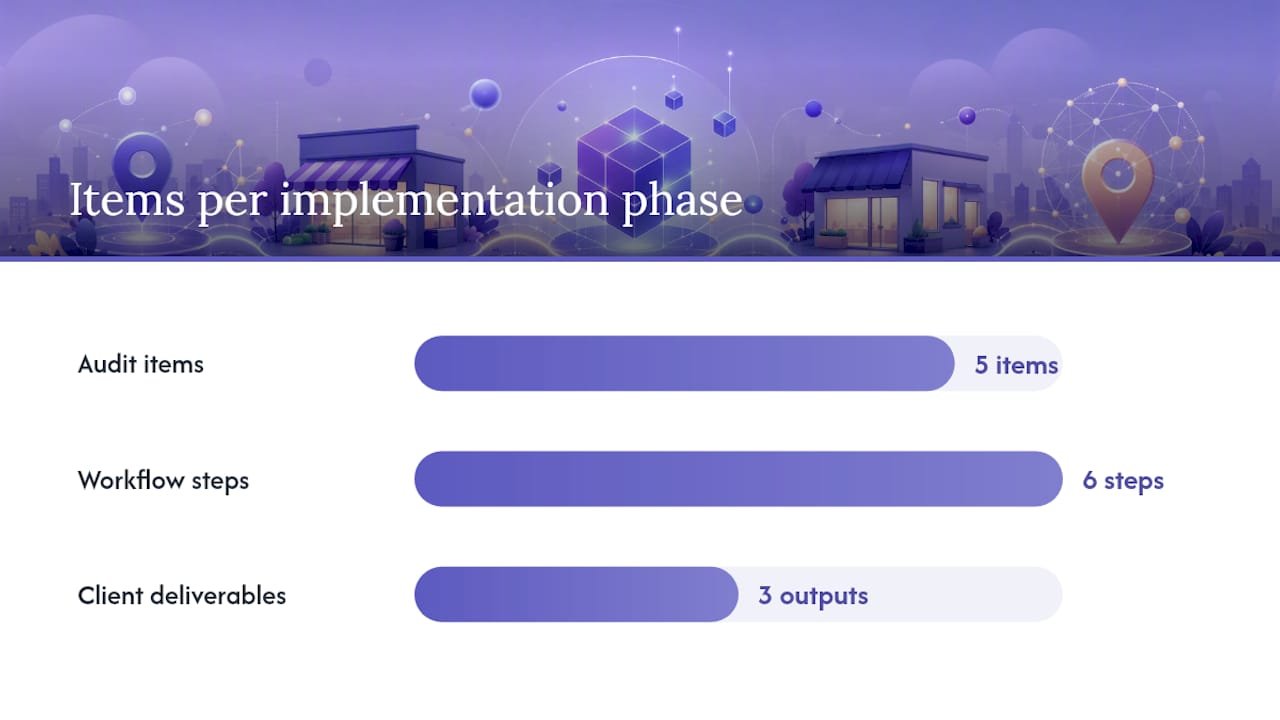
Audit checklist:
- Pull the GBP listing and document the canonical NAP (name, address, phone) exactly as it appears
- Check the existing site for any schema markup (use the Rich Results Test on the live URL)
- Identify the correct Schema.org subtype for the business
- Confirm which pages need a full block (homepage, location pages) versus a minimal reference
- Verify that location pages are canonicalized and indexable
Agency workflow steps:
- Discovery: collect GBP data, business hours, geo-coordinates, and all
sameAsprofile URLs from the client - Data canonicalization: establish one authoritative source of truth for NAP and resolve any inconsistencies across directories
- JSON-LD authoring: write one block per location using the correct subtype, all required properties, and relevant recommended properties
- Staging validation: run both the Schema Markup Validator and the Rich Results Test on the staging environment before go-live
- Deployment: inject JSON-LD into the
<head>of each target page via the CMS or a server-side template - Post-deploy monitoring: set a Search Console alert for structured data errors and schedule a 30-day follow-up validation
Clients receive a schema block per location, a validation report showing zero errors, and a 30-day monitoring window. For ongoing retainer clients, schema is updated automatically whenever GBP data changes. This process is part of the broader local service website redesign checklist Cosmicdigitalstudios follows on every build.
For multi-location clients, each location gets its own dedicated page with a unique @id, its own JSON-LD block, and its own Search Console property or URL inspection report. The multi-location site build process Cosmicdigitalstudios uses treats each location as a distinct entity, not a copy-paste variation.
Why most businesses get schema wrong, and what actually matters
The biggest mistake is treating LocalBusiness schema as a ranking lever and then abandoning it when the Local Pack position does not change overnight. Schema is not a ranking shortcut. It is an identity signal. The businesses that benefit most from it are the ones that treat it as part of a consistent entity strategy: GBP matches schema, schema matches directories, directories match the website.
The second mistake is obsessing over completeness before getting the basics right. A perfect 40-field JSON-LD block with a NAP mismatch is worse than a minimal 10-field block with exact GBP parity. Google’s entity confidence drops the moment it sees “123 Main Street” in schema and “123 Main St” in GBP. That small inconsistency signals uncertainty, not authority.
There is also a widespread misunderstanding about aggregateRating. Many site owners add it because they see competitors using it, then pull review data from a third-party source that is not visible on their page. That is a guidelines violation. The reviews must be on the page. If they are not, remove the property entirely and focus on getting genuine reviews onto your GBP instead.
The businesses that see the clearest benefit from schema are those that pair it with a well-optimized GBP, city-specific landing pages, and consistent NAP across 20 or more directories. Schema alone moves nothing. Schema as part of a complete local entity strategy moves the needle on knowledge panel accuracy, AI answer inclusion, and rich result eligibility.
Cosmicdigitalstudios builds local sites with schema built in from day one
If you would rather have a professional handle the schema audit, JSON-LD authoring, and ongoing maintenance, Cosmicdigitalstudios builds custom local service websites with valid LocalBusiness schema included in every project. There is no separate “schema add-on” fee. Every site we build ships with correct JSON-LD, GBP-matched NAP, and a validated markup report.
For local service businesses and coaches who need a site that is both technically sound and built to convert, our website design and branding service covers schema, page structure, messaging, and conversion flow in one project. You get a site that search engines can read and visitors actually act on.
Book a discovery call at Cosmicdigitalstudios and we will audit your current schema as part of the first conversation, at no cost.
Sources
Use these sources directly when building, validating, or troubleshooting your LocalBusiness schema:
- Local Business (LocalBusiness) Structured Data | Google Search Central
- Schema
- LocalBusiness Schema: Complete Guide (2026)
- Local SEO Schema: A Complete Guide To Local Structured Data & Rich Results | Search Engine Journal
- Local Schema Markup: The LocalBusiness JSON-LD Guide | Fokal Guides
- Schema Markup Validator