
A Facebook Lookalike Audience is a Meta-built prospecting pool that mirrors the behavioral and demographic profile of your best existing customers.
When lookalikes make sense right now:
- You have a clean customer list or a pixel with 500+ Purchase events. Seed quality is the single biggest driver of output quality.
- You’re prospecting in a niche market where broad delivery struggles to find the right people without a directional signal.
- You need exclusion plays or value-based shaping in accounts where Advantage+ alone is pulling in low-quality leads.
Practitioner analysis from 2026 confirms that Advantage+ and broad delivery have reduced the role of hand-built lookalikes for many accounts. Lookalikes still earn their place for exclusion strategies, value-based audience shaping, and niche scenarios where seed quality is high.
Key Takeaways
Facebook Lookalike Audiences work best when seed quality is high, size is calibrated to your budget, and the landing page is built to convert cold traffic.
| Point | Details |
|---|---|
| Seed quality over seed size | Build your seed from top-LTV buyers or verified purchasers; 1,000+ matched records is the practical minimum. |
| Start at 5–10% size | Gives Meta’s algorithm room to find converters; test 1% separately once you have baseline data. |
| Lookalikes vs. broad | Use broad + Advantage+ when your account has 500+ monthly purchases; use lookalikes for niche markets and exclusion plays. |
| Fix underperformance systematically | Check match rate, audience overlap, optimization event, and pixel health before changing creative or budget. |
| Cosmicdigitalstudios for post-click conversion | Lookalike traffic needs a fast, message-matched landing page and CAPI tracking to convert; Cosmicdigitalstudios builds both. |
Table of Contents
- How Meta builds lookalike audiences from your seed
- How to create a lookalike audience in Meta Ads Manager
- What your seed audience actually needs to produce reliable results
- Choosing lookalike size and what the reach numbers actually mean
- How to optimize lookalike performance once campaigns are live
- When to use lookalikes versus interest, broad, or Advantage+ targeting
- Diagnosing why your lookalike isn’t performing
- Your landing page checklist for converting lookalike traffic
- What actually separates the accounts that win with lookalikes
- Ready to turn your lookalike traffic into real leads and clients?
- Sources
How Meta builds lookalike audiences from your seed
The process runs in three stages: match, score, and populate.
When you upload a customer list or point Meta to a pixel event, Meta’s system attempts to match each record to an active Meta profile using identifiers like email addresses, phone numbers, and device IDs. Once matched, Meta scores every other profile in the target country against that matched set, looking for people who share similar behavioral patterns, engagement signals, demographic attributes, and purchase intent signals. The top-scoring profiles become your lookalike pool.
The signals Meta draws on span a wide range: pages liked, content engaged with, purchase behavior on and off Meta’s platforms, app activity, and demographic data. Crucially, the type of event you use as your seed matters. A seed built from Purchase events tells Meta to find people who buy. A seed built from page views tells Meta to find people who browse. The signal you feed in shapes the signal you get back.
Privacy changes since Apple’s App Tracking Transparency (ATT) rollout have reduced the fidelity of off-platform behavioral data, particularly on iOS. Meta’s response has been to lean harder into its own first-party signals and to push Advantage+ as a delivery model that compensates for reduced external data. That shift is why practitioner guides in 2026 increasingly treat lookalikes as a directional signal rather than a hard targeting fence. Meta’s algorithm still benefits from the seed’s direction, but it may expand delivery beyond the strict lookalike boundary when conversion probability is higher elsewhere.
How to create a lookalike audience in Meta Ads Manager
Meta documents the exact creation flow as: Audiences → Create audience → Lookalike Audience → choose source → select country → set audience size. Here’s how to execute each step without common setup mistakes.
- Open Audiences. Go to Meta Ads Manager, click the grid icon, and select “Audiences” under the Assets column.
- Click “Create audience,” then “Lookalike Audience.” This opens the lookalike creation panel.
- Choose your source. You can select an existing Custom Audience (customer list, pixel event, engagement audience, or app data), or create a new Custom Audience directly from this screen. For conversion campaigns, a pixel Purchase event audience or a value-weighted customer list gives the strongest signal.
- Select the target country. Create separate lookalikes per country. Mixing geographies into one lookalike dilutes the similarity score because Meta sizes the pool against a single national population.
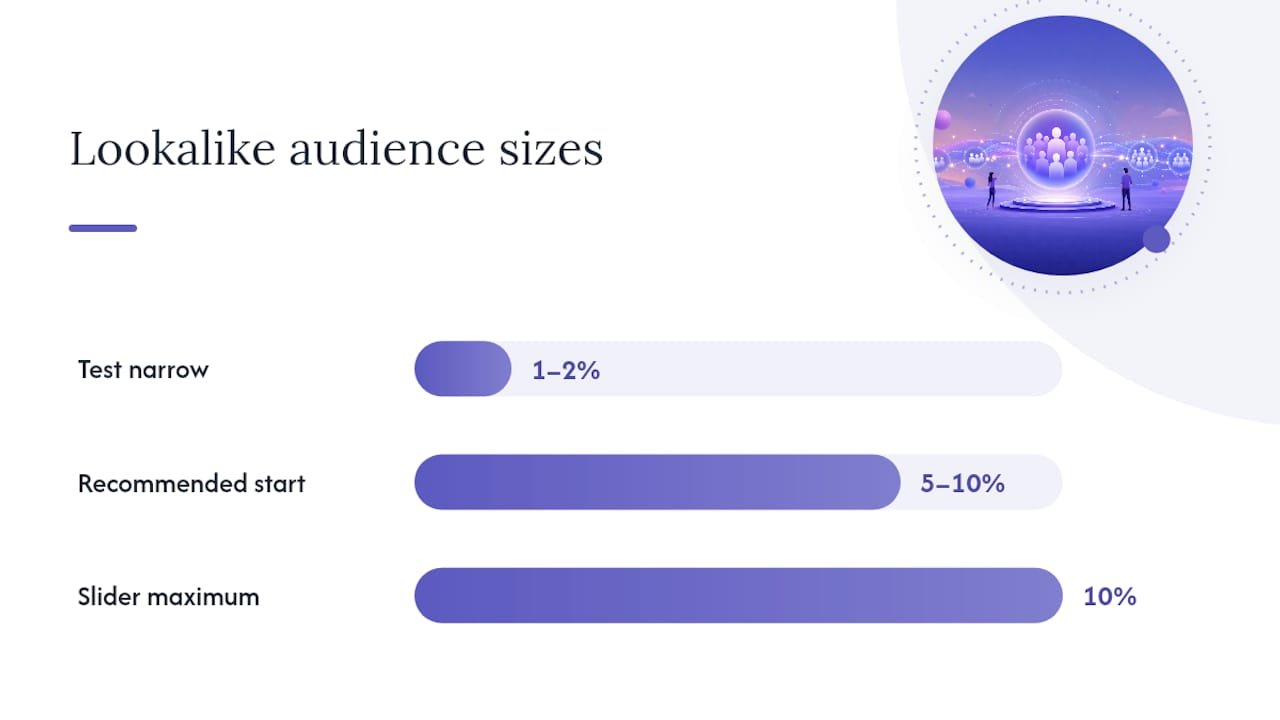
- Set audience size. The slider runs from 1% to 10% of the selected country’s eligible population. Start at 5–10% for most new campaigns; you can always test 1–2% separately.
- Click “Create Audience.” The status will show “Populating” first, then “Ready.” Practitioners report that Meta typically populates a new lookalike within 6–24 hours, though large uploads or low match rates can extend that window.
- Check the estimated audience size. Ads Manager shows a reach estimate before you save. Use this to confirm the pool is large enough for your budget and frequency targets.
- Create multiple sizes in one session. Build a 1%, 5%, and 10% version of the same seed in the same sitting. This sets up a clean size-test without extra work later.
Which source type to pick by objective:
- Purchase/Revenue campaigns: pixel Purchase event or a value-weighted customer list
- Lead generation: pixel Lead event audience or a list of your highest-quality closed leads
- App installs or in-app purchases: app event audiences from Meta SDK
- Engagement-based prospecting: video viewers or Instagram/Facebook page engagers (weaker signal for conversions, but useful for top-of-funnel)
Pro Tip: If your pixel Purchase event has fewer than 500 events in the last 180 days, use a customer list upload instead. A clean list of 1,000+ verified buyers will usually outperform a thin pixel event audience as a seed.
What your seed audience actually needs to produce reliable results
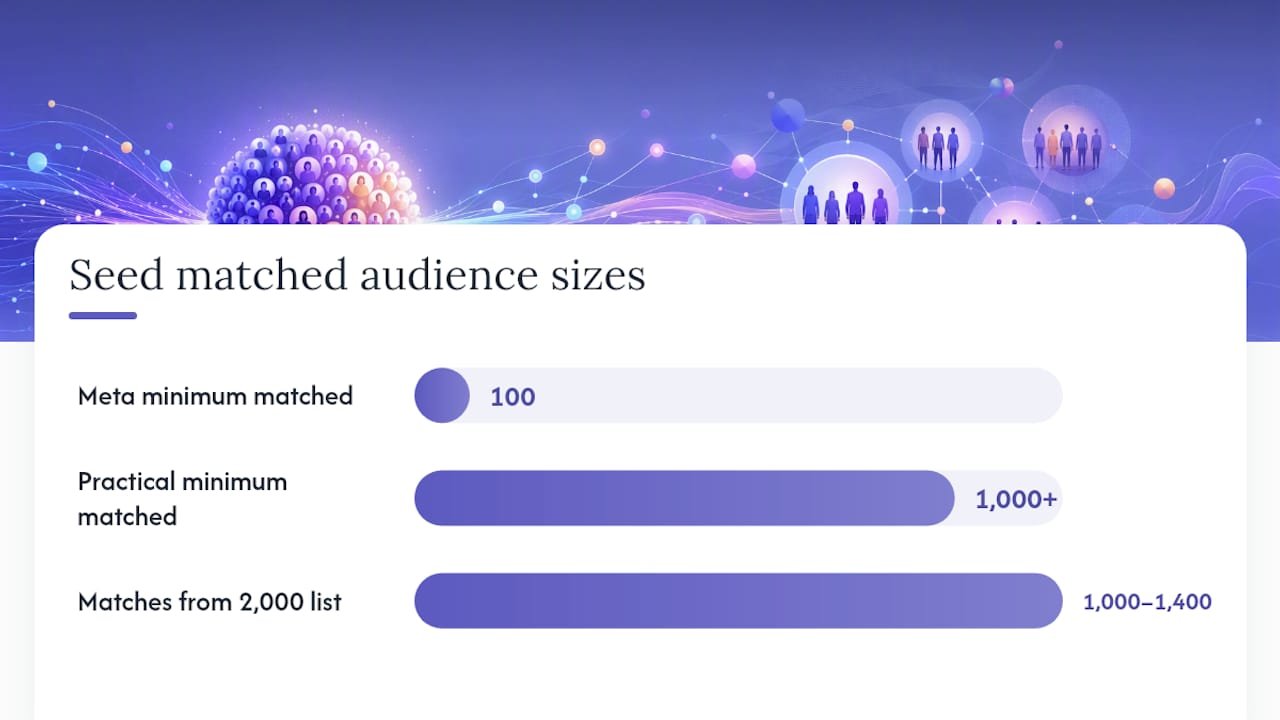
Meta’s official documentation states the minimum seed requirement is 100 matched people. In practice, treat 1,000+ matched records as the working minimum for reliable lookalike output. Below that threshold, Meta has too little signal to identify consistent patterns, and the resulting audience tends to be noisy.
Acceptable seed types and formatting basics:
- Customer list (CSV/TXT upload): Include email addresses, phone numbers (with country code), first name, last name, and city/state when available. More identifiers improve match rate.
- Pixel event audiences: Purchase, Lead, Add to Cart, or any custom conversion event. The event must have enough volume to be statistically meaningful.
- Engagement audiences: Video viewers, page followers, Instagram engagers. Useful for top-of-funnel lookalikes but weaker for conversion-focused campaigns.
- App event data: Purchases, subscriptions, or key in-app actions via Meta SDK.
Practitioners report that customer-list match rates typically land in the 50–70% range. That means a list of 2,000 emails might produce 1,000–1,400 matched profiles, which is a solid working seed.
- Normalize email formatting (all lowercase, no trailing spaces)
- Include country codes on phone numbers (+1 for US)
- Deduplicate the list before upload
- Add additional identifier columns (phone + email together, not just one)
A value-weighted seed tells Meta to find people who spend, not just people who bought once. Meta’s value-based lookalike feature lets you add a “value” column to your CSV upload to weight records accordingly.*
When your customer list is too small to be reliable, use proxy events. A “Viewed Pricing Page” pixel event or a “Completed Application” custom conversion can stand in until your Purchase event volume grows.
Choosing lookalike size and what the reach numbers actually mean
Lookalike sizes run from 1% to 10% of a country’s eligible population. Smaller percentages produce a tighter match to your seed; larger percentages expand reach at the cost of similarity. For the United States, that range spans millions of people at the low end to tens of millions at the high end.
| Lookalike Size | Similarity | Approximate US Reach | Best Use Case |
|---|---|---|---|
| 1% | Tightest | Several million | High-intent prospecting, small budgets, niche offers |
| 2–3% | High | Larger than 1% | Scaling a proven smaller audience without sacrificing too much quality |
| 5% | Moderate | Larger still | Most new campaigns; gives Meta room to optimize |
| 10% | Broadest | Largest | Scale plays, brand awareness, or when smaller audiences exhaust |
Audience-size estimates from Ads Manager and third-party sizer tools can vary by roughly ±15% from real-time availability due to active-user filtering and eligibility criteria. Treat these numbers as directional, not precise.
Practitioner testing increasingly shows that a 5–10% lookalike or even broad delivery with Advantage+ outperforms a 1% once an account has stable conversion volume, because Meta’s algorithm has more candidates to work with.
The audience sizer tool at Tracking Consulting lets you preview estimated reach by country and percentage before you build the audience in Ads Manager. Use it to confirm your budget can sustain the frequency you need before committing to a size.
How to optimize lookalike performance once campaigns are live
Getting a lookalike audience built is step one. Getting it to perform is a different problem. These are the moves that actually move the needle.
Optimization checklist:
- Segment your seeds. Don’t mix all customers into one lookalike. Build separate lookalikes from your top-LTV buyers, recent purchasers (last 90 days), and repeat customers. Each seed produces a different audience with a different behavioral profile.
- Use value-based lookalikes. Upload a customer list with a “value” column. Meta weights higher-value customers more heavily in the similarity scoring, which tends to attract higher-spending prospects.
- Exclude your existing customers. Create a Custom Audience of all past purchasers and exclude it from your lookalike ad sets. You’re paying to reach new people, not re-reach people who already converted.
- Exclude poor-quality leads. For B2B accounts, building a lookalike of your worst leads and excluding it is one of the highest-leverage moves available. It improves lead quality without touching creative.
- Match your optimization event to your objective. If you’re optimizing for Purchase, make sure the pixel Purchase event is firing correctly. Optimizing for a proxy event (like “Lead”) when you want buyers produces misaligned delivery.
- Pair lookalikes with strong creative. A lookalike audience doesn’t guarantee results if the ad itself doesn’t resonate. Test at least three creative variations per audience to separate audience performance from creative performance.
- Control frequency. Set frequency caps or monitor them manually. A lookalike audience can exhaust faster than you expect on a concentrated budget, especially at 1–3%.
Use campaign budget optimization (CBO) so Meta allocates spend toward the best-performing combinations. Judge performance after each ad set reaches at least 50 conversions. Fewer than that and the data is too noisy to act on.
Budget and learning phase: Meta’s learning phase requires roughly 50 optimization events per ad set per week to exit. If your budget can’t support that volume, consolidate ad sets rather than splitting budget too thin across multiple lookalike sizes.
Tighter doesn’t always mean better when the algorithm needs room to work.*
When to use lookalikes versus interest, broad, or Advantage+ targeting
Lookalikes aren’t always the right tool. The decision depends on your account’s conversion volume, pixel maturity, and campaign objective.
| Scenario | Recommended Targeting | Reason |
|---|---|---|
| New account, no pixel data, low budget | Interest or broad targeting | No signal to build a reliable seed |
| Account with 500+ monthly purchases, stable ROAS | Broad + Advantage+ | Algorithm has enough signal; broad often outperforms |
| Niche product, small addressable market | 1–3% lookalike from buyers | Broad delivery finds too many irrelevant users |
| B2B lead gen, quality over volume | Lookalike from closed-won customers + exclusion lookalike | Shapes quality without over-restricting reach |
| Mid-funnel prospecting, DTC brand | 5–10% lookalike from top-LTV buyers | Balances scale and similarity for acquisition |
| Retargeting warm audiences | Custom Audience (website visitors, engagers) | Lookalikes are for prospecting, not retargeting |
For campaign objectives, lookalikes pair best with Purchase, Value optimization, and Lead generation objectives where the pixel has enough event volume to guide delivery. For brand awareness or reach objectives, broad targeting usually wins on efficiency.
Practitioner analysis is clear on this: once an account reaches stable conversion volume, Advantage+ and broad delivery often outperform narrow 1% lookalikes. Use lookalikes as a directional signal in those accounts rather than a hard constraint. In newer accounts or niche markets, lookalikes still provide a meaningful edge over pure broad delivery.
Diagnosing why your lookalike isn’t performing
Most lookalike underperformance traces back to one of four problems. Here’s how to identify and fix each one.
-
Low match rate (under 40%). Your uploaded list isn’t matching to enough Meta profiles. Fix: normalize all emails to lowercase, add phone numbers with country codes, deduplicate the file, and re-upload. A match rate below 40% means your seed has fewer matched profiles than it should, which weakens the lookalike’s signal.
-
Audience overlap. Multiple lookalike ad sets are competing for the same people, inflating CPMs and confusing delivery. Fix: use Meta’s Audience Overlap tool (under Audiences in Ads Manager) to check overlap between your lookalike sizes. If overlap exceeds 60–70%, consolidate into fewer, larger ad sets rather than running all sizes simultaneously.
-
Wrong optimization event. You’re optimizing for a high-funnel event (page view, add to cart) but expecting purchase-quality results. Fix: map your optimization event to the actual outcome you want. If Purchase event volume is too low to optimize against, use a value-based lookalike or a proxy event that’s one step closer to purchase.
-
Exhausted audience pool. Frequency is climbing, CTR is falling, and CPA is rising. The lookalike has run out of fresh users at your budget level. Fix: expand to a larger percentage (5–10%), refresh the seed with a more recent customer list, or test broad delivery with Advantage+ to let Meta find new users outside the original pool.
-
Pixel misconfiguration. Your pixel isn’t firing the right events, or the Purchase event is firing on the wrong page. Fix: use Meta Pixel Helper (Chrome extension) to verify events are firing correctly on your confirmation/thank-you page. Check Events Manager in Meta Business Suite for event health and deduplication status.
-
Performance swings from measurement noise. Since ATT, some reported performance changes are tracking artifacts rather than real shifts. If your ROAS drops sharply but your actual revenue hasn’t changed, check your Conversions API (CAPI) setup. Server-side events through CAPI are more reliable than browser-only pixel data in the post-ATT environment.
-
Stale seed audience. A customer list uploaded six months ago doesn’t reflect your current best customers. Fix: refresh your seed every 30–60 days with a current export of your top buyers. A stale seed produces a lookalike that’s optimized for who your customers were, not who they are now.
-
Seed too small or too broad. A seed of 200 matched profiles is technically above Meta’s minimum but too thin for reliable pattern detection. A seed that includes everyone who ever visited your site is too broad to produce a meaningful signal. Fix: aim for 1,000+ matched records from a specific, high-value action.
Your landing page checklist for converting lookalike traffic
Getting the right people to click your ad is only half the job. Lookalike traffic is cold traffic. These visitors don’t know your brand, and they’ll leave in seconds if the page doesn’t immediately confirm they’re in the right place.
Speed and technical basics
Page load time under three seconds is the baseline. Use Google PageSpeed Insights to check your score. Compress images, minimize render-blocking scripts, and use a CDN. A slow page wastes every dollar you spent getting the click.
Messaging alignment
The headline on your landing page should mirror the promise in your ad. If your ad says “Get 50% more leads from your existing traffic,” your landing page headline shouldn’t say “Welcome to [Brand].” Messaging alignment between ad and landing page is one of the most underrated conversion levers available. Mismatched messaging creates cognitive friction that kills conversion rate before the visitor even reads your offer.
Single CTA and clear value proposition
One page, one goal. Remove navigation menus, secondary offers, and anything that competes with the primary conversion action. State your value proposition in the first 100 words. Lookalike visitors are evaluating you against alternatives they haven’t seen yet; give them a reason to stay in the first five seconds.
Trust elements
Include social proof near the CTA: a specific testimonial, a recognizable client logo, or a concrete result (“247 coaches booked their first client using this funnel”). Generic five-star ratings without context don’t move cold traffic. Specificity does.
Conversion tracking checklist
- Meta Pixel: Verify the Purchase or Lead event fires on your thank-you page, not your checkout page. Use Meta Pixel Helper to confirm.
- Conversions API (CAPI): Set up server-side event sending to supplement browser-based pixel data. CAPI events are less affected by iOS tracking restrictions and ad blockers, giving Meta more accurate conversion data to optimize against.
- Event deduplication: If you’re sending both pixel and CAPI events, configure deduplication using the
event_idparameter. Without it, Meta counts the same conversion twice, which inflates reported results and distorts optimization. - UTM parameters: Tag every ad URL with UTM parameters so you can verify conversion data in Google Analytics 4 alongside Meta’s reported numbers.
Sample funnel template
Ad → Landing page → Thank-you page → Email nurture sequence
The thank-you page is often ignored, but it’s where you set the next step in the customer relationship. Use it to confirm the conversion, set expectations, and offer a logical next action (book a call, download a resource, watch a video). Key metrics to monitor: landing page conversion rate, cost per conversion, and pixel match rate in Events Manager.
For practical guidance on turning paid traffic into clients, the post-click experience matters as much as the audience you built.
What actually separates the accounts that win with lookalikes
Most advertisers treat lookalike audience size as the primary variable. That’s the wrong frame.
The accounts that consistently get results from lookalikes share one thing: they obsess over the seed, not the slider. The algorithm is only as good as the pattern you give it to work from. Garbage in, garbage out.
The second thing those accounts get right is the post-click experience. Lookalike traffic is cold. These people have never heard of your brand. If your landing page loads slowly, leads with your company name instead of a clear benefit, or asks for too much before delivering value, the audience quality doesn’t matter. You’ve already lost them.
The third thing is measurement discipline. Post-ATT, a meaningful portion of Meta conversions go unreported in the browser-based pixel. Accounts running CAPI alongside their pixel see more complete data, which means Meta’s algorithm has better signal to optimize against. That’s not a nice-to-have in 2026. It’s the difference between a campaign that learns and one that stalls.
Ready to turn your lookalike traffic into real leads and clients?
Building a high-quality lookalike audience gets the right people to your page. What happens next is where most campaigns lose money. If your landing page isn’t fast, message-matched, and built around a single conversion goal, you’re paying Meta to send qualified traffic to a page that won’t close.
Cosmicdigitalstudios builds conversion-optimized landing pages and funnels specifically for coaches, consultants, and service businesses running paid traffic. Every build includes proper pixel and CAPI setup, message-matched copy, and a thank-you page that moves visitors to the next step. You get a complete post-click system, not just a pretty page. If you’re ready to stop wasting ad spend on a funnel that doesn’t convert, book a project consultation and get a clear plan for what your funnel needs to perform.
Sources
These are the primary references worth keeping open while you build and optimize your lookalike campaigns.
- Create a Lookalike Audience | Meta Business Help Center
- Lookalike Audience Sizer — Meta Lookalike Estimates | Tools | Tracking Consulting
- Facebook Lookalike Audiences in 2026: How They Actually Work (Complete Guide) | Victoria Alenich
- Facebook Ads Targeting: The Complete 2026 Guide | AdAdvisor