
Here is a fact that surprises most business owners: an outdated website damages customer trust faster than a typo, a broken form, or even a confusing navigation. Why outdated websites lose trust so quickly comes down to psychology. Visitors do not separate your website from your business. When they land on a page showing 2019 pricing, an expired promotion, or a copyright footer from three years ago, they do not think “minor oversight.” They think “this company is not on top of things.” That perception costs you leads, bookings, and sales before you ever get a chance to speak with them.
Table of Contents
- How outdated content triggers trust loss faster than errors
- The role of website design and performance in credibility perceptions
- How outdated website tools and broken elements increase security and trust risks
- Practical steps small businesses can take to keep websites current and trustworthy
- Comparing website trust factors: visual, content, performance, and security
- The overlooked truth about website trust: maintenance is an ongoing relationship, not a one-time project
- Modernize your website to protect and grow trust today
- Frequently asked questions
Key Takeaways
| Point | Details |
|---|---|
| Outdated content harms trust rapidly | Users perceive outdated website content as neglect, damaging credibility more than occasional errors. |
| Website design shapes first impressions | Poor design and slow load times create instant distrust and increase bounce rates. |
| Legacy tools increase security risks | Unsupported website software can be exploited, causing serious breaches in user trust. |
| Ongoing maintenance preserves trust | Regular updates, audits, and fixes prevent trust erosion and protect conversions. |
| Trust is a continuous effort | Maintaining website trust requires consistent attention, not just a one-time launch. |
How outdated content triggers trust loss faster than errors
A typo is a human slip. Outdated content is a pattern. That distinction matters enormously to your visitors, even if they never consciously articulate it.
Outdated information damages trust significantly faster than occasional errors, triggering what researchers call the “broken window effect,” which leads users to perceive systemic neglect across the entire brand. The broken window effect, a concept originally from criminology, applies directly here: one visible sign of neglect signals that everything else is probably neglected too. A visitor who sees a blog post from four years ago as your most recent content does not think your team is busy. They wonder if you are still in business.
“When a website feels abandoned, visitors unconsciously transfer that feeling to the brand behind it. The site becomes evidence of how you treat your customers.”
Content decay compounds over time. A page that is six months old raises a mild flag. The same page at two years old triggers a much stronger negative reaction. This is because building trust online requires consistent, visible signals that you are active, current, and reliable. Stale content removes those signals entirely.
Here is what outdated content communicates to your visitors, whether you intend it or not:
- You are not active. No recent updates suggest low business activity.
- You do not care about accuracy. Old pricing, expired offers, and outdated service descriptions feel deceptive.
- You will not be responsive. If the website is neglected, customer service probably is too.
- The brand is not credible. Trust issues with old websites are not just about looks. They are about perceived reliability.
Your essential website pages carry the heaviest trust burden. Services, pricing, about, and contact pages need to be accurate and current at all times.
The role of website design and performance in credibility perceptions
Beyond content accuracy, design and speed also shape user trust and behavior on your website.
The impact of website design on first impressions is instant and measurable. Users form first impressions about website credibility within 50 milliseconds based on appearance, and slow load speeds directly correlate with higher bounce rates and lower conversion rates. That is faster than a blink. Your visitor’s brain has already made a credibility judgment before a single word has been read.

A Stanford credibility study confirmed that site design strongly impacts perceived professionalism and trustworthiness immediately upon page load. Outdated website credibility suffers not just from old content, but from visual signals like cluttered layouts, mismatched fonts, low-resolution images, and color palettes that stopped feeling current years ago.
| Design and performance factor | Trust impact | What visitors think |
|---|---|---|
| Page load over 3 seconds | High negative | “This site is slow and unreliable” |
| Non-mobile-friendly layout | High negative | “This business is behind the times” |
| Outdated visual design | Moderate to high negative | “Is this company still active?” |
| Missing SSL certificate | Very high negative | “This site is not safe” |
| Modern, fast, responsive design | Positive | “This business is professional and trustworthy” |
How design affects trust goes deeper than aesthetics. Performance metrics known as Core Web Vitals (Google’s set of measurements for page speed and user experience) directly influence both trust and search rankings. Slow sites can boost SEO significantly when fixed, and fast sites convert better at every stage of the funnel.
- Pages loading in under 2 seconds see significantly lower bounce rates
- Mobile responsiveness is now a baseline expectation, not a feature
- Visual hierarchy and clean design reduce decision fatigue and keep visitors engaged
- HTTPS and visible trust signals (reviews, credentials, clear contact info) reinforce credibility
Pro Tip: Use Google’s free PageSpeed Insights tool to audit your load time and Core Web Vitals score. A score below 50 is an urgent red flag for trust and conversions. If you are building a converting website, performance is not optional.
How outdated website tools and broken elements increase security and trust risks
Security concerns and broken elements add another layer of risk beyond visual and content issues.
The negative perception of old sites goes well beyond aesthetics. Outdated plugins, deprecated editors, and legacy scripts are active security vulnerabilities. Outdated website components like deprecated editors can be exploited by attackers, and trust plummets fast when users encounter malware warnings or unexpected redirects. A visitor who lands on your site and immediately gets a browser security warning is not coming back, and they are likely telling others about the experience.
Broken links and outdated pages contribute to trust erosion and compliance risks, harming conversions and brand credibility. A single “404 not found” error on a key page can interrupt a visitor’s buying journey entirely. Multiple broken links signal to both users and search engines that the site is not maintained.
Here are the most common trust risks from neglected website tools and elements:
- Outdated CMS or plugins open doors to SQL injection, cross-site scripting, and malware injection attacks
- Expired SSL certificates trigger browser warnings that immediately kill visitor confidence
- Broken internal links frustrate users mid-journey and increase bounce rates
- Legacy third-party scripts (old payment gateways, outdated chat tools) create unpredictable behavior
- Unpatched software leaves known vulnerabilities unaddressed, making your site an easy target
Pro Tip: Run a monthly broken link audit using a free tool like Screaming Frog or Broken Link Checker. Combine that with a quarterly plugin and software update review. These two habits alone eliminate the majority of trust-damaging technical issues on your website pages.
Practical steps small businesses can take to keep websites current and trustworthy
Having explored the risks, let’s focus on straightforward actions you can take to keep your website trustworthy and up to date.
Scheduled content audits and ongoing maintenance preserve trust and prevent compounding decay, which typically accelerates after about a year without upkeep. The good news: you do not need to rebuild your site every year. You need a consistent, light-touch maintenance routine.
- Set a quarterly content review. Go through every core page and check for outdated pricing, expired offers, old team members, and stale blog content. Update or remove what no longer reflects your business accurately.
- Fix broken links monthly. Broken links are invisible to you but visible and frustrating to visitors. A quick automated audit catches them before they cost you conversions.
- Update plugins and software immediately. Do not delay security patches. Set a recurring calendar reminder to update your CMS, plugins, and any third-party tools every month.
- Test load speed every quarter. Run your top five pages through PageSpeed Insights. If any page scores below 70, prioritize the fix.
- Review your mobile experience. Pull up your website on your phone right now. If anything feels clunky, hard to tap, or slow, your mobile visitors are feeling the same friction.
- Automate where you can. Tools like UptimeRobot monitor site availability, and Google Search Console flags crawl errors and broken links automatically. Set these up once and let them run.
| Maintenance task | Frequency | Effort level | Trust impact |
|---|---|---|---|
| Content review and updates | Quarterly | Medium | High |
| Broken link audit | Monthly | Low | Moderate to high |
| Plugin and software updates | Monthly | Low | Very high (security) |
| Load speed testing | Quarterly | Low | High |
| Mobile experience check | Monthly | Low | High |
| Security scan | Monthly | Low to medium | Very high |
Pro Tip: Block two hours per month on your calendar specifically for website maintenance. Treat it like a client meeting. The businesses that maintain their sites consistently never face the expensive emergency of a full redesign because trust never fully eroded. Your website maintenance guide is a great reference to keep nearby when reviewing key website pages.
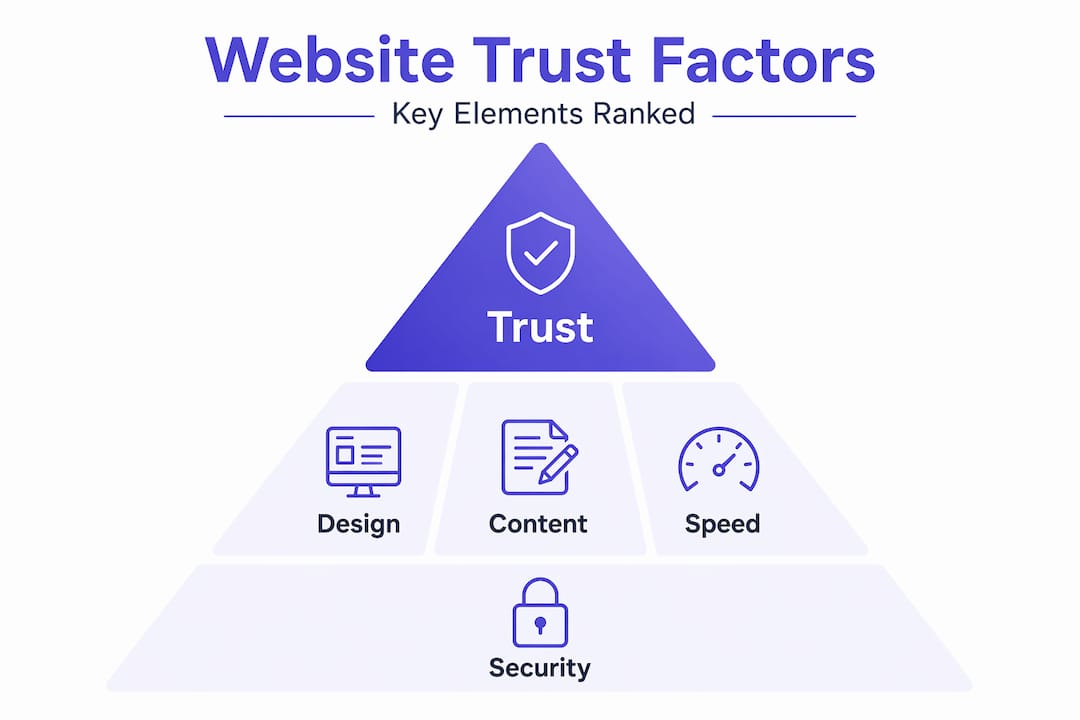
Comparing website trust factors: visual, content, performance, and security
To wrap up the educational content, here is a comparison framework summarizing key trust elements to help you prioritize your maintenance efforts.
Visual design, content freshness, site speed, and security vulnerabilities all contribute uniquely and collectively to trust loss or gain. No single factor dominates in isolation. Together, they shape every visitor’s perception of whether your business is worth trusting with their time and money.
| Trust factor | How it damages trust | How it builds trust | Priority level |
|---|---|---|---|
| Visual design | Outdated layouts feel amateurish | Modern, clean design signals professionalism | High |
| Content freshness | Stale info implies neglect | Updated content shows you are active | Very high |
| Site performance | Slow pages frustrate and push users away | Fast loading increases engagement and conversions | Very high |
| Security | Broken tools expose users to risk | SSL, patched software, and clean code build safety | Critical |
Understanding these website trust factors helps you allocate your time and budget effectively. You do not need to fix everything at once. Start with the factors that carry the highest risk for your specific site.
- If your content is over a year old, that is your first priority
- If your site loads slowly on mobile, that is your second
- If your plugins have not been updated in months, fix that immediately
- If your design looks like it belongs in 2015, plan a refresh within the next six months
The overlooked truth about website trust: maintenance is an ongoing relationship, not a one-time project
Most business owners think about their website the same way they think about a logo: you build it, you launch it, and it works. That assumption is where trust failure begins.
A website is not a finished product. It is a living business asset that reflects your brand’s current state to every visitor who lands on it. When maintenance stops, content decay and legacy software risks accelerate, making trust erosion a systemic, ongoing challenge rather than an isolated issue. The site does not just stagnate. It actively starts working against you.
Here is the uncomfortable truth: most small businesses know their website is outdated. They just keep pushing the update down the priority list. And every month they wait, the gap between their website and their competitors’ sites widens. Visitors notice that gap even if they cannot name it.
The businesses that win online are not necessarily the ones with the most expensive websites. They are the ones that treat their website like a sales tool that needs regular tuning. The ROI on consistent maintenance, keeping content current, fixing performance issues, patching security gaps, is far higher than the cost of rebuilding trust after it has been lost. Reactive website fixes are almost always more expensive, in time, money, and lost revenue, than proactive upkeep.
Think of it this way: every week your website is current and fast is another week it is quietly working for you, converting visitors into leads. Every week it is outdated is a week it is quietly sending people to your competitors. The math is not complicated. Integrating website maintenance into your regular business operations, not treating it as a one-off project, is one of the highest-ROI decisions you can make. Your website conversion strategies only work if the foundation underneath them is solid and current.
Modernize your website to protect and grow trust today
You now understand exactly why outdated websites lose trust and what it costs your business every day the issue goes unaddressed. The risks are real: content that signals neglect, design that feels unprofessional, slow pages that push visitors away, and outdated tools that open security gaps.

At Cosmic Digital Studios, we build custom websites, landing pages, and conversion-focused funnels designed to make your business look credible, load fast, and turn visitors into booked calls and leads. Every build is tailored to your goals, not a generic template. If your current site is working against you, we can fix that with a modern website design built for performance, trust, and real conversions. Explore our resources on key website pages and conversion-focused design to see what a current, professional website can do for your business.
Frequently asked questions
Why does outdated website content damage trust more than simple errors?
Outdated information damages trust significantly faster than occasional errors because stale content signals ongoing neglect rather than a one-time slip, leading visitors to question your reliability across the board. A typo is forgiven; a page that has not been updated in two years suggests you are not paying attention to your customers.
How does website load speed affect user trust?
Poor load speed leads to higher bounce rates and lower conversion rates, signaling to visitors that the site is unprofessional and unreliable before they have read a single word. Most users will abandon a page that takes more than three seconds to load and are unlikely to return.
Can outdated website tools cause security issues?
Yes. Outdated website components can be exploited by attackers, and trust drops sharply when visitors encounter malware warnings, unexpected redirects, or browser security alerts. Keeping your CMS, plugins, and third-party scripts updated is one of the most direct ways to protect both your visitors and your credibility.
What practical steps can small businesses take to maintain website trust?
Scheduled content audits and ongoing maintenance preserve trust and prevent the compounding decay that accelerates after about a year of neglect. Regular content reviews, monthly broken link audits, software updates, and load speed testing are the core habits that keep your website trustworthy and working for your business.