
Website content hierarchy is defined as the strategic organization of information on a webpage by order of importance, guiding users toward the most critical content first. The industry term for this practice is information architecture, and it spans three distinct layers: information hierarchy, semantic hierarchy, and visual hierarchy. Tools like Figma, platforms like UXPin, and accessibility standards from MDN Web Docs all treat these layers as interdependent. When you get all three right, you give visitors a clear path through your site. When you ignore even one, you lose them before they convert.
What is website content hierarchy and why does it matter?
Website content hierarchy is the system that orders information by priority so users always know where to look, what to do next, and what to skip. It is not just a visual choice. It is a functional system that reduces cognitive load and shapes every decision a visitor makes on your site. Designer and UX researcher Michela Ferron defines it as a multilayer concept combining information, semantic, and visual hierarchy working together.
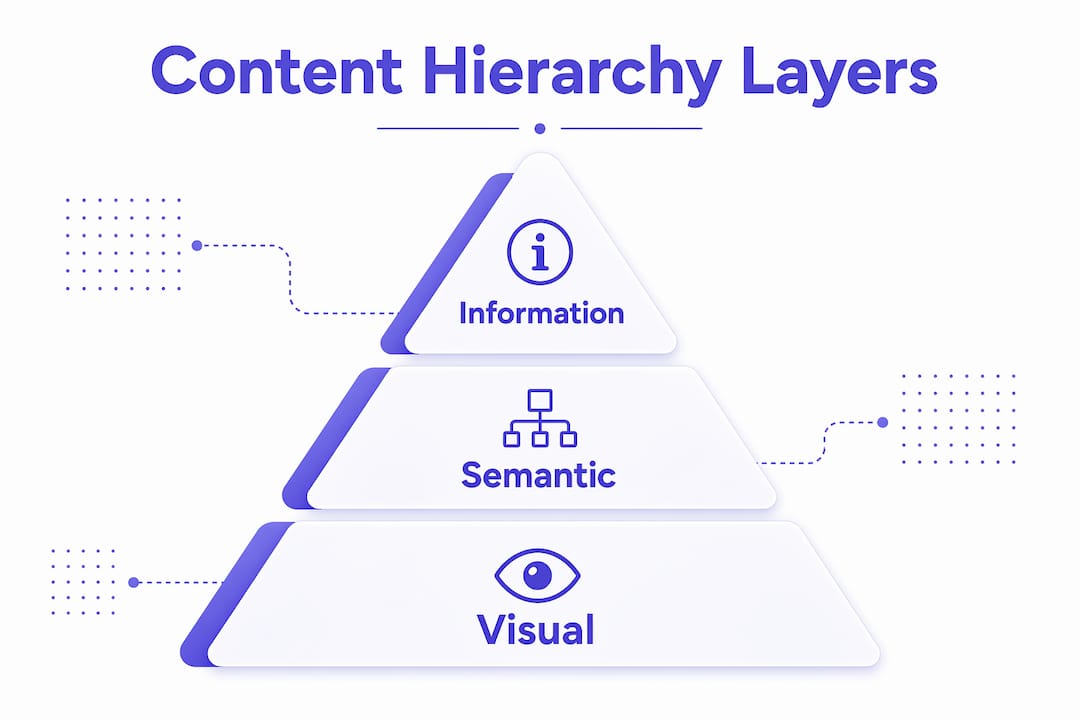
The information layer determines the order of ideas. The semantic layer uses HTML heading tags (H1 through H6) and structural elements to communicate priority to browsers, screen readers, and search engines. The visual layer uses size, color, contrast, and spacing to direct the human eye. Each layer reinforces the others. A site with strong visual hierarchy but broken semantic markup will rank poorly and fail users who rely on assistive technology.
Most web teams focus on visual design and skip the semantic layer entirely. That is the most common and most costly mistake in content organization strategies.

What are the three layers of content hierarchy?
Understanding each layer in depth helps you build a site that works for users, search engines, and accessibility tools simultaneously.
- Information hierarchy: This is the editorial layer. You decide which ideas appear first, which are secondary, and which are buried in subpages. A homepage that leads with your value proposition before listing service details has strong information hierarchy. One that opens with a company history does not.
- Semantic hierarchy: HTML heading tags map directly to information priority. H1 is your page title. H2 tags are major sections. H3 tags are subsections within those. Skipping levels (jumping from H1 to H3) breaks the DOM tree and confuses both screen readers and search engine crawlers.
- Visual hierarchy: Font size, weight, color contrast, and whitespace guide the eye before a user reads a single word. A bold 48px headline pulls attention. A gray 14px footnote signals low priority. This layer works in milliseconds, before conscious reading begins.
Pro Tip: Run your page through a free accessibility checker like WAVE or axe DevTools. If your heading structure fails, your semantic hierarchy is broken regardless of how good the visual design looks.
The three layers must align. If your H2 visually looks like a caption and your H3 looks like a headline, you have created a conflict between semantic and visual hierarchy. Users and machines will both get confused.
How does content hierarchy improve UX and SEO?
The benefits of content hierarchy are measurable, not theoretical. Well-structured content improves information processing speed by 40–60% and comprehension by 25–35% compared to flat layouts. That means visitors understand your offer faster and with less effort, which directly increases the chance they take action.
Task completion rates rise by 40–60% and time-to-information drops by 30–50% when hierarchy is applied correctly. These are not marginal gains. They represent the difference between a site that converts and one that just exists.
From an SEO perspective, critical pages should be reachable within 3 clicks of the homepage. Search engine crawlers follow link depth to assign crawl priority. Pages buried 6 or 7 clicks deep get crawled less frequently and rank lower. A logical content hierarchy keeps your most valuable pages close to the surface.
Progressive disclosure is one of the most underused tools in content organization strategies. Rather than dumping all information on a single page, you reveal detail progressively as users request it. Accordions, tabbed sections, and “read more” links all serve this function. The result is a cleaner page that feels less overwhelming without hiding information users need.
Pro Tip: Use Google Search Console’s Coverage report to identify pages with low crawl frequency. If key service pages are rarely crawled, your site’s link depth and internal linking structure are the first places to investigate.
What are the main website content hierarchy models?
Four main website structures exist: hierarchical, sequential, matrix, and database-driven. Each suits different content types and user goals.
| Structure | How it works | Best for |
|---|---|---|
| Hierarchical | Tree-like: homepage > categories > subcategories | Most business and service websites |
| Sequential | Linear path from step 1 to step N | Onboarding flows, checkout, courses |
| Matrix | Multiple entry paths, tag-based navigation | Large blogs, knowledge bases, e-commerce |
| Database-driven | Dynamic pages generated from queries | News sites, product catalogs, directories |
The hierarchical structure is the most common website architecture because it mirrors how people naturally categorize information. A consulting firm’s site with a homepage, service pages, and case studies under each service is a classic hierarchical model. It is intuitive to navigate and easy for search engines to crawl.
Sequential structures work well when you need users to complete steps in order. A SaaS onboarding flow or a multi-step lead generation funnel follows this model. Skipping steps creates friction, so the structure enforces the intended path.
Matrix structures suit content-heavy sites where users arrive with different goals. A marketing blog with tags like “SEO,” “paid ads,” and “conversion” lets users self-select their path. The risk is that without strong tagging and filtering, users get lost. Database-driven structures power sites like Zillow or Amazon, where content is generated dynamically from a backend query rather than manually organized.
Choosing the wrong model creates structural debt. Rebuilding a hierarchical site into a matrix structure after launch is expensive. Make this decision before you write a single page.
How to implement content hierarchy in design and development
Execution is where most teams fall short. Strong hierarchy principles mean nothing if the implementation is inconsistent.
- Use semantic HTML correctly. Every page needs exactly one H1. Major sections get H2 tags. Subsections get H3 tags. Never skip a level. This rule applies whether you are building in WordPress, Webflow, or custom code.
- Align visual weight with heading level. Your H2 should always look more prominent than your H3. If your design system has these reversed, fix the CSS before launch.
- Structure your navigation to reflect your hierarchy. Top-level navigation items should map to your H2-level content categories. Dropdown items should map to subcategories. A well-structured service business website menu makes this relationship explicit and easy to follow.
- Write URLs that mirror your hierarchy. A URL like
/services/web-design/landing-pagescommunicates structure to both users and search engines. A URL like/page?id=4821communicates nothing. - Validate with real users. Heading structure supports user scanning and AI content extraction. Run a five-second test using tools like Maze or UsabilityHub. Ask users what the page is about after five seconds. If they cannot answer, your information hierarchy is failing.
Pro Tip: Audit your site’s heading structure using the free Chrome extension Headings Map. It renders your full heading outline in a sidebar so you can spot skipped levels and structural gaps without reading the source code.
Good consulting website navigation follows the same logic: the most important service or offer sits at the top of the hierarchy, and every subsequent layer narrows the focus. Visual cues like color and contrast reinforce that structure at every level.
Key takeaways
Effective website content hierarchy requires aligning information order, semantic HTML structure, and visual design to guide users and search engines simultaneously.
| Point | Details |
|---|---|
| Three layers must align | Information, semantic, and visual hierarchy each serve a distinct role and must reinforce each other. |
| Semantic markup is non-negotiable | Correct H1 through H3 structure supports accessibility, SEO crawlability, and AI content parsing. |
| Hierarchy has measurable impact | Well-structured content improves processing speed by 40–60% and task completion by a similar margin. |
| Choose your model before you build | Hierarchical, sequential, matrix, and database structures each suit different content types and goals. |
| Validate continuously | User scanning tests and heading audits catch structural failures that design reviews miss. |
Why most sites get content hierarchy wrong
I have reviewed hundreds of websites for clients across industries, and the pattern is consistent. Teams spend weeks on visual design and almost no time on semantic structure. The result is a site that looks polished in Figma and breaks in a screen reader. That is not a minor accessibility issue. It is a signal to search engines that your content structure is unreliable.
The other mistake I see constantly is treating hierarchy as a one-time decision. You set it at launch and forget it. But content grows. New pages get added without a clear home in the hierarchy. Blog posts multiply without a logical category structure. Within 18 months, most sites have structural debt that quietly kills their SEO and confuses their users.
The insight that changed how I approach this: content hierarchy is a cognitive tool, not a design spec. Its job is to make decisions for the user before they have to make them consciously. When a visitor lands on your page, they should never have to ask “where do I go next?” The hierarchy answers that question automatically through visual weight, heading order, and navigation structure.
Semantic alignment is the piece most teams skip because it is invisible. No client ever asks for it in a brief. But it is what separates sites that rank and convert from sites that just look good in a screenshot. If you are building for AI indexing and voice search, semantic hierarchy is not optional. It is the foundation.
— Max
Build a site that guides every visitor to action
If this article made you realize your site’s structure needs work, you are not alone. Most business websites were built without a clear content hierarchy plan, and it shows in their traffic and conversion numbers.

Cosmicdigitalstudios builds custom websites with strategic content hierarchy built in from the start. Every page is structured to guide visitors toward the action you want them to take, whether that is booking a call, filling out a form, or making a purchase. From semantic HTML to visual design to navigation structure, every layer is intentional. If you are ready to turn visitors into clients, or if you need a full website redesign that gets the structure right, Cosmicdigitalstudios is ready to build it.
FAQ
What is website content hierarchy in simple terms?
Website content hierarchy is the system of organizing page information by order of importance so users find what they need quickly. It combines information order, HTML structure, and visual design into one coordinated system.
How does content hierarchy affect SEO?
Clear semantic markup using H1 through H3 tags helps search engine crawlers understand page structure and assign ranking priority. Pages with logical hierarchy and shallow link depth get crawled more frequently and rank higher.
What is the most common website structure?
The hierarchical (tree-like) structure is the most common website architecture, organizing pages from homepage through categories to subcategories. It suits most business and service websites because it mirrors natural categorization.
What is progressive disclosure in content hierarchy?
Progressive disclosure is the practice of revealing detailed information only when a user requests it, reducing cognitive load on the initial page view. Accordions, tabs, and expandable sections are common tools for applying this technique.
How do I test if my content hierarchy is working?
Run a five-second test with tools like Maze or UsabilityHub to check whether users can identify your page’s main purpose quickly. Also audit your heading structure with a tool like Headings Map to catch skipped levels and semantic errors.