
A service area page is a dedicated webpage that targets a specific geographic location where a business delivers services without operating a physical storefront there. Often called city landing pages or areas-served pages, these pages are used by plumbers, HVAC companies, mobile notaries, and delivery services to rank in local searches for the cities and neighborhoods they serve. If your business drives to customers rather than waiting for them to walk in, service area pages are your primary tool for capturing local search traffic at scale.
What is a service area page and how does it work?
A service area page, commonly abbreviated as SAP, is a location-targeted page built for a business that serves customers at their location rather than at a fixed address. Think of a residential cleaning company that operates out of one city but takes jobs across five surrounding suburbs. Without a storefront in each suburb, that company has no automatic local SEO foothold there. An SAP fills that gap by giving Google a clear, location-specific signal tied to each area the business actually serves.
As Melissa Popp describes, SAPs function as local landing pages that spotlight service offerings in specific cities, directly matching location-intent queries like “HVAC repair in Austin” or “mobile notary near me.” Each page targets one geographic area and answers the core question every local searcher has: does this business actually serve my area?

The pages work because Google reads the location-specific content on your website as a relevance signal. When your SAP for “Denver plumbing services” includes locally relevant details, a clear service description, and a call to action tied to that city, Google has strong evidence to surface your page for Denver-based searches. Without that page, you are invisible to those searchers regardless of how strong your main website is.
How do service area pages differ from location pages?
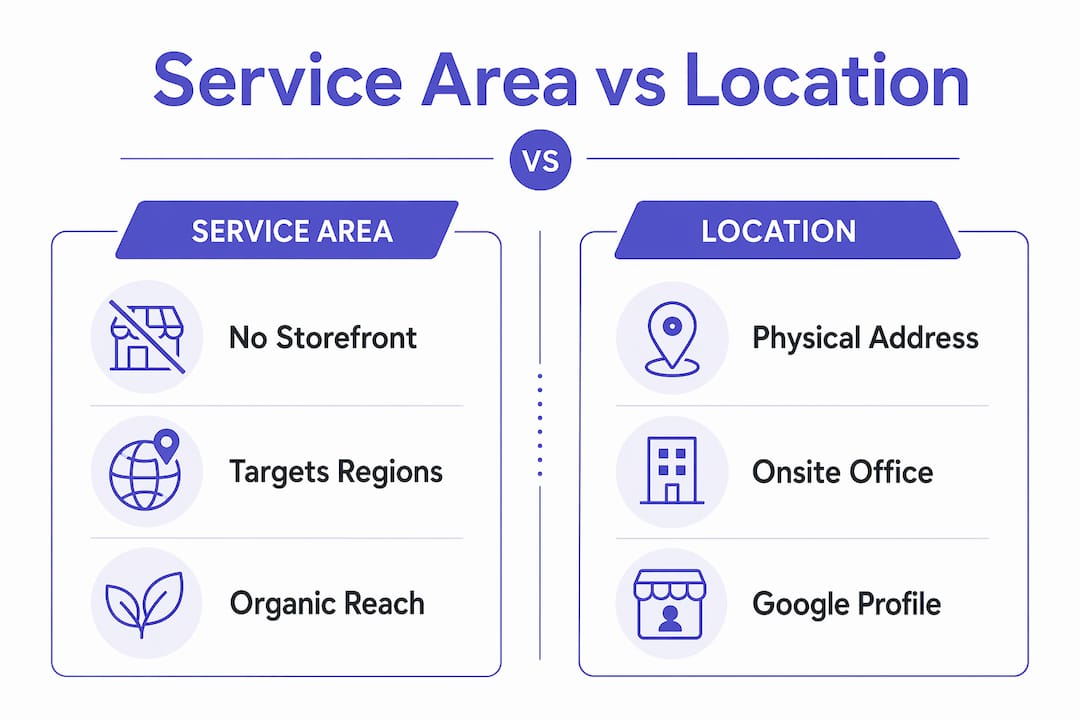
Service area pages and location pages solve different problems, and confusing the two leads to weak local SEO strategy. The distinction comes down to one factor: whether your business has a physical presence in the targeted area.
Location pages are built for businesses with a verified storefront, office, or branch at a specific address. A law firm with offices in Chicago, Dallas, and Miami creates a location page for each city because Google can verify the physical address through a Google Business Profile listing. The page reinforces what the GBP already confirms.
Service area pages exist for businesses without a storefront in the targeted location. Google Business Profile handles these differently. A service-area business hides its home address and instead lists the cities or zip codes it serves. The SAP on the website then provides location-specific content to back up those GBP service area settings.
| Feature | Service Area Page | Location Page |
|---|---|---|
| Business type | No storefront in target area | Physical address in target area |
| GBP treatment | Hidden address, service zones listed | Verified storefront address |
| Primary SEO role | Capture local-intent organic traffic | Reinforce GBP and map pack presence |
| Content focus | Area-specific service details and CTAs | Address, hours, staff, local context |
| Examples | Plumbers, cleaners, mobile services | Retail stores, law offices, clinics |
The practical implication is clear. If you serve customers across multiple cities but operate from one location, you need SAPs, not location pages. Building location pages without a verified address in each city wastes your effort and can confuse Google about your actual footprint.
Why are service area pages important for local SEO?
Service area pages are the primary mechanism through which service businesses capture organic local search traffic in areas where they have no physical presence. Google’s local search algorithm rewards pages that clearly match the geographic intent of a query. When someone searches “roof repair in Scottsdale,” Google looks for a page that explicitly addresses Scottsdale, not a generic services page that mentions the city once in passing.
Jeff Riddall emphasizes that SAPs are central to proving local relevance for businesses without storefronts, and that alignment between your Google Business Profile service area settings and your website SAPs provides the strongest possible location signal to Google. This dual-signal approach, GBP plus website content, is what separates businesses that rank in local results from those that do not.
“Service area pages act as always-on customer service content. SEO works best when it’s human-focused rather than search-engine-only.” — Elizabeth Rule, Search Engine Land
The business case extends beyond rankings. SAPs improve search visibility for service-area businesses that do not rely on foot traffic, meaning they work around the clock to generate discovery and conversions without any additional ad spend. A well-built SAP for a high-demand city can generate consistent inbound leads for years.
Pro Tip: Before writing a single word for a new SAP, confirm that you actually serve that area regularly. Google’s Helpful Content guidelines reward pages built for real users, and a page targeting a city you rarely visit will read as thin and unconvincing to both Google and the people who land on it.
What are best practices for creating effective service area pages?
Building SAPs that rank and convert requires more than copying your main services page and swapping in a city name. Google explicitly expects helpful content focused on human visitors rather than mass-produced low-value templates. Here is how to build pages that meet that standard.
-
Write unique content for every page. Describe what makes serving that specific area different. A landscaping company in Phoenix might note the desert climate, local plant species, or HOA regulations common in Scottsdale neighborhoods. That specificity signals genuine local knowledge.
-
Include locally relevant service context. Effective SAPs include area-specific challenges, case studies, and landmarks that help visitors quickly confirm the business serves their location. Mentioning a recognizable local landmark or referencing a common local problem builds immediate credibility.
-
Use a clean, consistent URL structure. A format like "/services/plumbing/denver/
is clear to both users and search engines. Avoid dynamic parameters or generic slugs like/page?city=denver`. -
Optimize metadata for the target city. Your title tag should follow a pattern like “Plumbing Services in Denver | [Business Name].” Your meta description should include the city name and a clear value statement.
-
Add LocalBusiness schema markup. Schema markup from Schema.org tells Google exactly what your business does and where, reinforcing the location signals in your page content.
-
Write a city-specific call to action. “Book a plumber in Denver today” outperforms a generic “Contact us” button on every metric. It confirms to the visitor that you serve their area and creates a direct path to conversion.
-
Limit your SAP footprint to realistic service areas. Publishing thin pages for every imaginable town harms SEO performance and user trust. Prioritize your top service cities with fully developed content before expanding.
Pro Tip: Internal linking between your SAPs and your main service pages strengthens the topical authority of your entire site. Link each SAP to the relevant service page and back again. This also helps Google crawl and index your location pages faster.
For a broader look at how SAPs fit into your full site structure, the guide on multi-location service websites at Cosmicdigitalstudios covers the architecture decisions in detail.
Can you show service area page examples and common mistakes to avoid?
Understanding what a strong SAP looks like in practice makes the difference between a page that ranks and one that sits idle. Here are three real-world scenarios that illustrate effective SAP construction.
Example 1: HVAC company in a metro area. A heating and cooling company based in Nashville creates individual SAPs for Brentwood, Franklin, and Murfreesboro. Each page opens with a description of common HVAC issues in that suburb, includes a local customer testimonial, lists specific services offered in that area, and closes with a “Schedule HVAC service in Franklin” CTA. Each page is 600 to 800 words of genuinely unique content.
Example 2: Mobile dog groomer. A groomer operating out of Portland creates SAPs for Lake Oswego, Beaverton, and Tigard. Each page notes the specific neighborhoods covered, mentions breed-specific grooming popular in that area, and includes a booking form pre-labeled with the city name. The pages rank for “[city] mobile dog grooming” queries within 90 days of publication.
Example 3: Residential cleaning service. A cleaning company in Atlanta builds SAPs for Buckhead, Decatur, and Sandy Springs. Each page references local apartment complexes and home styles common to that neighborhood, creating immediate relevance for residents searching for cleaning help.
Now, the mistakes that undercut all of that effort:
- Duplicate content. Copying the same page and changing only the city name triggers Google’s duplicate content filters and earns no ranking benefit.
- Ignoring GBP alignment. Your GBP service area settings and your SAPs must match. If your GBP lists Nashville but your SAP targets Memphis, Google sees a contradiction.
- Overextending your coverage. Publishing 50 thin SAPs for cities you rarely serve dilutes your site’s authority and signals low quality to Google.
- No conversion path. An SAP without a phone number, booking form, or city-specific CTA generates traffic but no leads.
- Missing schema markup. Skipping LocalBusiness schema leaves ranking signals on the table that your competitors are likely using.
For a practical framework on which pages your local service site needs beyond SAPs, the essential website pages guide at Cosmicdigitalstudios covers the full picture.
Key takeaways
Service area pages are the single most effective tool for service businesses to capture local organic search traffic without a physical storefront in every city they serve.
| Point | Details |
|---|---|
| SAP definition | A dedicated webpage targeting a geographic area where a business serves customers without a storefront. |
| SAP vs. location page | Location pages require a verified physical address; SAPs target service zones without one. |
| GBP alignment matters | Matching your GBP service area settings with your SAP content sends the strongest local relevance signal to Google. |
| Quality over quantity | Prioritize fewer, fully developed SAPs over mass-publishing thin pages for every possible city. |
| Conversion focus | Every SAP needs a city-specific CTA, contact method, and unique local content to generate actual leads. |
Why I think most service businesses are building SAPs wrong
After reviewing dozens of local service websites, the pattern is consistent. Business owners either skip SAPs entirely and wonder why they do not rank outside their home city, or they publish 40 identical pages with nothing but a city name swapped in and wonder why Google ignores them. Both approaches miss the point.
The businesses that win with SAPs treat each page as a genuine answer to a local customer’s question. They write about the specific neighborhoods they serve, the local conditions that affect their work, and the real results they have delivered for customers in that area. That is not an SEO trick. It is just good communication.
The GBP alignment piece is also consistently underused. Most businesses set their service areas in Google Business Profile and then build a website that never mentions those cities in any meaningful way. Aligning your GBP service area settings with dedicated, well-written SAPs creates a compounding effect. Google sees the same location signals from two trusted sources and rewards you with higher placement.
My honest recommendation: start with three to five cities where you do your best work. Build one strong SAP for each. Measure the results over 60 to 90 days. Then expand. Scaling quality beats scaling volume every time in local SEO.
— Max
Ready to build service area pages that actually rank?
Cosmicdigitalstudios builds local service websites designed to convert visitors into booked calls and leads. That includes custom-built SAP architecture, location-specific content strategy, and UX designed to guide visitors toward taking action in every city you serve.

If your service business is invisible outside your home city, the fix starts with a properly structured website. Cosmicdigitalstudios handles the design, the SEO architecture, and the conversion flow so you can focus on the work. Visit Cosmicdigitalstudios to see how we build local service sites that perform, or grab the local service website checklist to audit what you already have.
FAQ
What is a service area page in SEO?
A service area page is a dedicated webpage targeting a specific city or region where a business delivers services without a physical location there. It helps the business rank for local-intent searches like “[service] in [city]” by providing Google with clear, location-specific content.
How many service area pages should a business have?
A business should create one SAP per city or region it actively and regularly serves, starting with its highest-priority markets. Publishing thin pages for every possible town harms SEO performance and dilutes the authority of your stronger pages.
Do service area pages work without a Google Business Profile?
SAPs provide organic search visibility on their own, but pairing them with a Google Business Profile that lists matching service areas significantly strengthens local relevance signals. The combination of GBP settings and website SAP content is more effective than either alone.
What should I include in a service area page?
Every SAP should include a unique description of services in that area, locally relevant context such as area-specific challenges or landmarks, a city-specific call to action, a contact method, and LocalBusiness schema markup. Generic content copied from other pages will not rank.
How is a service area page different from a landing page?
A service area page targets a specific geographic location for organic local SEO, while a landing page is typically built for a paid campaign or a single conversion goal. SAPs are permanent, indexable pages designed for long-term search visibility rather than short-term campaign traffic.