
An emergency services page is a dedicated webpage that delivers real-time safety information, critical contact numbers, and clear instructions to users during a crisis. Also called an emergency status page in web operations contexts, it functions as the primary communication channel between your website and your audience when normal systems are under stress. Every website owner and digital marketer needs to understand what this page does, what it contains, and how to build one before an incident occurs. The difference between having one ready and scrambling to create one mid-crisis is the difference between maintaining trust and losing it.
What is an emergency services page and what does it do?
An emergency services page is defined as a temporary, standalone webpage activated during a crisis to provide users with immediate, accurate, and life-safety information. In web operations, emergency status pages require zero setup time and no signups, and they are hosted on separate infrastructure from your main site. That separation is the defining technical feature. If your primary server goes down during an outage or disaster, a page hosted on the same infrastructure goes down with it, cutting off your users exactly when they need you most.
Public sector emergency pages, such as those maintained by government agencies, display tiered warning systems with levels like Advice, Watch, and Emergency Warning. They also list centralized contact numbers like 911 in the US and provide direct instructions for specific emergencies including fire, medical events, and natural disasters. These pages set the standard that website owners and digital marketers should follow when building their own versions. The goal is always the same: give users one clear place to go for verified information.

What essential elements should an emergency services page include?
The most effective emergency services webpages share a consistent set of elements that prioritize clarity over everything else.
- Critical contact numbers. List 911 for the US and any relevant local emergency services. If your business operates in a specific region, include direct lines for police, fire, and medical services. Emergency contact information for these services, including layered severity warnings, appears on every high-performing emergency page.
- Real-time status updates. Tell users what is happening right now. One sentence is enough. “Our servers are down. We are working to restore service. Last updated: 2:45 PM EST.”
- Tiered alert levels. Use a simple color-coded or labeled system. Advice means stay informed. Watch means prepare to act. Emergency Warning means act now. This structure reduces panic and guides behavior.
- Simple, plain language. No jargon. No brand voice. Write at a sixth-grade reading level during an emergency. Users are stressed and need to absorb information fast.
- Above-the-fold placement. Every critical detail must appear without scrolling. If a user has to hunt for the phone number, the page has failed.
- A shareable URL. Keep the URL short and memorable so users can share it quickly across social media and messaging apps.
Pro Tip: Pre-write your emergency page content before any incident occurs. Drafting under pressure leads to errors. A saved template means you can publish in under 60 seconds when it matters most.
The page should also be mobile-friendly by default. Most users will access it from a phone during a crisis, not a desktop. Test the layout on a small screen before you ever need to use it.
How does an emergency services page differ from a permanent status page?
The distinction matters because the two tools serve different purposes and require different infrastructure decisions.
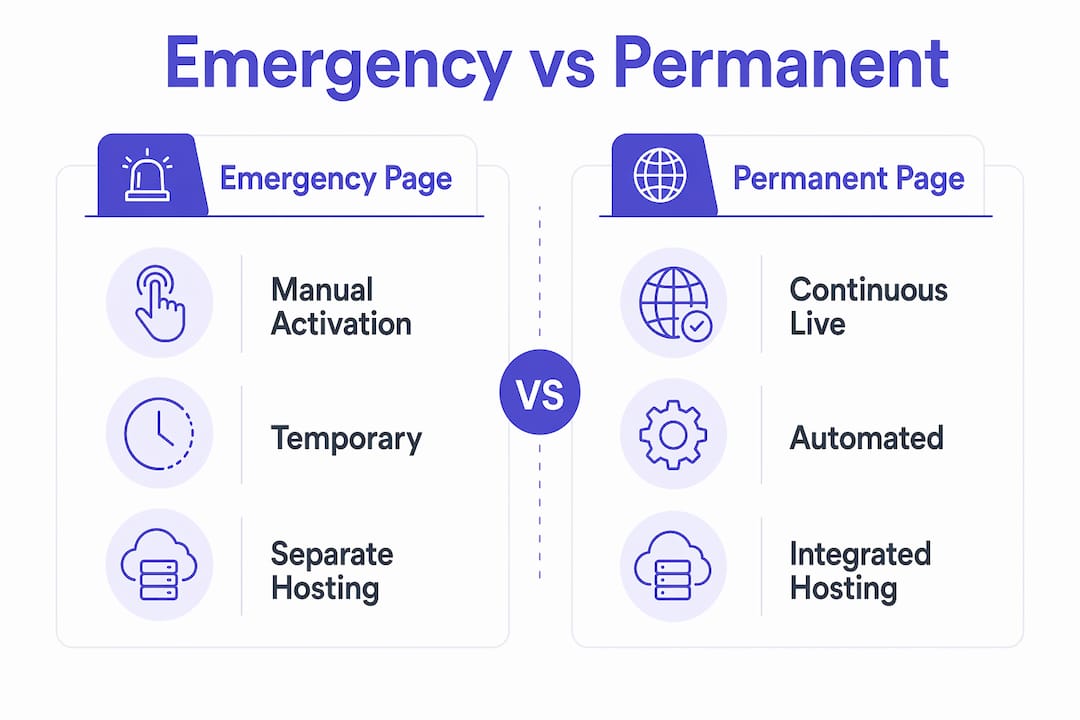
An emergency page is a temporary, manually activated tool. You turn it on when something goes wrong and take it down when the situation resolves. It has no automation, no incident history, and no subscriber notification system. Its entire value is speed and simplicity. Emergency status pages are designed for immediate activation with simple messages, not elaborate designs or branding.
A permanent status page runs continuously, 24 hours a day, 7 days a week. It includes automated monitoring integrations, a full incident history log, subscriber email or SMS notifications, and custom domain support. It is the right tool for SaaS companies, e-commerce platforms, and any business where uptime is a core product promise.
| Feature | Emergency page | Permanent status page |
|---|---|---|
| Activation | Manual, on demand | Always live |
| Setup time | Under 60 seconds | Hours to days |
| Incident history | None | Full log |
| Subscriber notifications | None | Automated |
| Hosting | Separate infrastructure | Dedicated infrastructure |
| Best for | Crisis communication | Ongoing transparency |
| Design complexity | Minimal | Fully branded |
The hosting rule applies to both types. Separate hosting infrastructure is non-negotiable for either page. If your emergency page lives on the same server as your main application, it will go offline the moment your main application does. That is the single most common and most damaging mistake website owners make.
Best practices for creating and maintaining an emergency services page
Preparation is the entire game with emergency pages. The following steps give you a reliable process to follow before, during, and after an incident.
-
Pre-draft your message templates. Write three versions: a service outage message, a natural disaster message, and a security incident message. Save them somewhere accessible outside your main CMS. Pre-drafting outage copy cuts activation time and keeps messaging clear under pressure.
-
Host the page on separate infrastructure. Use a third-party hosting provider, a CDN, or a static file host that operates independently from your main site. This is the single step most website owners skip, and it is the one that matters most.
-
Keep language simple and updates frequent. Post an update every 30 minutes during an active incident, even if the update is just “We are still working on this.” Silence reads as incompetence.
-
Integrate with automated alert systems where possible. The FCC’s Wireless Emergency Alerts system has been used nearly 96,000 times since 2012 to broadcast geographically targeted safety information. Understanding how these systems work helps you align your page’s messaging with official alerts your users are already receiving.
-
Use a short, memorable URL. Something like yourdomain.com/emergency or status.yourdomain.com. Avoid long slugs with dates or IDs that users cannot remember or type quickly.
-
Test the page before you need it. Activate it in a staging environment. Check load time, mobile layout, and link functionality. A broken emergency page is worse than no page at all.
Pro Tip: Avoid overbranding your emergency page. Heavy logos, brand colors, and navigation menus slow load time and distract users. Strip the page down to the minimum. Name, status, contacts, and next steps.
Check your website redesign checklist to confirm your emergency page is part of your site architecture from the start, not an afterthought added after a crisis exposes the gap.
Why is an emergency services page important for user experience and trust?
An emergency services webpage is the “single source of truth” during an incident. That phrase has a specific meaning: when users have one verified place to check, they stop spreading unverified information across social media and messaging apps. That single page controls the narrative.
Transparency and speed of updates on emergency pages are the two factors that most directly preserve public trust. Users forgive outages. They do not forgive silence. A business that communicates clearly during a crisis consistently comes out of it with stronger customer relationships than it had before.
The UX benefits extend beyond the crisis itself:
- Reduced support volume. When users can self-serve accurate information, they stop flooding your inbox and phone lines.
- Preserved brand perception. A clear, calm emergency page signals organizational competence. It tells users you planned for this.
- SEO protection. A well-structured emergency page with a stable URL can rank for crisis-related searches and direct users away from misinformation.
- Post-incident recovery. After the crisis passes, the page transitions to include recovery timelines and next steps. Post-emergency pages that include recovery and funding information extend the trust benefit well beyond the incident itself.
Understanding the importance of emergency services as part of your overall web presence is not a niche concern. It belongs in the same conversation as your contact page, your about page, and your service pages.
Key Takeaways
An emergency services page is the fastest way to maintain user trust and safety communication when your primary systems fail, and separate hosting is the one technical requirement that makes or breaks its effectiveness.
| Point | Details |
|---|---|
| Separate hosting is non-negotiable | Host your emergency page on independent infrastructure so it stays live when your main site goes down. |
| Pre-draft templates before incidents | Write your outage and crisis messages in advance so you can publish in under 60 seconds. |
| Simplicity outperforms branding | Strip the page to name, status, contacts, and next steps. Heavy design slows load time and confuses users. |
| Frequent updates preserve trust | Post a status update every 30 minutes during an active incident, even if nothing has changed. |
| Emergency pages differ from status pages | Emergency pages are manual and temporary. Permanent status pages run continuously with automation and incident history. |
The oversight that costs businesses the most
Every website owner I have worked with who skipped the emergency page conversation told me the same thing afterward: “I didn’t think we’d need it.” That is the wrong frame. You do not build a fire extinguisher because you expect a fire. You build it because the cost of not having one is catastrophic.
The hosting mistake is the one I see most often. A business spends real time building a clean, clear emergency page, then hosts it on the same server as their main site. The moment the main site goes down, the emergency page goes with it. The entire preparation effort is wasted. Separate hosting is not a technical nicety. It is the foundation the page is built on.
The second mistake is treating the emergency page as a branding exercise. I have reviewed pages loaded with navigation menus, hero images, and brand color palettes. None of that helps a user who needs a phone number in 10 seconds. The best emergency pages look almost boring. Plain background, large text, one or two contact numbers, and a timestamp on the last update. That is it.
The third mistake is waiting until an incident to write the copy. Under pressure, people write vague, passive, and confusing messages. Pre-drafted templates eliminate that problem entirely. Write them now, save them outside your CMS, and review them once a year.
Emergency pages also have a long-term relationship benefit that most digital marketers overlook. Customers who see a business communicate clearly during a crisis become more loyal, not less. The page you build today is an investment in the trust you will need tomorrow.
— Max
Cosmicdigitalstudios builds websites that hold up when it counts
A well-built website does not just convert visitors on a good day. It communicates clearly on a bad one. Cosmicdigitalstudios designs fast, modern websites with the structure and reliability your business needs, including emergency communication pages built to 2026 UX standards.

If your current site has no emergency page, no separate hosting plan, and no pre-drafted crisis templates, that is a gap worth closing now. Cosmicdigitalstudios builds custom websites that include the pages your business actually needs, designed for clarity, speed, and user trust from day one. Whether you need a full site build or a focused addition to your existing web presence, the work is tailored to your goals.
FAQ
What is an emergency services page on a website?
An emergency services page is a dedicated webpage that provides real-time safety information, critical contact numbers, and clear instructions during a crisis. It acts as the primary communication channel when normal site functions are disrupted.
How is an emergency page different from a regular contact page?
A contact page is permanent and general. An emergency page is activated during a specific incident and contains real-time status updates, tiered alert levels, and direct emergency contacts like 911.
Why should an emergency page be hosted separately?
If your emergency page shares infrastructure with your main site, it goes offline the moment your main site does. Separate hosting keeps the page live exactly when users need it most.
What content should an emergency services webpage include?
Every emergency services webpage should include critical contact numbers, a plain-language status update with a timestamp, tiered alert levels, and a short shareable URL. Mobile-friendly design is required.
How do I create an emergency page quickly during an outage?
Pre-draft your message templates before any incident occurs. Store them outside your main CMS. With templates ready, you can publish an emergency page in under 60 seconds without writing under pressure.