
Yes — if your goal is to attract paying clients, invest in professional website design and branding. A site that looks polished but sends mixed signals about who you serve and what you offer will cost you leads every single day. When branding and design work together, your site builds trust fast, guides visitors toward a clear action, and converts attention into booked calls.
Who should hire a pro now vs. DIY first:
- Hire a pro now if you’re a coach, consultant, or local service business actively selling and losing leads to a weak or outdated site.
- DIY first if you’re pre-revenue, still validating your offer, or working with a budget under $1,000.
- Immediate next step for everyone: audit your current site for messaging clarity and mobile performance before spending a dollar on redesign.
Table of Contents
- Why your branding and website design must work together
- Core brand elements that directly shape your website
- What a brand-led website actually delivers
- How to prepare your brand before hiring a designer
- What you should expect: responsive design, speed, and accessibility
- What does professional branding and website design actually cost?
- How to choose and hire a branding and web design partner
- What brand-led website changes look like in practice
- How Cosmicdigitalstudios approaches branding and website design
- Key Takeaways
- When hiring a professional designer is the right move
- Cosmicdigitalstudios builds sites that get you clients
- Further reading and authoritative sources
Why your branding and website design must work together
For most buyers, your website is the first and only brand experience they get before deciding whether to contact you. Branding and website design are not two separate projects. Branding defines the visual language, tone, and promise; the website is where those signals become interactive. When they’re misaligned, visitors feel the friction even if they can’t name it.
Brand signals directly shape every design decision on a page. Your color palette sets the emotional tone above the fold. Your typography communicates whether you’re premium or approachable. Your messaging hierarchy determines which headline a visitor reads first and whether they scroll at all. A designer working without a clear brand foundation is essentially guessing at all three.
The business case is straightforward. A well-designed website functions as a marketing and communication tool that builds trust and generates leads when paired with clear messaging and strong UX. Without brand alignment, even a technically clean site can underperform because the visual identity, copy, and calls to action pull in different directions.
Risks of a misaligned brand and site:
- Visitors can’t quickly identify who you serve or what you do.
- Inconsistent colors and fonts signal low professionalism, reducing trust.
- Competing CTAs or unclear messaging increases bounce rates.
- Your pricing power drops when the site doesn’t match the premium you charge.
Core brand elements that directly shape your website
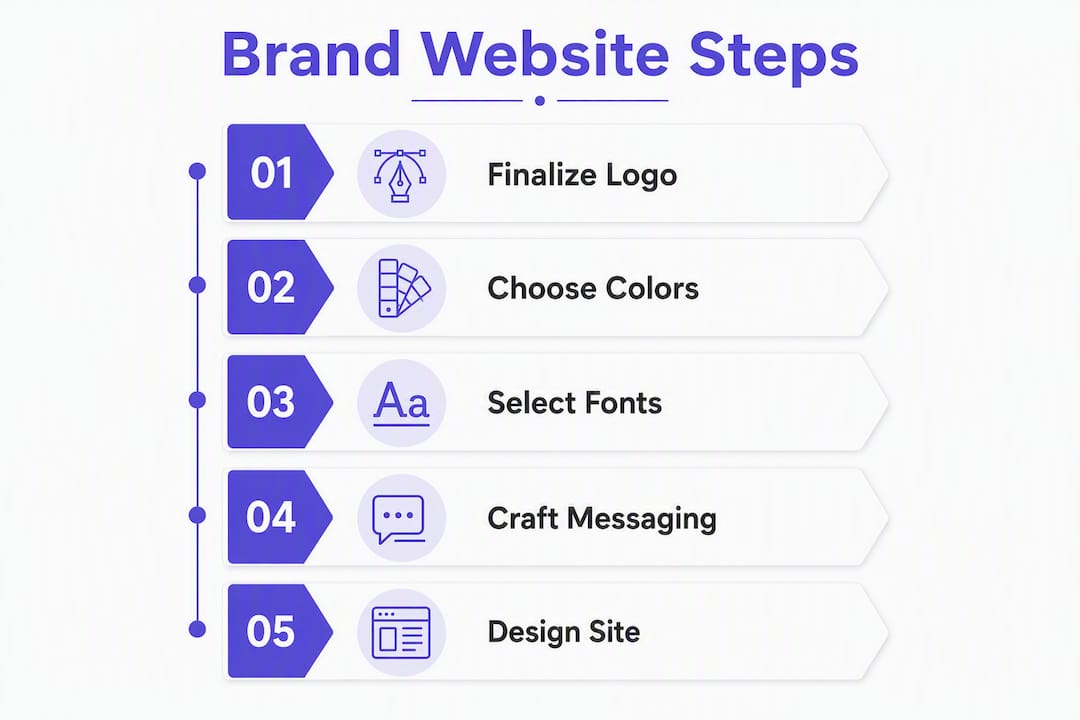
Every design decision on your site traces back to a brand decision made earlier. Get these assets locked in before a single wireframe is drawn.
- Audience definition. Knowing exactly who you serve determines page layout, reading level, and which pain points lead every headline. Without it, copy becomes generic and conversion suffers.
- Brand promise and voice. Your tone (formal, conversational, bold) sets the copy style across every page, from hero headlines to button labels. Messaging clarity drives conversions more reliably than visual polish alone.
- Logo files. You need SVG and high-resolution PNG versions. A low-resolution logo forces a designer to work around a constraint that affects every header and favicon.
- Color palette. Primary, secondary, and accent hex codes must be finalized before UI design begins. Color choices affect both emotional response and accessibility compliance. Colors must meet WCAG 2.1 contrast ratios (4.5:1 for body text) to be usable for all visitors.
- Typography. A type scale (heading sizes, body size, line height) keeps pages readable and on-brand. Font licenses matter too — using a paid typeface without a web license creates legal and performance issues.
- Imagery and photography. Custom photography outperforms stock every time for service businesses. Your image style (bright and airy vs. dark and editorial) should be decided before the designer builds the hero section.
- Iconography and UI patterns. Consistent icon sets and button styles reduce cognitive load and reinforce brand recognition across pages.
- Messaging hierarchy. The order in which you present your offer, proof, and CTA is a brand decision as much as a design one. Nail this before the layout is built. For service-based businesses, consulting website navigation structure can make or break lead flow.
Pro Tip: For an MVP launch, finalize your logo, color palette, one hero font, and your core messaging before engaging a designer. Photography and iconography can be refined post-launch without rebuilding the site.
For service businesses, salon branding offers a useful model: the visual identity, voice, and client promise must be consistent from the first touchpoint to the booking confirmation. The same principle applies whether you run a coaching practice or a local plumbing company.
What a brand-led website actually delivers
The headline benefits are trust, higher conversion rates, and a cleaner funnel. But those outcomes trace back to specific design decisions, not just aesthetics.

Visitors decide within seconds whether a site feels credible. A consistent visual identity, clear headline, and professional layout signal that the business is established and worth contacting. That perception directly reduces bounce rates. When visitors stay longer, they consume more proof (case studies, testimonials, service details) and arrive at the CTA with higher intent.
Three outcomes worth noting for small-business owners:
Client attraction. A site built around a specific audience and offer attracts the right visitors and filters out poor-fit inquiries. You spend less time on discovery calls that go nowhere.
Price integrity. A premium visual identity supports premium pricing. When your site looks like a $500 template, it’s harder to charge $5,000 for a service. The design signals the value before the prospect reads a single word of copy.
Repeatable funnel flows. A conversion-optimized site creates a predictable path from landing to lead. You can measure where visitors drop off, run A/B tests on headlines or CTAs, and improve performance over time. That’s how a website becomes a lead generation asset rather than a digital brochure.
How to prepare your brand before hiring a designer
The most expensive part of any web project is rework caused by unclear direction. Showing up to a kickoff call with your assets organized cuts project time and cost significantly.
Step-by-step prep checklist:
- Define your target client and primary offer. Write one sentence describing who you serve, what you do for them, and the result they get. This becomes the foundation for every headline.
- Identify your primary conversion action. Is it a booked call, a form submission, a purchase, or a download? Every page should point toward one action.
- Audit your current site. Note what’s working (pages with traffic or leads) and what’s broken (slow load times, unclear CTAs, missing mobile optimization). A website redesign guide can help you structure this audit.
- Gather all brand files. Collect logo files (SVG and PNG), color hex codes, font files and licenses, and any existing brand guidelines.
- Document your tone and messaging. Write down three to five words that describe your brand voice. Pull two or three examples of copy you like (from your own site or others) and two or three you want to avoid.
- List must-have pages and features. Homepage, services, about, contact, and booking are standard. Add anything specific: a portfolio, a blog, a client portal, or e-commerce.
- Gather testimonials and photos. Collect written testimonials (with permission to use names and photos), headshots, and any project or product photography you have.
Asset inventory checklist:
- Logo files: SVG (scalable), PNG with transparent background, favicon version
- Color palette: hex codes for primary, secondary, accent, and neutral tones
- Typography: font names, weights, and web license confirmation
- Hero images and supporting photography (minimum 1920px wide for web)
- Legal copy: privacy policy, terms of service, disclaimers
- Analytics access: Google Analytics or equivalent, Google Search Console
- CMS credentials if migrating an existing site
On content: write your homepage headline, your core offer description, and your bio before the project starts. For supporting pages (blog posts, detailed service descriptions), a good agency can help you structure and refine the copy. Don’t let missing content become the reason a launch gets delayed by weeks.
What you should expect: responsive design, speed, and accessibility
Responsive, fast, and accessible are not premium add-ons. They are the baseline for any professional web build in 2026. If a proposal doesn’t address all three, ask why before signing.

Responsive web design is the industry standard approach using fluid grids, flexible images, and media queries to make sites usable across devices. The core principle, articulated by Ethan Marcotte in A List Apart, is designing for flexibility and content-first layouts rather than building separate desktop and mobile versions. A site that simply shrinks a desktop layout onto a phone screen is not responsive; it’s a compromise that frustrates users and hurts search rankings.
Modern builds use CSS Grid and Flexbox alongside responsive image techniques like srcset and sizes to reduce bandwidth waste and improve Core Web Vitals. Those vitals (Largest Contentful Paint, Cumulative Layout Shift, Interaction to Next Paint) are Google ranking signals, so performance is directly tied to SEO.
Performance priorities to confirm with your developer:
- Images served in WebP or AVIF format, sized for each breakpoint
- Hosting on a CDN (Cloudflare, AWS CloudFront, or equivalent) for fast global delivery
- Minimal render-blocking scripts; deferred JavaScript loading
- Core Web Vitals targets: LCP under 2.5 seconds, CLS under 0.1
Accessibility essentials to require:
- Color contrast ratios meeting WCAG 2.1 AA (4.5:1 for body text, 3:1 for large text)
- Full keyboard navigation support
- Semantic HTML (proper heading hierarchy, labeled form fields, alt text on all images)
- Screen-reader-compatible navigation and skip links
Accessibility isn’t just a compliance issue. It expands your audience and reduces legal risk. In the United States, ADA-related web accessibility lawsuits have increased steadily, and courts have applied Title III of the ADA to commercial websites.
What does professional branding and website design actually cost?
Ballpark ranges for small-business projects: a template-based site runs $1,000–$5,000; a freelance or basic custom build lands in the $3,500–$15,000 range; a full brand identity plus custom site can reach mid-five figures depending on scope. Timelines scale with complexity, from two weeks for a simple landing page to three months for a full brand-plus-build project.
| Project tier | Typical cost range | Typical timeline |
|---|---|---|
| DIY / template site | $1,000–$5,000 | 1–3 weeks |
| Freelance / basic custom site | $3,500–$15,000 | 4–8 weeks |
| Full brand + custom site | mid-five figures | two weeks to three months |
Ranges sourced from startup branding pricing data; actual costs vary by market, scope, and provider.
Primary cost drivers:
- Scope: number of pages, custom features, and integrations
- Custom design vs. theme customization
- E-commerce functionality (product catalog, checkout, payment processing)
- Copywriting: whether you provide final copy or the agency writes it
- Photography: custom shoots vs. stock
- Third-party integrations: CRM, booking software, email marketing, chat widgets
- Content readiness: disorganized assets add billable hours
Ongoing costs to budget for:
- Hosting: $20–$200/month depending on traffic and platform
- Domain renewal: $10–$20/year
- Maintenance and security updates: $100–$500/month for managed plans
- Marketing support: email campaigns, paid ads, and funnel optimization are typically separate from the build fee
How to choose and hire a branding and web design partner
Hire for the full capability stack: brand strategy, UX, visual design, front-end development, and conversion focus. A designer who can’t speak to funnel performance, and a developer who ignores brand consistency, will both leave money on the table.
Interview checklist (request these before shortlisting):
- Portfolio with at least two to three projects in your industry or a closely adjacent one
- Case studies that include outcomes (leads generated, conversion rate changes, traffic growth) not just screenshots
- Tech stack disclosure: what CMS, frameworks, and hosting they build on and why
- A written project timeline with milestones and client deliverable dates
- References from past clients willing to speak on process and communication
Key questions to ask during proposals:
- “Walk me through your brand discovery process. What do you need from me before design starts?”
- “How do you measure success after launch? What metrics do you track?”
- “How many revision rounds are included, and what’s your process for scope changes?”
- “Who handles the project day-to-day — a senior designer or a junior team member?”
- “What does post-launch support look like, and is it included or billed separately?”
Red flags to watch for:
- No defined process or discovery phase before design begins
- Case studies with no performance metrics, only visual samples
- Opaque or all-inclusive pricing with no line-item breakdown
- No mention of post-launch support, maintenance, or handoff documentation
- Pressure to decide quickly or sign before seeing a proposal
Quick scoring rubric for shortlisting:
Score each candidate 1–5 on: portfolio relevance, process clarity, conversion focus, communication quality, and price-to-value fit. Any candidate scoring below 3 on process clarity or conversion focus is a risk regardless of price.
What brand-led website changes look like in practice
The highest-impact changes are almost always about messaging clarity and CTA prioritization, not visual redesigns. Cleaner copy, a single focused CTA, and a streamlined booking flow consistently outperform elaborate visual overhauls.
The pattern that drives results: When a service business replaces a vague homepage headline (“Welcome to [Business Name]”) with a specific outcome-focused one (“We help [audience] achieve [result] in [timeframe]”), visitor engagement increases and bounce rates drop. The design didn’t change. The message did.
Mini-case: local service business (before/after)
- Before: Homepage with five competing CTAs, generic “About Us” hero, no social proof above the fold.
- After: Single headline naming the service and city, one “Book a Free Estimate” CTA, three client testimonials in the first scroll.
- Expected outcome: More qualified calls, fewer “just browsing” inquiries, clearer pricing conversations.
Mini-case: independent coach (before/after)
- Before: Long homepage with a bio at the top, services buried below the fold, no booking link until the contact page.
- After: Outcome-led headline above the fold, three-step process section, booking widget embedded on the homepage.
- Expected outcome: Shorter path to conversion, higher percentage of visitors who book a discovery call.
For coaches and consultants, a high-converting coaching landing page follows a predictable structure: clear offer, social proof, and a single CTA. The brand identity makes that structure feel credible and premium.
How Cosmicdigitalstudios approaches branding and website design
Cosmicdigitalstudios builds custom websites, landing pages, and conversion funnels with one goal: turn attention into booked calls, leads, and sales. Every project starts with brand strategy and ends with a measurable, conversion-optimized site.
The studio’s process:
- Discovery and brand strategy: Audience definition, offer clarity, competitive positioning, and messaging framework.
- Messaging: Core headlines, value proposition, and page-by-page copy direction.
- Visual system: Color palette, typography, imagery direction, and UI component library.
- Design: Wireframes and high-fidelity mockups reviewed and approved before development begins.
- Build: Custom development on a modern, responsive stack with Core Web Vitals performance targets built in.
- QA and testing: Cross-device and cross-browser testing, accessibility checks, and load performance review.
- Launch: DNS migration, analytics setup (Google Analytics, Google Search Console), and conversion tracking.
- Measurement: Post-launch review of funnel behavior, A/B testing setup, and optimization recommendations.
What you get in deliverables: a custom homepage, service or landing pages, a lead magnet or booking flow, analytics configuration, and a documented handoff so you can manage the site after launch.
The studio works with coaches, consultants, and local service businesses. If you’re ready to see examples, the portfolio and services overview is the right starting point.
Key Takeaways
Professional website design and branding work together to build trust, attract the right clients, and create a repeatable conversion funnel — and the investment pays off fastest when you arrive with clear messaging and organized assets.
| Point | Details |
|---|---|
| Branding drives design decisions | Lock in your logo, color palette, typography, and messaging before design starts to avoid costly rework. |
| Responsive and accessible are baseline | Every professional build must use fluid grids, media queries, and WCAG 2.1 contrast standards. |
| Cost scales with scope | Template sites run $1,000–$5,000; full brand plus custom site projects typically reach mid-five figures. |
| Hire for the full stack | Evaluate candidates on brand strategy, UX, conversion focus, and post-launch support, not just visual portfolio. |
| Cosmicdigitalstudios | Builds custom websites, landing pages, and funnels for coaches, consultants, and local service businesses focused on booked calls and leads. |
When hiring a professional designer is the right move
Most small-business owners underestimate how much a weak site costs them compared to how much a good one costs to build. The math is simple: if your site generates zero qualified leads per month and a professional build generates five, the project pays for itself in the first quarter for almost any service business charging more than a few hundred dollars per client.
Where I’d push back on conventional wisdom: the decision to hire isn’t really about budget. It’s about complexity and stakes. If your offer is clear, your audience is defined, and you need a single landing page to test a new service, a well-structured DIY build on a modern platform can work. But the moment you’re running a multi-service business, building a funnel with email sequences and booking integrations, or trying to position yourself at a premium price point, a professional designer pays for the project in avoided mistakes alone.
The other thing most guides don’t say: the biggest risk in hiring isn’t overpaying. It’s hiring someone who can design but can’t think about conversion. A beautiful site that doesn’t guide visitors toward a clear action is an expensive brochure. The right partner asks about your funnel before they ask about your color preferences.
Cosmicdigitalstudios builds sites that get you clients
If you’re a coach, consultant, or local service business and your current site isn’t generating consistent leads, the problem is almost never the platform. It’s the combination of unclear messaging, weak visual identity, and a funnel that doesn’t guide visitors anywhere specific.

Cosmicdigitalstudios builds custom websites and conversion funnels tailored to your brand and offer. Every project includes a brand strategy session, custom design, responsive development, and analytics setup. No generic templates. No junior handoffs. A discovery call covers your goals, current site gaps, and a ballpark estimate for the scope you actually need.
The studio is the right fit if you’re serious about using your site as a sales tool, not just a digital business card. Book a discovery call to see examples and get a clear picture of what a custom build would look like for your business.
Further reading and authoritative sources
These are the primary sources used as evidence throughout this article. Each one is worth bookmarking if you want to go deeper on a specific topic.
- Responsive web design — MDN Web Docs — The definitive technical reference for responsive design principles, fluid grids, and media queries.
- Responsive web design — A List Apart — Ethan Marcotte’s original essay establishing the content-first, flexible-layout philosophy behind modern responsive design.
- Responsive web design basics — web.dev — Google’s practical guide to mobile-first CSS, Flexbox, Grid, and responsive image techniques.
- Responsive web design — Wikipedia — A useful overview of the history, techniques, and terminology of responsive layouts.
- How branding and website design work together — Design In DC — A clear explanation of how brand decisions translate into specific website design choices.
- Startup branding cost guide — Metabrand — Pricing benchmarks for branding and website projects, from template builds to full custom brand identities.
- Web development services — Netguru — Context on how professional web development functions as a marketing and lead-generation asset.
- What does salon branding mean for your business? — Growth Reach Marketing — A practical look at how brand consistency drives client trust and business growth for service businesses.