
Urgency is the single most underrated conversion driver on a local service area page. When a homeowner’s pipe bursts at 10 PM or an HVAC unit dies on a 95-degree afternoon, they are not browsing. They are deciding. The role of urgency in a local service page is to meet that decision-making moment head-on, signal that you are ready right now, and give the visitor every reason to call you instead of scrolling to the next result. First responders win the customer most of the time regardless of price or review count. That single figure should reshape how you think about every word on your service pages.
The gap between knowing urgency matters and actually building it into your pages is where most local businesses lose. Contacting a lead within 5 minutes makes your business 100 times more likely to qualify the lead than contacting within 30 minutes. Yet the median response time across service businesses is often measured in multiple hours, not minutes. Your page is the first signal you send. If it communicates speed, availability, and confidence, you win the call before your competitor even sees the notification.
Here is what urgency does for your local service pages when you get it right:
- Reduces bounce rate by giving high-intent visitors an immediate reason to stay and act
- Increases dwell time through specific, decision-ready content that answers urgent questions
- Improves local SEO signals by matching emergency and same-day search intent
- Filters leads by setting clear expectations, so callers are already pre-qualified
- Builds trust faster than generic service copy by communicating real availability and response windows
What are local service area pages and why do they matter for local SEO?
Local service area pages are dedicated web pages built around a specific service and a specific geographic area. A plumber serving three counties does not get maximum SEO value from one generic “plumbing services” page. Each city, neighborhood, or service zone deserves its own page that tells both search engines and potential customers exactly where you work and what you do there.
These pages are distinct from location pages, which typically describe a physical office or storefront. A neighborhood service page targets customers in a specific area even when you have no physical presence there. Google’s local algorithm rewards geographic relevance, and a well-structured service area page signals that relevance clearly.
The SEO benefits are direct and measurable:
- Geographically targeted traffic: Pages optimized for “emergency electrician in Naperville” attract visitors who are already in your service area and ready to act.
- Improved Google Business Profile alignment: Service area pages reinforce the cities and zip codes listed in your Google Business Profile, strengthening local pack rankings.
- Higher conversion intent: Visitors landing on a city-specific page convert at a higher rate than those landing on a generic homepage because the content matches their search exactly.
- Topical authority: A cluster of well-built service area pages signals to Google that you are a credible, specialized provider in your market.
- Reduced competition: Hyper-local pages often face less competition than broad service terms, making it easier to rank and capture traffic.
Clear service area communication also builds trust with visitors. When someone in a specific zip code sees their neighborhood mentioned alongside your response time and credentials, they feel confident they are not wasting a call on a provider who does not serve their area.
Pro Tip: Align the opening sentence of every service area page with the exact search phrase your customer would type in a panic. If they search “same-day AC repair in Mesa,” your page should open with those words in context, not with a company history paragraph.
Key elements every optimized local service page needs
A local service page that ranks and converts does one job: it gives a buyer enough information to stop searching and call you. That means every element on the page must answer a question the visitor is actually asking, not fill space with marketing copy.
Content that drives decisions
Your service description needs to be specific. Name the exact problems you solve, the neighborhoods you cover, and the outcomes customers can expect. Vague copy like “we provide quality plumbing services” answers nothing. “We repair burst pipes, sewer backups, and water heater failures across the north suburbs, with same-day availability on weekdays” answers everything a buyer needs to move forward.

Pricing transparency is one of the most overlooked trust signals on local service pages. You do not need to publish a flat rate. A range like “$350–$900 for drain line clearing depending on access and severity” filters bad-fit leads and positions you as honest before the first call. Buyers are already running this math in their heads. Help them do it on your page.
Trust signals that convert
- Reviews with location specifics: A testimonial that says “fixed our burst pipe in Wicker Park the same afternoon” outperforms five generic five-star ratings.
- Licenses and certifications: Display your contractor license number, insurance carrier, and any relevant certifications prominently. Buyers in urgent situations need to trust fast.
- Real project photos: Before-and-after images from actual jobs in the service area reinforce both credibility and geographic relevance.
- Response time commitment: State your actual response window in plain language. “We respond to all inquiries within 90 minutes during business hours” is a trust signal. “Contact us today” is not.
Technical and UX factors
Fast-loading pages are not optional for local service businesses. A visitor dealing with a flooded basement will not wait three seconds for your page to load. Google’s Core Web Vitals directly influence local rankings, and a slow page signals poor quality to both the algorithm and the visitor. Mobile optimization is equally non-negotiable since most urgent local searches happen on a phone.

Pro Tip: Structure your service page as a buyer decision tool, not a company brochure. Every section should answer one of these questions: What do you fix? Where do you work? How fast do you show up? What does it cost? Why should I trust you? If a section does not answer one of those questions, cut it.
How urgency messaging lifts your SEO rankings and customer engagement
Urgency messaging on local service pages works through two parallel channels: it improves user behavior signals that feed Google’s ranking algorithm, and it directly increases the rate at which visitors convert to callers. Both effects compound over time.
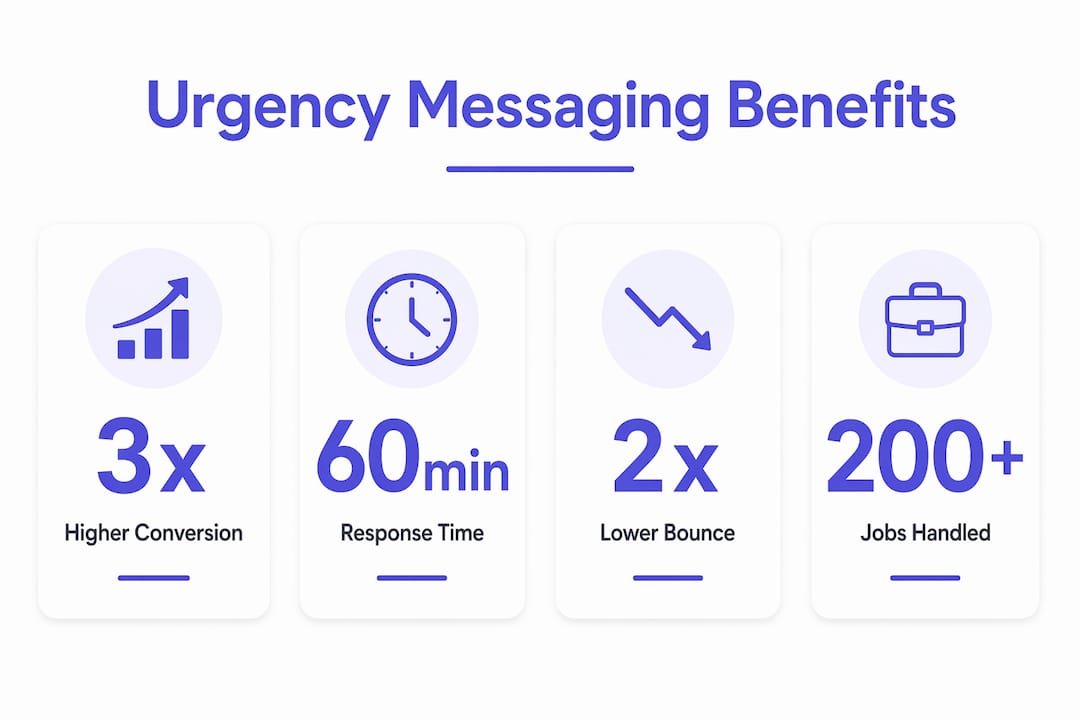
When a visitor lands on a page that immediately communicates “we respond within 60 minutes, available evenings and weekends,” they stay longer and engage more deeply. That dwell time and reduced bounce rate send positive signals to Google that your page satisfies the search intent. High-converting service pages act as buyer decision tools rather than brochures, matching urgency in messaging to buyer intent. Pages built this way consistently outperform generic service pages on both rankings and conversions.
The conversion math is stark. Faster response times yield 2–3x higher conversion rates, and once the response window closes, the lead is typically already booked elsewhere. Your page’s urgency messaging sets the expectation that you will respond fast. When you follow through, that expectation becomes a booking.
Emergency search terms like “same-day,” “urgent,” and “open now” carry higher conversion intent than general service queries. Targeting them honestly on your service pages, meaning only when you actually provide those services, attracts visitors who are already at the decision point. The key word is honestly. Misleading emergency claims damage trust and generate poor-fit calls that waste your team’s time.
Practical urgency integration techniques that work in 2026:
- Specific response windows: “90-minute response in [City], including weekends” beats “available 24/7” every time. Specificity is credibility.
- Emergency service indicators: A clearly labeled “Emergency Service” section with its own call-to-action button captures visitors in crisis mode before they scroll away.
- Seasonal and local event triggers: A roofing company in Florida can add a page section that activates during hurricane season. An HVAC company in Phoenix can reference summer heat waves. Tying urgency to real local conditions makes it feel authentic, not manufactured.
- Live availability signals: Even a simple “Accepting new jobs this week” badge communicates momentum and availability without overpromising.
- Permission to wait messaging: Tell visitors when their issue can safely wait. A plumber who explains “a slow drain is not an emergency, but here is when it becomes one” builds authority and filters calls to high-value jobs.
- Clear next steps for urgent vs. non-urgent needs: Separate call-to-action paths for “I need help now” and “I want to schedule” reduce friction for both visitor types.
Pro Tip: Responding to Google reviews quickly reinforces the same urgency signal your page communicates. A business that answers reviews within hours looks like a business that answers calls within hours.
Common mistakes that kill local service page performance
Most local service pages underperform not because of bad design but because of specific, fixable mistakes. These errors are especially damaging when you have invested in urgency messaging, because a credibility gap between your claims and your actual setup destroys trust faster than no urgency messaging at all.
-
Vague availability claims: Phrases like “available 24/7” or “fast response guaranteed” without specifics communicate nothing. Specify your response windows with exact times and days. “Available for emergency calls Monday through Saturday, 7 AM to 9 PM, with a 90-minute response window” is a claim a visitor can evaluate and trust.
-
Misleading emergency claims: If you do not actually provide after-hours emergency service, do not imply that you do. Customers who call expecting emergency availability and reach a voicemail will leave a negative review. Targeting emergency search terms only works when your actual service matches the claim.
-
Missing or buried contact information: A visitor in crisis should never have to scroll to find your phone number. Your primary call-to-action, including a clickable phone number, belongs above the fold on every service page.
-
Outdated service area information: If you have expanded or contracted your coverage area, your pages need to reflect that immediately. A visitor who calls and learns you do not serve their zip code is a lost lead and a potential negative review.
-
Ignoring mobile experience: Most urgent local searches happen on a phone. A page that loads slowly, has tiny tap targets, or buries the call button below a wall of text will lose the visitor before they ever read your urgency messaging. Check every service page on a mobile device before publishing.
-
Slow follow-up despite urgency claims: Your page can promise a fast response, but if your actual intake process takes hours, the promise backfires. Less than 8% of service businesses respond to fresh leads within 5 minutes, and the median lead response time is 47 hours—with worst cases stretching to over seven days. If your page signals urgency but your team responds in 47 hours, you are creating a trust problem, not solving one.
-
Generic filler content: Paragraphs that describe your company’s “commitment to excellence” or “customer-first philosophy” without specifics waste the visitor’s time and dilute your page’s SEO relevance. Every sentence should answer a question a buyer is actually asking.
How to measure whether urgency is actually working on your service pages
Knowing your urgency messaging is live is not the same as knowing it works. You need specific metrics to confirm that your pages are driving faster decisions and more qualified calls.
Metrics that tell the real story
Bounce rate by page: A service area page with strong urgency messaging should see a lower bounce rate than your generic pages. If visitors are leaving immediately, the messaging is not matching their intent or the page is loading too slowly to hold them.
Time on page: Urgency-focused pages that function as buyer decision tools tend to generate longer sessions because visitors are reading through response times, pricing ranges, and trust signals before calling. A short session on a long page usually means the visitor did not find what they needed.
Call tracking by source: Tools like CallRail let you assign unique phone numbers to individual pages. This tells you exactly which service area pages are generating calls and at what volume. If a page gets traffic but no calls, the urgency messaging or call-to-action is not converting.
Lead response time vs. close rate: Track how quickly your team responds to form submissions and calls from each page, then correlate that with your close rate. The speed-to-lead research is consistent: faster responses close more jobs. If your close rate is low despite good traffic, response time is usually the culprit.
Conversion rate by urgency element: Run A/B tests on specific urgency elements. Test a page with a specific response window (“90-minute response”) against one with a generic claim (“fast response”). Test a page with a visible emergency call-to-action against one without. Google Optimize and similar tools make this straightforward for most service business websites.
What good looks like
A well-optimized local service page with authentic urgency messaging should generate a call-to-visit ratio that improves month over month as you refine the content. The service pages that matter for rankings in 2026 are the ones that convert traffic into booked jobs, not just impressions. Track the full funnel from search impression to booked appointment, and you will know exactly where urgency is working and where it needs adjustment.
How to balance urgency with authenticity so customers trust you
Urgency that feels manufactured pushes customers away. The goal is not to create artificial pressure. It is to accurately communicate the real time-sensitivity of your services and the real availability of your team.
The most effective urgency messaging mirrors what the customer is already feeling. A homeowner with a flooded basement does not need to be told the situation is urgent. They need to know you understand the situation and can help right now. Your page’s job is to confirm that you are the right call, not to manufacture a sense of crisis.
Authenticity comes from specificity. “We’ve handled over 200 emergency water damage jobs in the Chicago metro area” is more credible than “we’re your trusted local experts.” Real job photos, named neighborhoods in reviews, and a specific response window all signal that your urgency claims are grounded in actual operations.
Telling customers when they do not need emergency service is one of the most trust-building moves you can make. A page that explains “a slow-draining sink is not an emergency, but here is when it becomes one” positions you as an honest advisor. Buyers remember that kind of clarity when the real emergency arrives, and they call you first.
The local service website redesign checklist from Cosmicdigitalstudios covers this balance in detail: every urgency element should be tied to a real operational capability, not a marketing aspiration. If you promise a 60-minute response, you need the staffing and systems to deliver it every time.
How seasonal and local events can sharpen your urgency messaging
Urgency is not a static element you set once and forget. The most effective local service pages update their messaging to reflect real conditions in the market, and that means tying urgency to the events and seasons your customers actually experience.
A roofing company in the Gulf Coast should have a page section that activates during hurricane season, explaining exactly what storm damage services they provide, which areas they cover, and how quickly they can respond after a major weather event. That is not manufactured urgency. That is accurate, timely information for a customer who genuinely needs it.
HVAC companies in Phoenix can reference summer heat advisories directly on their service pages. Pest control companies in the Southeast can align messaging with termite swarm season. Landscaping companies in the Midwest can build urgency around spring cleanup windows before the growing season peaks. Each of these connects your availability to a real, time-bound customer need.
Local events create the same opportunity. A city hosting a major convention or sports event will see a spike in demand for certain services. Plumbers, electricians, and cleaning companies near event venues can build short-term urgency content around those windows. The essential website pages for a local service business include exactly this kind of timely, location-specific content.
Seasonal urgency messaging also gives you a reason to update your service pages regularly, which signals freshness to Google and keeps your content aligned with current search behavior. A page last updated in 2022 with no seasonal references looks stale next to a competitor whose page was updated last month with current local context.
Key Takeaways
Urgency on local service pages drives faster customer decisions and stronger local SEO performance when it is specific, authentic, and tied to real operational capabilities.
| Point | Details |
|---|---|
| First responders win most leads | First responders win the customer most of the time regardless of price or review count. |
| Specificity beats generic claims | Replace “available 24/7” with exact response windows and days to build real trust with visitors. |
| Urgency messaging improves SEO signals | Pages matching emergency search intent reduce bounce rate and increase dwell time, both positive ranking signals. |
| Misleading claims backfire | Targeting emergency search terms only works when your actual service delivery matches the promise. |
| Measure the full funnel | Track bounce rate, call volume by page, and lead response time together to confirm urgency is converting traffic to booked jobs. |
Your local service pages should work as hard as you do
If your service pages are not communicating urgency, availability, and trust within the first few seconds, you are losing high-intent customers to competitors whose only advantage is a clearer page. Cosmicdigitalstudios builds custom-designed local service websites that are fast, conversion-focused, and built to capture the visitor the moment they land. Every page we build is structured around buyer decision logic, not generic service copy.

Whether you need a full site build or a targeted redesign of your service area pages, we can help you turn your web presence into a lead generation system that works around the clock. Turn your visitors into clients with pages built for the way local customers actually decide.