
Most contractors assume they’re losing jobs to lower bids or bigger competitors. The real reason why contractor websites lose jobs is far less obvious and far more fixable. Slow response times, poor mobile experiences, and confusing site design are quietly costing you work every week. The good news: these are all problems you can solve without rebuilding your entire business. This guide breaks down each major failure point and tells you exactly what to do about it.
Table of Contents
- Key takeaways
- Why contractor websites lose jobs at the first contact point
- Mobile performance and what it costs you
- Common contractor website design mistakes
- How offline delays make web losses worse
- My honest take after years of working with contractors
- How Cosmicdigitalstudios helps contractors win more jobs online
- FAQ
Key takeaways
| Point | Details |
|---|---|
| Speed-to-lead is critical | Contractors who respond within 5 minutes are 21x more likely to win jobs than those who wait 30 minutes or more. |
| Mobile experience drives conversions | Sites with slow load times and buried contact info push urgent mobile searchers directly to competitors. |
| Form design kills lead capture | Long, complex forms cause visitors to abandon before submitting, reducing your contractor website conversion rates. |
| Operational delays compound losses | Offline process bottlenecks hurt your reputation and make job losses from poor web design even worse. |
| Design and messaging matter | Unclear calls to action, missing trust signals, and confusing navigation are common contractor website mistakes that silently reduce conversions. |
Why contractor websites lose jobs at the first contact point
The most damaging thing on your website is not bad design. It’s the gap between when someone submits a form and when you actually reply.
Contractors responding within 5 minutes are 21 times more likely to win the job compared to those who respond after 30 minutes. That is not a slight advantage. That is the difference between a booked job and a dead lead. What makes this more alarming is that the median first response time sits at 42 minutes, and 27% of inquiries never receive any response at all.
Think about what that means for your business. Someone searches for a contractor, lands on your site, fills out your contact form, and then hears nothing for over 40 minutes. By minute six, they have already called someone else.
Here is what drives this problem:
- No automated confirmation. Without an instant reply acknowledging receipt, leads assume their message went nowhere and move on.
- CRM tools left unused. 76% of CRM features go unused by small businesses, meaning most contractors have systems that could automate follow-up but never set them up.
- No dedicated intake process. When leads come in through different channels without a central system, things fall through the cracks fast.
Pro Tip: Set up an automated text or email reply that fires within 60 seconds of a form submission. It does not need to be complex. Something like “We got your message and will call you within 15 minutes” keeps the lead warm and signals professionalism immediately.
A marketing automation checklist for small businesses can help you build this kind of workflow without needing a technical background. The point is simple: a perfect website still loses jobs without prompt, consistent lead handling. Speed and follow-up matter as much as site quality.
Mobile performance and what it costs you
When someone searches for a contractor in an emergency, they are almost always on their phone. That single fact should shape every decision you make about your website.
The benchmark you need to hit is a Largest Contentful Paint (LCP) score under 2.5 seconds. Sites with LCP over 3 seconds lose urgent lead conversions at a measurably higher rate. Interaction delays matter too. An Interaction to Next Paint (INP) score above 200 milliseconds creates friction that makes your site feel unresponsive, and impatient mobile users leave fast.

Here is a direct comparison of how mobile performance affects lead outcomes:
| Site condition | User experience | Likely outcome |
|---|---|---|
| LCP under 2.5 seconds | Fast, snappy load | Visitor stays, contacts you |
| LCP 3 to 5 seconds | Noticeable delay | Many visitors bounce |
| Contact info buried | Requires scrolling or searching | Emergency searchers call competitors |
| Sticky “Get a Quote” button | Always visible on scroll | Higher contact rate and conversions |
Contractor sites lose jobs most sharply at moments of highest intent. When someone with a burst pipe or a roof leak cannot find a phone number within five seconds of landing on your site, you have lost that job. A sticky contact button visible on every page scroll is one of the simplest fixes available, and most contractor sites do not have one.
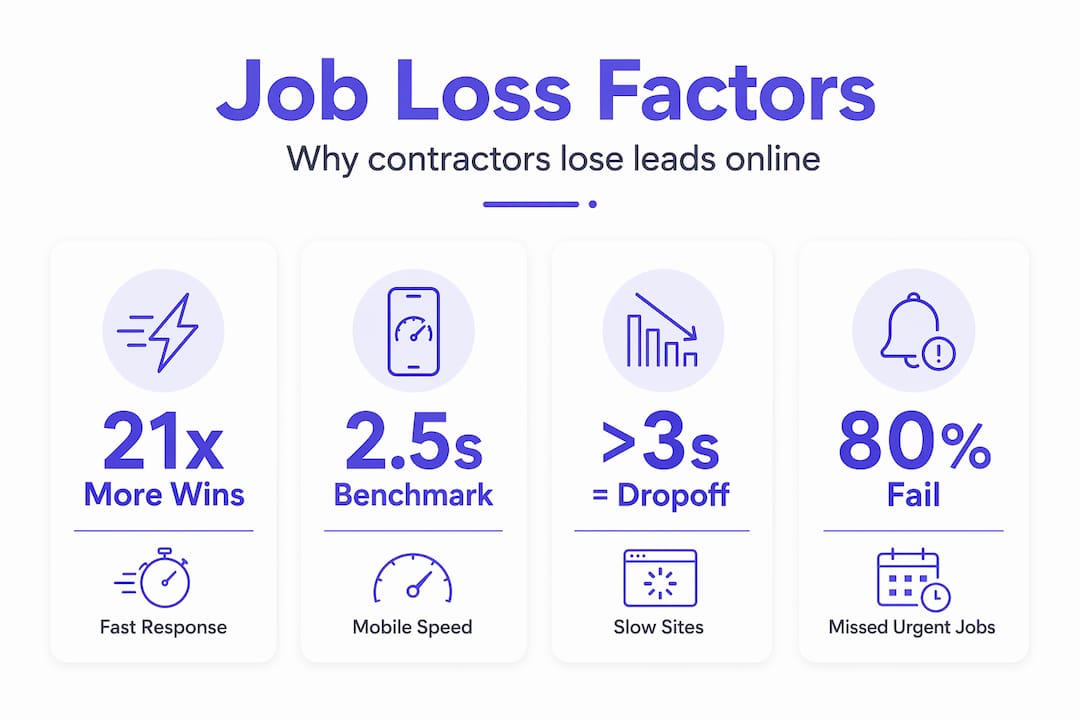
Understanding why this happens is covered well in Cosmicdigitalstudios’s breakdown of mobile site speed for small business owners. The short version: slow sites do not just frustrate users. They actively hand your leads to a faster competitor.
Pro Tip: Run your site through Google’s PageSpeed Insights today. Check the mobile score specifically. If your LCP is above 2.5 seconds or your mobile score is below 70, you have an urgent fix to make before spending another dollar on ads or SEO.
Common contractor website design mistakes
Speed and response time are the two biggest factors, but poor contractor website design creates a third layer of losses that compounds everything else.
Here are the design mistakes that show up most often on contractor sites:
- Overcomplicated contact forms. Form abandonment increases sharply when forms ask too many questions, lack real-time error validation, or use input fields that are hard to type in on mobile. Ask for a name, phone number, and a brief project description. That is enough to qualify a lead.
- No clear call to action. If a visitor lands on your homepage and cannot tell within three seconds what you want them to do next, they leave. “Get a Free Estimate” above the fold works better than a generic “Learn More” buried halfway down the page.
- Missing trust signals. No reviews, no licenses displayed, no photos of real work. Visitors make trust decisions in under ten seconds. Without proof of quality and legitimacy, uncertainty sends them elsewhere.
- Unclear service areas and service descriptions. If someone has to dig to figure out whether you serve their city or handle the specific job they need, you are creating doubt. Doubt kills conversions.
Tracking where visitors drop off inside your forms, not just whether they submitted or not, lets you pinpoint exactly which question is costing you leads. Most contractors never look at this data. Knowing which pages your website needs to include and how to structure them addresses many of these issues before they start.
How offline delays make web losses worse
Your website is only part of the picture. What happens after someone reaches out matters just as much as the initial contact.
Process problems on the operational side amplify every weak point on your site. A recent survey found that 94% of contractors say site access delays stem from process issues, and 39% say they actively avoid jobs at sites with frustrating access experiences. If your intake process after a web lead involves multiple back-and-forth emails, repeated documentation requests, or unclear scheduling steps, clients notice.
Here is how offline bottlenecks multiply your web-driven losses:
- Slow proposal turnaround. A fast web response that leads to a week-long wait for an estimate reverses the goodwill you created. Clients who were ready to hire you start shopping again.
- Unclear next steps after contact. If a lead does not know what to expect after reaching out, they disengage. A simple confirmation sequence describing your process keeps them committed.
- Compliance and paperwork delays. Repeated document requests or lengthy onboarding processes erode confidence in your professionalism, regardless of how good your website looks.
- No follow-up after no response. If someone does not reply to your first message, most contractors drop it. A single follow-up message sent 24 hours later recovers a meaningful percentage of warm leads that simply got busy.
When businesses pause their SEO efforts on top of these operational delays, organic traffic drops and competitors take over rankings within months. Every layer of inefficiency stacks on the others. The result is a website that technically works but consistently loses jobs because the surrounding system fails it.
My honest take after years of working with contractors
I’ve seen contractors spend thousands of dollars on paid ads, new logos, and complete redesigns, and still wonder why they are losing jobs online. In almost every case, the real problem was not the look of the site. It was the response system behind it.
I’ve worked on contractor websites where the design was genuinely solid and the traffic numbers were healthy. But the phone was not getting picked up, forms were sitting unread for hours, and mobile load times were quietly killing conversions before the visitor ever saw the work portfolio. Those contractors were not failing because of their prices. They were failing because their digital presence treated leads like low-priority tasks.
What I’ve learned is this: your website is not a brochure. It is the front desk of your business. When it is slow, confusing, or disconnected from a real intake system, every marketing dollar you spend gets wasted at that front desk.
The fix is rarely dramatic. Faster response automation, a cleaned-up mobile experience, shorter forms, and visible trust signals together move the needle faster than a complete redesign. But ignoring these issues while competing for jobs on price alone is a losing position. The contractors winning online right now are not necessarily the cheapest or the most experienced. They are the most responsive, and their sites make it effortless to contact them.
— Max
How Cosmicdigitalstudios helps contractors win more jobs online
If this article surfaced problems you recognize in your own site, you are not alone. Most contractor websites were built to look good, not to convert visitors into booked calls.

At Cosmicdigitalstudios, we build fast, mobile-optimized websites specifically designed to turn visitors into leads and leads into booked jobs. Every site we build includes clear calls to action, trust-signal architecture, and mobile-first performance built around contractor conversion goals. If your current site is losing jobs because of slow load times, buried contact info, or a weak intake flow, a website redesign could be the most direct path to recovering that lost revenue. You can also explore our full service offering to see how we approach contractor web builds from the ground up. Clean design. Strong messaging. Real results.
FAQ
Why do contractor websites lose jobs despite getting traffic?
Traffic without conversion means your site is getting visitors but failing to turn them into leads. The most common culprits are slow mobile load times, buried contact info, and no fast follow-up system after a form submission.
How fast should contractors respond to website leads?
Responding within 5 minutes increases your chance of winning the job by 21 times compared to waiting 30 minutes or more. Automated instant confirmations keep leads engaged until you can call.
What is the biggest contractor website design mistake?
Overcomplicated contact forms and unclear calls to action are the most damaging design mistakes. Form abandonment rises sharply when forms are too long or hard to use on mobile, and most visitors will not try again.
How does mobile performance affect contractor job wins?
Sites with an LCP above 3 seconds lose urgent mobile searchers before they ever contact you. Fixing load speed and adding a visible contact button are the fastest ways to recover those leads.
Does stopping SEO hurt a contractor’s ability to win jobs online?
Yes. Pausing SEO causes organic traffic to decline gradually as competitors take over rankings, reducing the volume of inbound leads your site receives over time.