
Your local business home page is the single most important page on your website. It tells visitors what you do, who you serve, and what to do next. Visitors decide within 3–5 seconds if a homepage meets their needs. That window is not forgiving. When you write a local business home page with clarity and purpose, you turn casual browsers into booked customers. This article covers every element, SEO tactic, and writing step you need to get it right in 2026.
What should every local business home page include?
A strong local business home page communicates your value before a visitor has to scroll. The industry term for this is “above the fold,” meaning the content visible without scrolling. Get this section wrong, and the rest of the page does not matter.
A headline that states your value clearly
Your headline is the first thing visitors read. A homepage headline should clearly state what you do, who you do it for, and the outcomes clients can expect. Avoid clever or vague phrasing. “We help homeowners in Austin get spotless homes in under two hours” outperforms “Your home, transformed” every time. Clarity wins.

A specific, low-friction call to action
Your primary call to action (CTA) must tell visitors exactly what to do next. Generic “Contact Us” CTAs convert at lower rates than specific options like “Get a Free Quote” or “Book a 15-Min Call.” The more specific the ask, the less friction the visitor feels. Place your CTA above the fold and repeat it at least once lower on the page.
Social proof that builds trust fast
Testimonials, logo banners, and case snippets reduce visitor doubt quickly. For a local business, this means featuring Google reviews, star ratings, and real customer names with their city or neighborhood. A plumber in Denver who shows five-star reviews from Denver residents builds more trust than one who shows generic praise. Local specificity in your social proof matters.
Services described by outcomes, not tasks
List your core services on the home page, but frame them around what the customer gets. “Roof repair” becomes “Stop leaks before they damage your home.” This shift from task to outcome speaks directly to what the visitor actually wants. Keep the list short. Three to five services with brief outcome-focused descriptions work better than a full catalog.
A human element
A short owner bio or a team photo makes your business feel real. Local customers want to know who they are hiring. Two or three sentences about your background and your commitment to the community go a long way. This is especially true for service businesses like landscaping, legal, or home repair.
Pro Tip: Skimmable layouts with short paragraphs, bullet points, and bold headers significantly improve readability. Structure your home page so a visitor can understand your full offer in under 30 seconds of scanning.
How do you optimize your home page for local SEO?
Local SEO home page optimization means making your page visible to people searching in your area. The technical term for this is “local search optimization,” and it combines on-page content, structured data, and consistent business information.
- Add LocalBusiness schema markup. Using LocalBusiness schema markup on your home page improves how search engines present your business in local results. Tools like Schema Pro make this straightforward without coding.
- Include your city and service in the page title and H1. “Plumber in Denver” signals to Google exactly who you serve. Do not stuff keywords. One or two natural mentions in the headline and first paragraph are enough.
- Keep your NAP consistent. Your Name, Address, and Phone number must match exactly across your website, Google Business Profile, and every directory listing. Even small differences confuse search engines and reduce your local ranking.
- Link to service area and service pages. Internal linking between service and location pages helps Google understand your site structure and improves local search rankings. Your home page should link to dedicated pages for each service and each city you serve.
- Integrate your Google Business Profile. Embed your Google map and keep your profile updated. Consistency between your profile and your website signals credibility to both Google and your visitors.
| SEO element | What to do | Why it matters |
|---|---|---|
| LocalBusiness schema | Add structured data to home and service pages | Improves visibility in local search results |
| NAP consistency | Match name, address, phone across all platforms | Prevents ranking confusion for search engines |
| Location keywords | Include city and service in title, H1, and intro | Signals local relevance to Google |
| Internal links | Link home page to service and city pages | Builds site authority and improves crawlability |
| Google Business Profile | Keep profile updated and embed map on site | Reinforces trust and local signals |
Consistency across service and city pages compounds website authority over time. This is not a one-time task. It is an ongoing process that pays off in higher rankings and more calls.
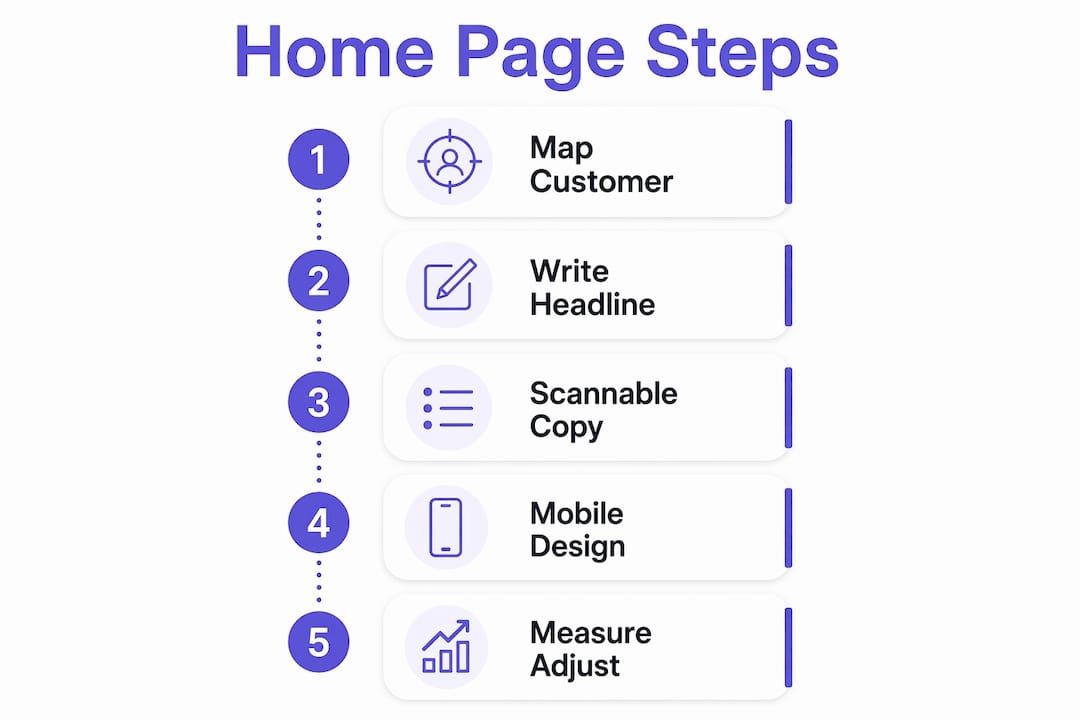
What practical steps help you write and design a high-converting home page?
Creating a business home page that converts requires a clear workflow. Writing and design decisions made without a plan produce pages that look fine but fail to generate leads.
Step 1: Map your customer profile
Before writing a single word, define who your ideal customer is and what problem they need solved. A roofing company in Phoenix serves homeowners worried about storm damage. A family law attorney in Chicago serves people going through stressful life changes. Your homepage message must speak directly to that person’s situation.
Step 2: Write your headline first
Your headline sets the tone for everything else. Draft five to ten versions. Test them against this filter: does it say what you do, who you serve, and what they get? The version that passes all three wins. Homepage copywriting that prioritizes visitor understanding over cleverness generates better conversion results.
Step 3: Write short, scannable copy
Use short paragraphs of two to three sentences. Use bullet points for lists of services or benefits. Bold the most important phrases. Avoid long blocks of text. Visitors scan before they read, so your key messages must be visible at a glance.
Pro Tip: Use Grammarly or Hemingway Editor to check your copy for readability. Aim for a grade 8–10 reading level. Simple language converts better than formal language for most local service businesses.
Step 4: Design for mobile first
Mobile responsiveness and fast site speed significantly impact bounce rates and visitor engagement. Most local searches happen on phones. If your home page loads slowly or looks broken on a small screen, you lose the visitor before they read a word. Test your page on at least three different screen sizes before publishing.
Step 5: Measure and adjust
Connect Google Analytics and Google Search Console to your site from day one. Track which pages visitors land on, how long they stay, and where they drop off. Use that data to rewrite weak sections and test new CTAs. A home page is never truly finished.
| Task | Recommended tool | Purpose |
|---|---|---|
| Copy editing | Grammarly, Hemingway Editor | Improve clarity and readability |
| Schema markup | Schema Pro | Add structured data without coding |
| Mobile testing | Google Mobile-Friendly Test | Verify responsiveness across devices |
| Analytics | Google Analytics, Search Console | Track traffic and user behavior |
| Business profile | Google Business Profile | Strengthen local search presence |
What homepage mistakes do local businesses most often make?
Most local business home pages fail for the same reasons. Recognizing these patterns is the first step to fixing them.
- Vague headlines. “Welcome to our website” tells a visitor nothing. Replace it with a direct statement of what you do and where you do it.
- Weak or missing CTAs. A page with no clear next step leaves visitors with nowhere to go. Every section of your home page should point toward one primary action.
- Too much information. Listing every service, award, and company milestone on the home page creates clutter. Keep the home page focused. Link to detail pages for deeper content.
- Ignoring mobile usability. A local homepage layout that looks great on a desktop but breaks on a phone loses the majority of local searchers. Mobile-first design is not optional.
- No social proof. A home page without reviews, ratings, or client logos asks visitors to trust you without any evidence. Add at least three real testimonials with names and locations.
- Generic contact buttons. “Contact Us” is the weakest CTA you can use. Replace it with something specific: “Get Your Free Estimate,” “Schedule a Same-Day Visit,” or “Talk to a Local Expert Today.”
Dedicated location-specific pages, when combined with a well-written home page, can increase inbound calls dramatically. The home page sets the foundation. Every other page on your site builds on it.
Key takeaways
A well-written local business home page converts visitors by stating your value clearly, building trust with social proof, and guiding every visitor toward one specific next step.
| Point | Details |
|---|---|
| Lead with a clear headline | State what you do, who you serve, and the outcome in one sentence. |
| Use specific CTAs | Replace “Contact Us” with action-specific prompts like “Get a Free Quote.” |
| Add local social proof | Feature reviews with customer names and cities to build neighborhood trust. |
| Optimize for local SEO | Add LocalBusiness schema, consistent NAP, and internal links to city pages. |
| Design for mobile first | Test on multiple screen sizes and prioritize fast load times before publishing. |
What I’ve learned from reviewing hundreds of local business home pages
The most common mistake I see is not a technical one. It is a mindset problem. Most local business owners write their home page about themselves. They lead with how long they have been in business, their certifications, and their company story. Visitors do not care about any of that in the first five seconds. They care about whether you can solve their problem.
The fix is simple but uncomfortable. Rewrite every sentence that starts with “We” and ask: does this tell the visitor what they get? “We have 20 years of experience” becomes “You get a licensed contractor who has handled over 500 local jobs.” The shift is small. The impact on conversions is not.
The second thing I have learned is that local SEO and conversion copywriting are not separate strategies. They are the same strategy. A page that clearly states your city, your service, and your customer outcome ranks better AND converts better. Internal linking to service area pages is not just an SEO tactic. It also helps visitors find exactly what they need faster.
Finally, do not treat your home page as a finished product. The businesses I have seen grow fastest revisit their home page every quarter. They update testimonials, test new headlines, and adjust CTAs based on real data. A home page that was good in january may be underperforming by july. Check it regularly.
— Max
How Cosmicdigitalstudios builds home pages that actually convert

If writing and designing your home page feels like too much to tackle alone, Cosmicdigitalstudios builds custom websites for local businesses that are designed to turn visitors into leads. Every page is built with clear messaging, mobile-first design, and conversion-focused layouts tailored to your specific market. From homepage redesigns to full website UX improvements, the team at Cosmicdigitalstudios handles the strategy and execution so you can focus on running your business. Ready to see what a professionally built home page can do for your local visibility and lead flow? Start with Cosmicdigitalstudios today.
FAQ
What is the most important element of a local business home page?
The headline is the most critical element. It must clearly state what you do, who you serve, and what outcome the visitor can expect, all within the first line they read.
How long should a local business home page be?
A local business home page should be long enough to cover your headline, CTA, services, social proof, and contact information. Most effective local home pages fall between 400 and 700 words of visible copy.
What CTA works best on a local business home page?
Specific, low-friction CTAs like “Get a Free Quote” or “Book a 15-Min Call” outperform generic options like “Contact Us.” The more specific the action, the higher the conversion rate.
Does a local business home page need schema markup?
Yes. Adding LocalBusiness schema markup to your home page helps search engines display your business accurately in local results, improving your visibility for nearby searches.
How often should I update my local business home page?
Review your home page at least once per quarter. Update testimonials, refresh your headline if conversions drop, and adjust CTAs based on analytics data to keep the page performing at its best.