
The digital web is the connected system of design, development, SEO, analytics, and marketing that makes a website useful, discoverable, and capable of generating real business results. The core disciplines are web design, user experience (UX), front-end and back-end development, search engine optimization, digital branding, and marketing channels. Together, they form what the industry calls a “digital presence,” and every piece affects the others.
Here is what to do right now based on where you stand:
- Learn the basics: Start with HTML/CSS fundamentals on MDN Web Docs, then move to UX principles and basic SEO.
- Run a mini audit: Check your site’s mobile experience, page speed, and whether your primary call-to-action is visible above the fold.
- Build a simple project: A one-page portfolio or landing page teaches more than any course alone.
- Contact a professional: If your site needs to generate leads or book calls within a defined timeline, a studio like Cosmicdigitalstudios builds conversion-focused sites tailored to coaches, consultants, and local service businesses.
The U.S. Web Design System (USWDS) sets the accessibility and mobile-friendliness standards that professional sites are measured against. If your site does not meet those standards, you are leaving both users and search rankings on the table.
Table of Contents
- What are the core components of the digital web?
- What makes a website design actually work for users?
- What SEO and performance basics does every site need?
- How do digital branding and marketing channels connect to your site?
- Which type of website fits your business goal?
- How do you actually learn digital web skills from scratch?
- How Cosmicdigitalstudios builds conversion-focused websites
- Should you DIY your site or hire a studio?
- Key Takeaways
- What actually matters when you build a site that converts
- Cosmicdigitalstudios builds sites that actually book calls
- Useful sources and next-step reading
What are the core components of the digital web?
The digital web is not a single tool or platform. It is an ecosystem of disciplines that each play a specific role and feed into one another.

Web design covers the visual and structural presentation of a site, including graphic design, UI layout, and the front-end experience users see. UX design sits inside that layer, focused on how users move through a site and whether they accomplish their goals without friction. Front-end development translates design into working code using HTML, CSS, and JavaScript. Back-end development handles the server, database, and application logic that powers dynamic content, forms, and e-commerce functionality.
SEO determines whether a site gets found. It covers technical setup (crawlability, structured data, sitemaps), on-page content (title tags, headings, keyword relevance), and off-page authority (backlinks, brand mentions). Analytics closes the loop by measuring what is working, where users drop off, and which pages drive conversions. Digital branding aligns visual identity, voice, and values across every online touchpoint, from the website to paid ads to email. Marketing channels, including PPC, email, content, and social, drive traffic into the site and move visitors through a funnel toward a conversion.
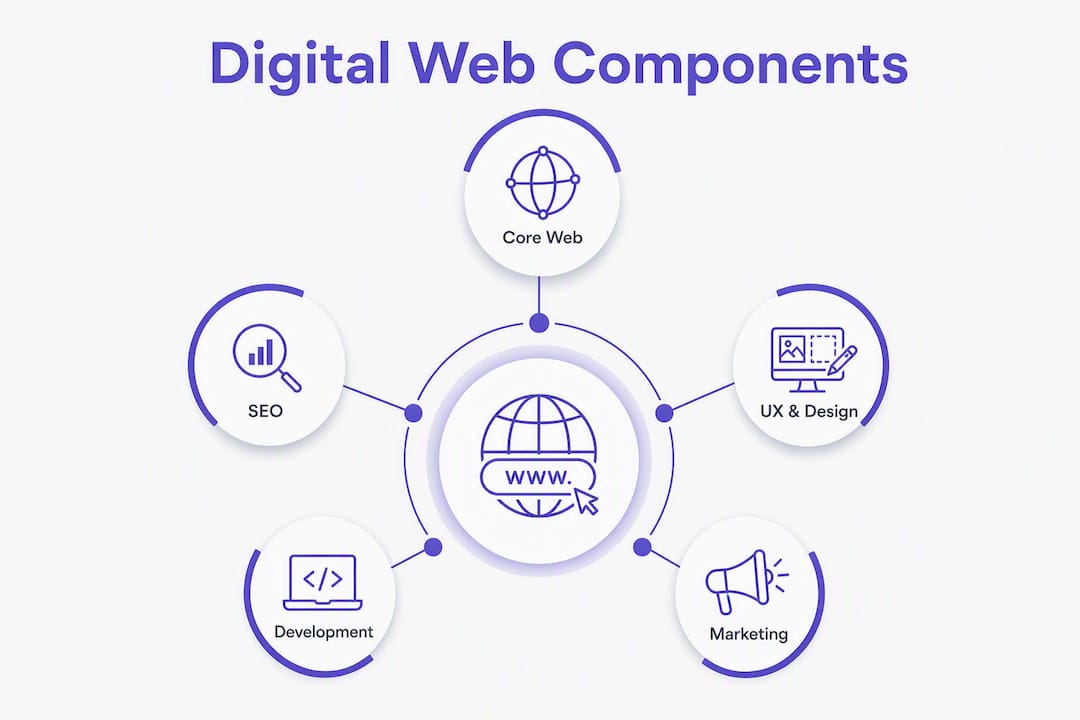
How these disciplines interact
The flow looks like this: Design and UX shape the first impression and usability. Development makes the design functional and fast. SEO makes the site visible in search. Analytics measures behavior and outcomes. Marketing channels bring traffic in, and branding keeps the experience consistent across every touchpoint. When one layer breaks, the others underperform. A beautifully designed site with slow load times loses rankings. A fast site with weak messaging fails to convert.
Common deliverables per discipline
- Web design: — Wireframes, mockups, style guide, component library
Core KPIs to track across the stack
| KPI | What it measures | Why it matters |
|---|---|---|
| Organic traffic | Visitors from search engines | Indicates SEO health and content relevance |
| Conversion rate | % of visitors who complete a goal | Measures whether the site earns its traffic |
| Bounce rate | % who leave after one page | Signals UX or relevance issues |
| Page speed (Core Web Vitals) | Load, interactivity, visual stability | Affects rankings and user retention |
| Customer lifetime value (LTV) | Revenue per customer over time | Connects web performance to business growth |
What makes a website design actually work for users?
Responsive design means a site adapts its layout to any screen size, from a 27-inch desktop monitor to a 375-pixel phone screen. Mobile-first design takes that further: you design for the smallest screen first, then scale up. The USWDS treats accessibility and mobile-friendliness as professional standards, not optional enhancements. For public-facing sites in the U.S., that means meeting WCAG 2.1 AA guidelines at minimum, which covers color contrast, keyboard navigation, screen reader compatibility, and form labeling. A full walkthrough of ADA compliance for service sites is available at Cosmicdigitalstudios.
UX best practices that move the needle
- Use a clear visual hierarchy: one primary heading, one primary CTA per page
- Keep navigation predictable, with no more than 7 top-level items
- Write accessible form labels and error messages in plain language
- Use microcopy (button labels, helper text, confirmation messages) to reduce user anxiety
- Place your primary CTA above the fold on every key page
- Test on real mobile devices, not just browser emulators
Conversion elements worth prioritizing
A conversion-focused site is not just a pretty layout. It includes specific functional elements that guide visitors toward action. Conversion-optimized web design integrates features like chat widgets, clear CTA paths, and trust signals to turn traffic into booked calls and sales. The most effective elements include:
- A hero section with a specific value proposition (not a generic tagline)
- A primary CTA button with action-oriented copy (“Book a Free Call,” not “Learn More”)
- Trust badges: certifications, client logos, review counts
- Social proof: testimonials with names and outcomes, not anonymous quotes
- A chat widget or contact shortcut visible on mobile
Color choices also affect conversion. The psychology behind visual decisions is covered in depth in the Cosmicdigitalstudios color psychology guide.
Pro Tip: If your budget is tight, fix mobile usability and add one clear CTA before spending on anything else. Those two changes produce the largest conversion gains per dollar spent.
What SEO and performance basics does every site need?
Technical SEO is the foundation. Without it, even excellent content stays invisible. Web design history and practice confirms that the split between front-end presentation and back-end functionality has made technical SEO a shared responsibility between designers and developers. Here is what to get right before launch.
Pre-launch SEO checklist
- Title tags: Unique, under 60 characters, include the primary keyword
- Meta descriptions: Under 155 characters, written to earn the click
- Robots.txt: Configured to allow crawling of all indexable pages
- XML sitemap: Submitted to Google Search Console
- Canonical tags: Set on duplicate or near-duplicate pages
- 301 redirects: Map all old URLs if you are migrating a site
- Structured data: Add Schema.org markup for your business type (LocalBusiness, FAQPage, etc.)
- Page speed: Run Google PageSpeed Insights and resolve Critical issues before launch
Where performance and UX overlap
Google’s Core Web Vitals measure three things: Largest Contentful Paint (how fast the main content loads), Interaction to Next Paint (how quickly the page responds to a click), and Cumulative Layout Shift (how stable the layout is while loading). Poor scores on any of these hurt both rankings and user experience. A site that loads in under 2.5 seconds on mobile retains significantly more visitors than one that takes 4 seconds or more.
Technical priorities for a launch or audit
- Compress and convert images to WebP format
- Enable browser caching and GZIP compression
- Use a content delivery network (CDN) for static assets
- Minify CSS and JavaScript files
- Audit for broken links and fix or redirect them
- Check mobile rendering on iOS and Android devices
How do digital branding and marketing channels connect to your site?
Brand strategy and digital strategy are distinct disciplines. Brand strategy defines who you are, what you stand for, and how you want to be perceived. Digital strategy selects the tools, budgets, and channel tactics that execute on that positioning. The two must align. A premium coaching brand running discount-heavy PPC ads creates a perception gap that erodes trust.

Digital branding prioritizes interactive experiences across sites, social, and ads over physical media. That means your website, your Google Business profile, your email templates, and your ad creative all need to speak with the same voice and look like they belong to the same brand. Qualtrics recommends a stepwise digital brand strategy that starts with defining your mission and audience, then builds out pillars, channel tactics, and team responsibilities.
Channel-to-goal mapping
- PPC (Google Ads, Meta Ads): Best for immediate lead generation and direct response
- Content marketing (blog, video, podcast): Builds organic traffic and long-term authority
- Email automation: Nurtures leads who are not ready to buy yet; highest ROI for existing audiences
- Social media: Supports awareness and community building; less reliable for direct conversion
- SEO: Compounds over time; the highest-value channel for sustainable traffic
A simple funnel that ties it together
PPC ad targets a specific search intent → visitor lands on a dedicated landing page with one CTA → visitor submits a form and enters an email sequence → email sequence delivers value and drives a booking. Every step in that flow needs to reflect the same brand voice and visual identity. A mismatch at any point breaks trust and kills the conversion.
For channel selection guidance, the 16W Media Group’s digital media channels guide covers channel types and tactical fit in practical terms.
Brand governance and asset management
Consistent branding at scale requires systems. Digital Asset Management (DAM) platforms centralize approved logos, templates, and content so every team member or contractor pulls from the same source. Without a DAM or at least a shared brand folder with a style guide, asset drift happens fast. Your website ends up using a slightly different shade of blue than your ads, and your email footer has an old logo. Small inconsistencies compound into a brand that looks unmanaged.
The Smart Insights Digital Branding Guide applies the SOSTAC and RACE frameworks to build structured brand communications, which is useful for anyone mapping out a channel plan for the first time.
Which type of website fits your business goal?
Not every business needs the same kind of site. Choosing the wrong type wastes budget and delays results.
Brochure or portfolio site: A simple, informational site that presents your work, credentials, and contact information. Best for freelancers, creatives, and professionals who generate leads through referrals and need a credible online presence. Typical features include a homepage, about page, portfolio or services page, and contact form. The KPI focus is brand credibility and contact form submissions.
Lead-generation or service site: Built to convert visitors into inquiries, calls, or booked appointments. This is the right choice for coaches, consultants, and local service businesses. It includes conversion-focused landing pages, a clear value proposition, testimonials, and a booking or contact flow. Cosmicdigitalstudios specializes in this type. You can see what a lead generation website looks like in practice.
E-commerce site: Designed to sell products directly. Requires a product catalog, shopping cart, payment processing, inventory management, and order fulfillment logic. The KPI focus shifts to average order value, cart abandonment rate, and return customer rate.
| Site type | Primary purpose | Key features | KPI focus | When to upgrade |
|---|---|---|---|---|
| Brochure / portfolio | Credibility and contact | About, portfolio, contact form | Form submissions, time on site | When you need active lead generation |
| Lead-gen / service | Convert visitors to leads | Landing pages, CTA, booking flow | Conversion rate, cost per lead | When you need e-commerce or membership |
| E-commerce | Sell products online | Catalog, cart, payments, inventory | Revenue, AOV, cart abandonment | When scaling requires custom back-end |
Cost and timeline vary widely based on complexity, content volume, integrations, and whether you are starting from scratch or redesigning. A brochure site typically takes a few weeks and costs less than a full lead-gen build. A custom e-commerce platform can take months. The landing page vs. full website guide helps you decide which scope fits your current stage.
How do you actually learn digital web skills from scratch?
Learning the digital web is not a single course. It is a progression through interconnected skills, and the fastest way to validate each stage is to build something real and measure it.
Beginner path
- HTML and CSS fundamentals: MDN Web Docs is the most authoritative free reference. Spend four to six weeks here.
- Basic content and copywriting: Learn how to write a clear headline, a value proposition, and a CTA.
- Intro to SEO: Google’s Search Central documentation covers crawling, indexing, and on-page basics at no cost.
First project: Build a one-page portfolio site and publish it. The act of getting something live teaches more than any tutorial.
Intermediate path
- Responsive design and CSS Grid/Flexbox layouts
- JavaScript basics (DOM manipulation, form validation)
- UX principles: user flows, wireframing with Figma or similar tools
- Google Analytics 4 setup and basic reporting
- On-page SEO: keyword research, meta tags, internal linking
Project: Build a lead-generation landing page for a real or hypothetical service. Track form submissions with GA4.
Advanced path
- Back-end basics: Node.js, Python, or a CMS like WordPress with custom post types
- A/B testing methodology and tools
- Email marketing automation (sequences, segmentation, triggers)
- Agentic AI workflows: AI agents are now used to draft copy, run A/B tests, and personalize site experiences in real time, turning a site into an active revenue engine rather than a static brochure
Project: Run a live A/B test on a landing page headline. Measure conversion rate change over a few weeks.
Pro Tip: Validate each stage by publishing a live project, not just completing a course. A live site with real traffic teaches you things no sandbox environment can replicate.
How Cosmicdigitalstudios builds conversion-focused websites
The process at Cosmicdigitalstudios is built around one outcome: turning site visitors into booked calls, leads, and sales. Here is how each project runs.
- Discovery: Clarify business goals, target audience, competitive positioning, and success metrics before any design begins.
- Messaging and information architecture: Define the core value proposition, page structure, and conversion flow. Messaging drives conversions more than visual design, so this step gets the most attention.
- Design: Custom layouts built around the brand, with conversion elements (hero, CTA, trust signals, social proof) placed intentionally.
- Build: Front-end development with performance, mobile responsiveness, and accessibility baked in from the start.
- QA and launch: Cross-browser and cross-device testing, speed checks, redirect verification, and analytics setup before going live.
- Optimization and analytics: Post-launch tracking of conversion rate, traffic sources, and user behavior, with ongoing refinement based on real data.
Cosmicdigitalstudios builds sites for coaches, consultants, and local service businesses that need more than a good-looking page. Every build is designed to guide visitors toward a specific action, whether that is booking a call, submitting a form, or starting a conversation.
Coaches and consultants can see a detailed breakdown of the build process in the coaching website guide. For service businesses, the home services funnel guide covers the full lead-gen flow from traffic to booked job.
To get started, visit Cosmicdigitalstudios and book a discovery call.
Should you DIY your site or hire a studio?
The honest answer depends on four variables: budget, timeline, technical complexity, and what happens if the site underperforms.
DIY makes sense when:
- You have time to learn and iterate (three to six months minimum for a competent result)
- Your site is a brochure or portfolio with low conversion pressure
- You are in the learning phase and want hands-on experience
- Budget is the primary constraint
Hiring a studio makes sense when:
- You need results within a defined timeline (a product launch, a campaign, a rebrand)
- Your site needs to generate revenue and you cannot afford a slow ramp-up
- Technical requirements (custom integrations, accessibility compliance, performance targets) exceed your current skills
- Your time is worth more than the cost of professional help
Questions to ask any agency or freelancer
- Can you show me three recent examples of sites you built for businesses similar to mine?
- What does your discovery and strategy process look like before design starts?
- How do you measure success, and what KPIs do you track post-launch?
- What is included in the project price, and what costs extra?
- Who owns the site files and domain after the project ends?
- What does ongoing support or maintenance look like, and what does it cost?
- Have you worked with businesses that have accessibility or ADA compliance requirements?
Red flags to watch for
- No clear discovery or strategy phase before design
- Proposals that lead with visual style before asking about your business goals
- Vague deliverables with no defined revision rounds or launch criteria
- No post-launch analytics or performance tracking included
- Pressure to sign quickly without a clear scope of work
Pricing and timeline expectations
Pricing varies based on scope, number of pages, integrations, and whether copywriting is included. A basic lead-gen site from a professional studio typically takes several weeks. A full custom build with e-commerce, automation, and advanced analytics takes longer. Always ask for a detailed scope of work before signing, and confirm what happens if the project scope changes mid-build.
Key Takeaways
The digital web combines design, UX, development, SEO, branding, and marketing channels into one system, and every discipline affects the others.
| Point | Details |
|---|---|
| All disciplines connect | Design, UX, development, SEO, analytics, and marketing work as one system, not separate silos. |
| Conversion elements are specific | Hero value proposition, primary CTA, trust badges, social proof, and chat widgets are the features that turn traffic into leads. |
| Technical SEO is non-negotiable | Title tags, sitemaps, structured data, and Core Web Vitals must be correct before launch or rankings suffer. |
| Site type determines strategy | Brochure, lead-gen, and e-commerce sites have different KPIs, features, and upgrade triggers. |
| Cosmicdigitalstudios builds for results | For coaches, consultants, and local service businesses, Cosmicdigitalstudios delivers custom-built, conversion-focused websites with a defined process from discovery to post-launch optimization. |
What actually matters when you build a site that converts
Most articles about the digital web spend too much time on tools and not enough on sequencing. The order in which you make decisions matters more than any individual choice. Messaging before design. Structure before aesthetics. Analytics before optimization. When those priorities get reversed, you end up with a site that looks polished but does not perform.
The other thing most guides understate is how much a weak value proposition costs you. You can have perfect Core Web Vitals, a mobile-first layout, and a technically flawless SEO setup, and still convert at under 1% if your headline does not immediately answer the visitor’s question: “Is this for me, and can I trust it?” That single line of copy, the one at the top of your homepage, does more work than any design element on the page.
For service businesses especially, the gap between a site that looks good and a site that books calls is almost always a messaging problem, not a design problem. Fix the message first. Then optimize the design around it.
Cosmicdigitalstudios builds sites that actually book calls

If you are a coach, consultant, or local service business owner who needs a site that generates real leads, Cosmicdigitalstudios builds custom websites, landing pages, and conversion-focused funnels designed to do exactly that. Every project starts with a discovery process that clarifies your goals, your audience, and your conversion path before a single design decision is made. The result is a site that looks professional, communicates clearly, and guides visitors toward booking a call or submitting a form.
No generic templates. No guesswork on messaging. A custom build tailored to your business, delivered with a clear process and post-launch analytics so you can see what is working.
Ready to see what a conversion-focused site looks like for your business? Book a discovery call with Cosmicdigitalstudios and get a clear picture of what your site could be doing for you.
Useful sources and next-step reading
These are the authoritative references used throughout this guide, plus a few practical next steps for readers who want to go deeper.
| Source | What you will learn |
|---|---|
| U.S. Web Design System (USWDS) | Federal accessibility and mobile-friendliness standards for professional web experiences |
| MDN Web Docs | The most authoritative free reference for HTML, CSS, JavaScript, and web APIs |
| W3C Web Standards | Official web standards for accessibility (WCAG), HTML, and CSS |
| Smart Insights: Brand Strategy and Digital Strategy | How to align brand positioning with digital channel tactics |
| Smart Insights: Digital Branding Guide | SOSTAC and RACE frameworks applied to digital brand communications |
| Qualtrics: Digital Brand Strategy | Step-by-step process for defining mission, audience, pillars, and tactics |
| Bynder: Digital Branding Explained | Clear definition of digital branding and how it differs from traditional brand strategy |
| Smartsheet: DAM Best Practices | How to centralize brand assets and prevent identity drift across channels |
| Optimizely: A/B Testing with Agentic AI | How AI agents automate testing and personalization in modern web workflows |
| SNHU: What Is Web Design | Foundational definition of web design covering UI/UX, graphic design, and SEO |
| Cosmicdigitalstudios: Turn Visitors into Clients | Practical conversion tactics and next steps for service businesses ready to hire help |